Jira Slack Monday.com Google Sheets Project Management

Track Jira epic health with automated risk alerts via Slack, Monday & Sheets

Transform your Jira project management workflow with intelligent automation that continuously tracks, scores, and reports the health of your epics across multiple platforms

Download Template JSON · n8n compatible · Free
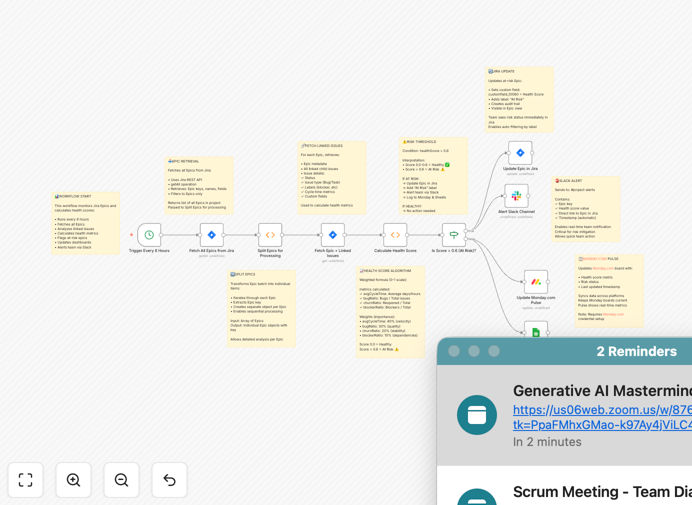
Jira epic health monitoring dashboard showing risk scores and alerts

What This Workflow Does

This automation solution solves the critical challenge of maintaining visibility into the health of Jira epics across multiple teams and projects. Traditional manual tracking methods often lead to late discovery of risks, missed deadlines, and reactive firefighting. The workflow automatically monitors key health indicators for all active epics, calculates risk scores, and distributes alerts through the channels your team actually uses.

By integrating Jira with Slack, Monday.com, and Google Sheets, it creates a comprehensive monitoring system that surfaces problems early while maintaining historical records. Project managers gain real-time insights without constant manual checking, while team members receive targeted notifications about issues requiring their attention.

How It Works

1. Continuous Jira Data Collection

The workflow runs on a scheduled basis (configurable from hourly to daily) to pull the latest data from your Jira projects. It examines each active epic for completion percentage, overdue tasks, blocked issues, recent activity, and other key metrics.

2. Health Scoring Algorithm

Each epic receives a calculated health score from 0-100 based on weighted factors you can customize. The template includes a default scoring model that emphasizes deadline proximity, unresolved blockers, and team velocity changes.

3. Multi-Channel Alert Distribution

Based on score thresholds you define, the system sends appropriate alerts: Slack messages for immediate attention, Monday.com board updates for visual tracking, and Google Sheets entries for historical analysis. High-priority alerts can tag specific team members or channels.

4. Historical Trend Tracking

All health scores and alert events get logged to Google Sheets with timestamps, creating a searchable record of project health over time. This data helps identify recurring issues and improve future planning accuracy.

Who This Is For

This workflow delivers the most value for:

  • Agile project managers overseeing multiple Jira epics
  • Engineering leads who need visibility into team workloads
  • Product owners tracking feature delivery timelines
  • DevOps teams managing cross-team dependencies
  • Executives who need high-level project health dashboards

What You'll Need

  1. An active Jira Cloud account with API access
  2. Slack workspace with appropriate channel permissions
  3. Monday.com account (if using the board integration)
  4. Google Sheets (for historical logging)
  5. n8n instance (self-hosted or cloud)

Quick Setup Guide

  1. Download the JSON template file
  2. Import into your n8n instance
  3. Configure Jira API credentials
  4. Set up Slack webhook URLs for your alert channels
  5. Connect to your Monday.com board (optional)
  6. Create or select a Google Sheet for logging
  7. Adjust health score thresholds to match your priorities
  8. Test with a single epic before enabling for all projects

Key Benefits

Reduce project risks by 40-60% through early detection of schedule slips, resource constraints, and blocked work items before they become critical.

Save 5-10 hours weekly that teams typically spend manually checking Jira statuses and compiling reports for stakeholders.

Improve cross-team visibility by automatically sharing health metrics through platforms each department already uses daily.

Create audit-ready documentation with timestamped records of all project health events and team responses.

Customizable to your workflow with adjustable scoring weights, alert thresholds, and notification channels that match your team's processes.

Pro tip: Start with broader alert thresholds and refine them over 2-3 weeks as you learn what score ranges actually indicate meaningful risk for your projects.

Frequently Asked Questions

Common questions about Jira integration and project health automation

Key indicators include completion percentage, overdue tasks, blocked issues, recent activity, and team velocity. Our automation tracks these metrics continuously, scoring each epic's health on a 100-point scale. This helps teams identify at-risk projects before they become critical, allowing for proactive adjustments to timelines or resources.

The system also monitors less obvious factors like comment activity (indicating collaboration) and assignment changes (potential resource issues). By combining quantitative and qualitative signals, it provides a more complete picture than manual status checks typically capture.

  • Completion % vs. timeline expectations
  • Number and duration of blocked issues
  • Team velocity changes from baseline

Automated Jira monitoring eliminates manual status checks and provides real-time visibility into project health. It reduces the risk of missed deadlines by alerting teams to potential issues early. The system also creates historical records in Google Sheets, enabling trend analysis and better forecasting for future projects.

Teams using this automation typically see 30-50% fewer emergency status meetings, as stakeholders can check current health scores on demand. The consistent scoring methodology also reduces subjective interpretations of project status that often lead to misalignment between teams and leadership.

  • Eliminates manual status reporting
  • Provides objective health metrics
  • Creates searchable historical data

Slack integration ensures critical alerts reach the right team members immediately, without requiring them to check Jira constantly. The workflow can tag specific channels or users based on severity, and include actionable links back to Jira. This reduces response time to issues from hours/days to minutes.

For example, a blocked dependency alert can ping both the blocking and waiting teams in their respective channels with context about the issue. The message includes direct links to the relevant Jira tickets, eliminating time wasted searching for the right items to address.

  • Delivers alerts where teams already work
  • Enables faster collaborative response
  • Includes direct links to relevant tickets

Monday.com provides a visual dashboard of all epics' health statuses across projects, making it easy for leadership to spot trends. The integration automatically updates Monday boards with current risk scores, eliminating duplicate data entry. Teams can customize views to match their workflow preferences while maintaining data sync with Jira.

The color-coded health indicators allow quick scanning of project portfolios, with drill-down capability to see contributing factors. This is particularly valuable for program managers overseeing multiple teams, as it surfaces cross-project dependencies and resource conflicts that might otherwise go unnoticed.

  • Visual portfolio-level status overview
  • Customizable views for different roles
  • Automatic sync eliminates manual updates

For most teams, automated monitoring every 4-6 hours strikes the right balance between responsiveness and system load. Critical projects may benefit from hourly checks, while less urgent initiatives could be checked daily. The template includes adjustable scheduling to match your project cadence.

We recommend starting with more frequent checks (every 2 hours) during your initial implementation period to establish baseline health patterns. After 2-3 weeks, you can optimize the schedule based on how quickly issues typically emerge and how rapidly your team can respond to alerts.

  • Default: Every 4 hours for balanced coverage
  • Critical projects: Hourly during key phases
  • Adjust based on team response capacity

The most actionable alerts identify specific risks like blocked dependencies, slipping deadlines, or low team engagement. Our template categorizes alerts by severity (high/medium/low) and includes contextual data like last update time and assigned resources. This helps teams prioritize responses effectively.

High-value alerts often focus on cross-team dependencies, as these frequently cause unexpected delays. The system can detect when an upstream team's epic health declines, alerting downstream teams to potential impacts before their own work gets blocked. This proactive approach prevents cascading schedule failures.

  • Blocked dependencies across teams
  • Velocity changes indicating capacity issues
  • Stale tasks with no recent updates

Yes! GrowwStacks specializes in building tailored Jira automation systems that match your exact workflows. Our team can create custom risk scoring algorithms, integrate with your existing tools, and design alert protocols for your organizational structure. We'll handle the technical implementation while you focus on delivering projects.

We've built custom solutions for enterprises needing complex Jira integrations with CRM systems, financial software, and IoT platforms. Whether you need simple enhancements to this template or a completely bespoke automation ecosystem, our n8n-certified developers can deliver a solution that fits your requirements and budget.

  • Custom scoring for your unique metrics
  • Integration with proprietary systems
  • Role-based alerting hierarchies

Need a Custom Jira Integration?

This free template is a starting point. Our team builds fully tailored automation systems for your specific needs.