Google Sheets Telegram Finance Automation n8n

Automate Multi-Broker Investment Tracking with Google Sheets & Telegram

Consolidate all your portfolios into one dashboard, get real-time P&L alerts, and never manually update spreadsheets again.

Download Template JSON · n8n compatible · Free
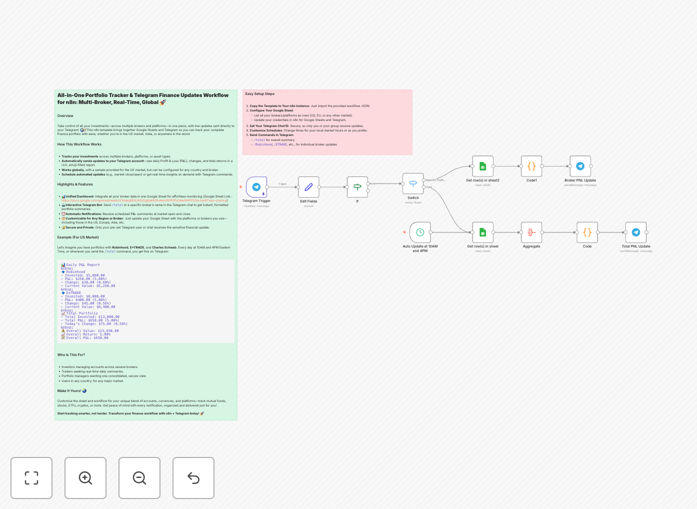
Visual diagram of the investment portfolio tracker automation connecting Google Sheets and Telegram

What This Workflow Does

If you manage investments across multiple brokers, you know the pain of logging into different platforms, copying numbers into spreadsheets, and calculating your total portfolio performance manually. This process is time-consuming, error-prone, and leaves you without a real-time view of your overall financial health.

This n8n automation solves that by creating a unified investment command center. It automatically consolidates data from any broker (US, EU, Asia, crypto exchanges) into a single Google Sheet, calculates your daily profit & loss, and sends beautifully formatted summaries directly to your Telegram. Whether you want a morning snapshot or an alert when markets move, this workflow keeps you informed without the manual work.

Think of it as your personal financial assistant that works 24/7, giving you back hours each month while providing clearer insights into your investment performance across all accounts.

How It Works

The workflow operates on a simple but powerful three‑step cycle: collect, calculate, and communicate.

Step 1: Data Collection & Consolidation

You maintain one master Google Sheet with columns for each broker, invested amount, current value, and dates. The workflow reads this sheet on a schedule (or via Telegram command) to fetch the latest numbers. Since it uses Google Sheets as the source, you can manually enter data from any broker worldwide—no API limitations.

Step 2: Profit & Loss Calculation

n8n processes each row, calculating the absolute P&L, percentage return, and daily change. It aggregates totals across all your brokers to show your overall portfolio performance. The logic handles currency conversions if needed and can be extended to include dividends, fees, or taxes.

Step 3: Telegram Notification & Reporting

Once calculations are complete, the workflow sends a rich, emoji‑filled report to your private Telegram chat or group. You can customize the message format, include only specific brokers, or trigger reports on demand by sending a simple command like /total or /robinhood.

Pro tip: Set up two separate schedules—one for a detailed end‑of‑day report and another for a brief morning snapshot. This gives you both depth and daily awareness without notification overload.

Who This Is For

This template is ideal for retail investors, traders, and finance enthusiasts who use more than one brokerage platform. It’s especially valuable for:

  • Multi‑platform investors who hold stocks in Robinhood, ETFs in Vanguard, and crypto on Binance.
  • International investors with accounts in different countries (e.g., US‑based ETFs and Indian mutual funds).
  • Busy professionals who want a daily portfolio summary without opening five different apps.
  • Finance‑focused Telegram users who prefer getting updates in their messaging app rather than email.
  • Small fund managers or family offices that need a simple, automated way to track aggregated performance.

What You'll Need

  1. A running n8n instance (cloud or self‑hosted).
  2. A Google account with Sheets access (free tier works).
  3. A Telegram account and a bot token (create via @BotFather).
  4. Your Telegram Chat ID (find it using @userinfobot).
  5. A Google Sheet structured with columns for Broker, Invested, Current Value, and Date.
  6. Basic familiarity with copying and pasting workflow JSON into n8n.

Quick Setup Guide

You can have this automation running in under 15 minutes:

  1. Download the template using the button above and import it into your n8n workspace.
  2. Duplicate the sample Google Sheet (link in the workflow description) and populate it with your broker data.
  3. Create a Telegram Bot via @BotFather and note your bot token and chat ID.
  4. Configure the Google Sheets and Telegram nodes in n8n with your credentials.
  5. Test the workflow manually, then set your preferred schedule (e.g., daily at 6 PM).
  6. Optional: Add more brokers, customize the message format, or set up alert thresholds.

Pro tip: Start with a weekly schedule to verify calculations, then switch to daily once you're confident. Use the Telegram command feature for on‑demand reports anytime.

Key Benefits

Save 5–10 hours per month on manual data entry and spreadsheet updates. The automation handles the consolidation and math, freeing you to focus on investment decisions.

Eliminate calculation errors that creep in when you manually transfer numbers between platforms. The workflow ensures consistent, accurate P&L figures every time.

Gain real‑time visibility into your total net worth across all accounts. No more guessing—you’ll know exactly how your portfolio performed today.

Customizable for any asset class—stocks, ETFs, mutual funds, crypto, or even physical assets. Just add a new row in your Google Sheet.

Private and secure—your data stays in your Google Sheet and Telegram, with no third‑party analytics or data sharing.

Frequently Asked Questions

Common questions about investment tracking automation and integration

Automating portfolio tracking saves hours of manual data entry each week, reduces human error in calculations, and provides real-time visibility into your total net worth across all brokers. Instead of logging into multiple platforms, you get a consolidated view and instant alerts, helping you make faster, data-driven decisions.

Manual tracking often leads to outdated spreadsheets and missed opportunities. Automation ensures your numbers are always current, so you can react quickly to market movements and rebalance your portfolio based on accurate, aggregated data.

Yes, the workflow is broker-agnostic and region-independent. It uses Google Sheets as the central database, so you can manually input data from any broker worldwide (like Robinhood, E*TRADE, Charles Schwab, Zerodha, or local platforms). The automation then calculates your P&L and sends summaries via Telegram, regardless of your location.

The flexibility comes from using Google Sheets as the input layer. You're not limited by API availability—if you can get the data into a spreadsheet, the automation can process it. This makes it perfect for international investors or those using niche brokers without public APIs.

The workflow is designed for personal use with privacy in mind. Your Google Sheet remains private, and Telegram messages are end-to-end encrypted in secret chats. The automation sends summaries only to your pre-authorized chat ID, so sensitive raw data never leaves your controlled environment. It's as secure as your Google and Telegram accounts.

For additional security, you can configure the workflow to send only percentage changes instead of absolute values, or use code nodes to partially mask sensitive figures. The template doesn't store any data externally—it acts as a processing pipeline between your secured sheets and your private chat.

The template is fully customizable. You can add new rows in your Google Sheet for crypto exchanges (like Coinbase, Binance) or mutual fund platforms. The n8n workflow will automatically include them in the total calculations and Telegram reports. You can even create separate sheets or categories for different asset classes.

For crypto, you might add columns for wallet addresses or exchange balances. For mutual funds, you could include NAV and units held. The workflow's aggregation logic sums all values, so mixing asset types doesn't break anything—it just gives you a more complete picture of your total portfolio.

You control the schedule. You can set it to run at market close daily, weekly, or even on-demand via a Telegram command. Common setups include daily summaries at 4 PM, weekly reports every Friday, and instant updates whenever you send /total in Telegram. The workflow uses n8n's scheduler, so there's no need for manual triggering.

Most users start with a daily schedule after market close. As you become comfortable, you can add additional triggers—like running when your Google Sheet is edited or at specific price thresholds. The template includes example schedules, but you can adjust them to any cadence.

No coding is required. The workflow uses n8n's visual interface—you just import the template, connect your Google Sheets and Telegram accounts, and configure your portfolio data. The template includes clear instructions for non-technical users. However, if you want to extend it (like adding API connections to brokers), basic technical understanding helps.

The setup is designed for business users, not developers. You'll be guided through creating API credentials, setting up webhooks, and testing the connections. Most users complete the initial configuration in under 20 minutes without writing a single line of code.

Absolutely. GrowwStacks specializes in building tailored financial automation for businesses. We can create custom workflows that pull live data from broker APIs, generate compliance reports, automate tax calculations, or build dashboards for client portfolios. Our team handles the technical setup so you can focus on strategy.

Whether you need multi‑user access, regulatory reporting, or integration with accounting software, we design automations that fit your specific workflow. Book a free consultation to discuss your requirements—we'll provide a custom solution that saves you time and reduces operational risk.

Need a Custom Investment Tracking Automation?

This free template is a starting point. Our team builds fully tailored automation systems for your specific business needs.