Zapier Google Sheets Email Alerts Market Research Real Estate

Automate Real Estate Competitor Tracking with Google Sheets & Email Alerts

Free n8n workflow template to automatically monitor competitor pricing and features for real estate projects, log data to Google Sheets, and send email alerts for price changes.

Download Template JSON · n8n compatible · Free
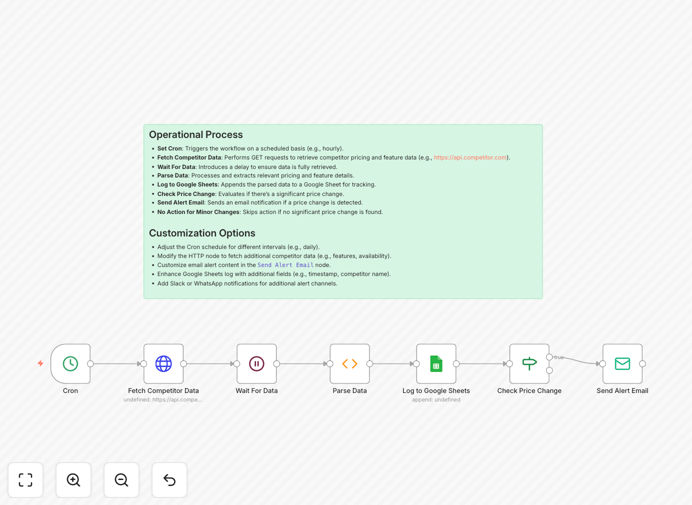
Visual diagram of the real estate competitor tracking automation workflow

What This Workflow Does

In the competitive real estate market, staying ahead means knowing what your competitors are offering—their prices, features, and promotions. Manual tracking is slow, inconsistent, and leaves you vulnerable to sudden market shifts. This automation solves that.

This workflow automatically fetches competitor data from APIs or websites, processes the information, logs it into a Google Sheets spreadsheet for historical analysis, and sends you an email alert whenever a significant price change occurs. It runs on a schedule (like hourly or daily), giving you a real-time, automated competitive intelligence system.

You gain a persistent, up-to-date record of market conditions, enabling smarter pricing decisions, feature benchmarking, and timely marketing responses without manual effort.

How It Works

Step 1: Scheduled Trigger

A Cron node triggers the workflow at your chosen interval—daily, hourly, or weekly. This ensures regular, consistent data collection without you having to remember to run it.

Step 2: Fetch Competitor Data

The workflow performs an HTTP request to a competitor API or scrapes a target website to retrieve current pricing and feature listings. This could be a property portal API or a structured data source.

Step 3: Parse & Structure Data

Raw data is parsed and transformed into a clean, structured format. Key details like project name, price per unit, amenities, location, and completion date are extracted for analysis.

Step 4: Log to Google Sheets

The parsed data is appended to a designated Google Sheet. Each row becomes a timestamped record, building a historical dataset you can use for trend analysis and reporting.

Step 5: Check for Price Changes

The workflow compares the new data against previous entries in the sheet. If a competitor's price drops or increases beyond a configured threshold, it triggers the next step.

Step 6: Send Alert Email

An email is automatically sent to your team detailing the change—which competitor, what price shift, and any relevant context. This enables immediate strategic discussion.

Step 7: No Action for Minor Changes

If the price change is within a normal fluctuation range, the workflow simply logs the data and completes silently, avoiding unnecessary alerts.

Who This Is For

This template is ideal for real estate developers, property agencies, investment firms, and marketing teams who need to monitor the competitive landscape.

Real Estate Developers: Track competing projects to adjust your own pricing and feature offerings.

Sales & Marketing Teams: Get alerted to competitor promotions so you can counter-market effectively.

Investment Analysts: Build a historical dataset of market prices for valuation and trend analysis.

Property Managers: Monitor rental or sale prices in your area to optimize your own listings.

Pro tip: Configure the price change threshold based on your market's typical volatility. A 5% change might be significant in luxury markets, while 2% could be critical in high-volume commercial real estate.

What You'll Need

  1. n8n instance (cloud or self-hosted) to run the workflow.
  2. Access to a competitor data source—an API endpoint, a scrapeable website, or a data feed.
  3. Google Sheets setup with a prepared spreadsheet for logging.
  4. Email service credentials (like SMTP or a service like SendGrid) for sending alerts.
  5. Basic understanding of n8n nodes to configure the HTTP request and data parsing.

Quick Setup Guide

  1. Import the template: Download the JSON file and import it into your n8n workspace.
  2. Configure the Cron node: Set your desired schedule (e.g., every 6 hours).
  3. Set up the HTTP Request node: Enter the URL of your competitor API or data source.
  4. Connect Google Sheets: Authenticate with Google and specify the sheet ID and tab name for logging.
  5. Configure the Email node: Add your SMTP details or email service credentials and set the recipient addresses.
  6. Adjust the threshold: In the "Check Price Change" node, set the percentage or absolute value that triggers an alert.
  7. Test the workflow: Run it once manually to verify data fetching, logging, and alerting work correctly.
  8. Activate: Turn on the workflow and let it run automatically on your schedule.

Key Benefits

Save 10–15 hours per week on manual competitor research. Automation eliminates the need for team members to manually check websites, compile spreadsheets, and analyze changes.

React to market changes within minutes, not days. Email alerts ensure your team knows about competitor price drops or new features immediately, allowing for swift strategic adjustments.

Build a historical database for better forecasting. Google Sheets logging creates a time-series dataset you can use to predict market trends and plan future projects.

Improve pricing accuracy and competitiveness. With real-time data, you can adjust your own prices dynamically to match or beat the market, maximizing revenue.

Enhance cross-team collaboration with centralized data. Sales, marketing, and development teams all access the same live competitor sheet, aligning strategies based on shared intelligence.

Frequently Asked Questions

Common questions about real estate competitor tracking automation and integration

Competitor tracking is crucial for real estate businesses to stay competitive, adjust pricing strategies, and understand market trends. Without automation, manually checking competitor listings is time-consuming and prone to missing key changes. Automated tracking ensures you have real-time data to make informed decisions about pricing, features, and marketing.

For example, if a competing developer suddenly offers a price discount or adds a new amenity, you can immediately evaluate your own project's positioning and decide whether to adjust your sales strategy or highlight your unique advantages.

Track pricing per unit or project, available amenities, project completion timelines, location advantages, marketing promotions, and any special offers. This data helps you benchmark your offerings and identify gaps in your own projects. Automated workflows can capture this data from competitor websites, APIs, or listing platforms.

Beyond basic price, consider tracking feature lists (pool, gym, concierge), unit sizes, financing options, and customer reviews. This holistic view helps you understand not just what they charge, but why customers might choose them over you.

Automation transforms market analysis from a sporadic manual task into a continuous, data-driven process. It collects competitor data consistently, logs it for historical analysis, and alerts you to significant changes immediately. This allows for proactive strategy adjustments rather than reactive decisions.

With historical data logged in Google Sheets, you can create charts and dashboards showing price trends over time, identify seasonal patterns, and forecast future market movements. This level of analysis is impossible with occasional manual checks.

Google Sheets provides a centralized, accessible dashboard for your team. It allows for easy data visualization, trend analysis over time, and sharing insights across departments like sales, marketing, and development. Automated logging ensures the sheet is always up-to-date without manual entry.

You can set up pivot tables, charts, and conditional formatting to highlight significant changes. Teams can collaborate on the same sheet, adding notes or action plans directly alongside the data.

Email alerts provide immediate notification when a competitor lowers prices or adds new features, enabling quick strategic response. You can adjust your pricing, highlight your own advantages, or launch counter-promotions. This keeps your sales and marketing teams informed without constant manual monitoring.

Alerts can be tailored to different stakeholders—sales managers get price change alerts, marketing gets feature updates, and executives get weekly summary reports. This ensures the right people get the right information at the right time.

Yes, the core workflow—fetching data from an API, parsing it, logging to a spreadsheet, and triggering alerts based on changes—is applicable to any competitive market. You can adapt it for retail price tracking, SaaS feature monitoring, hospitality rate comparisons, or any industry where competitor data is publicly available.

The key is identifying your data source (competitor website, API, or feed) and defining what constitutes a significant change for your business. The workflow structure remains the same, making it versatile across sectors.

Manual tracking is inconsistent, time-intensive, and often misses sudden changes. Data gets siloed, analysis is delayed, and team collaboration is difficult. Automation solves these by providing scheduled, reliable data collection, centralized logging, and instant alerts, freeing up team time for strategic work.

Common pitfalls include forgetting to check regularly, misreading competitor details, not documenting changes systematically, and failing to share insights across teams. Automation eliminates these human errors and process gaps.

Absolutely. GrowwStacks specializes in building tailored automation systems for real estate developers, agencies, and investors. We can integrate with your specific data sources (like property portals or internal databases), customize alert thresholds, add Slack/Teams notifications, and build dashboards tailored to your KPIs.

Beyond this template, we can create workflows that combine competitor data with your internal sales data, trigger automated marketing campaigns when competitors change prices, or generate weekly competitive analysis reports. Book a free consultation to discuss your needs.

  • Integration with proprietary data sources and internal CRM systems.
  • Multi-channel alerts (email, Slack, SMS) for different team members.
  • Advanced analytics dashboards with predictive trend indicators.

Need a Custom Real Estate Competitor Tracking Automation?

This free template is a starting point. Our team builds fully tailored automation systems for your specific business needs.