What This Workflow Does
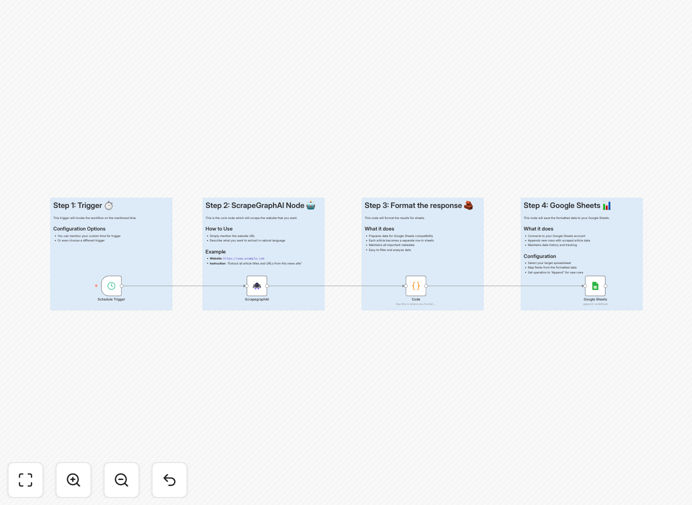
This n8n workflow automates the process of tracking stock prices by scraping real-time data from Yahoo Finance using ScrapegraphAI and updating a Google Sheets spreadsheet automatically. It eliminates the need for manual data entry while ensuring your investment tracking remains current and accurate.
Financial professionals, individual investors, and analysts can use this automation to maintain up-to-date records of portfolio performance, track market movements, and analyze trends without spending hours copying data between platforms. The workflow runs on a schedule you define, pulling the latest market data at regular intervals.
How It Works
1. ScrapegraphAI extracts Yahoo Finance data
The workflow uses ScrapegraphAI to navigate Yahoo Finance and extract current stock prices, volume, and other market data. This community node handles the web scraping process reliably while respecting Yahoo's terms of service.
2. Data is processed and formatted
After collection, the workflow cleans and structures the scraped data into a standardized format. It handles conversion of numeric values, date formatting, and any necessary calculations like percentage changes or portfolio weighting.
3. Google Sheets updates automatically
The processed data is sent to your specified Google Sheet, updating the designated cells or tabs. The workflow can append new rows with timestamped data or update existing cells with current values, depending on your tracking needs.
4. Scheduled execution
You configure how frequently the workflow runs - whether multiple times per day for active traders or weekly for long-term investors. n8n's scheduler triggers the automation without manual intervention.
Who This Is For
This workflow benefits anyone who needs to track stock performance but wants to avoid manual data entry:
- Individual investors managing personal portfolios
- Financial advisors maintaining client reports
- Analysts tracking sector performance
- Educators teaching investment concepts
- Startups monitoring competitor valuations
What You'll Need
- A self-hosted n8n instance (community nodes aren't available in cloud)
- Google Sheets with edit permissions
- Yahoo Finance accounts for the stocks you want to track
- Basic understanding of n8n workflow configuration
Quick Setup Guide
- Download the JSON template file
- Import into your n8n instance
- Configure the ScrapegraphAI node with your target stock symbols
- Connect the Google Sheets node to your spreadsheet
- Set your preferred schedule in the n8n trigger
- Test the workflow with a manual run
- Enable production mode when satisfied
Pro tip: Start with a small set of stocks to test the workflow before scaling up. Monitor your n8n logs to ensure stable operation.
Key Benefits
Save 5-10 hours weekly by eliminating manual stock tracking and spreadsheet updates. The automation handles data collection and entry seamlessly.
Reduce human error in financial record-keeping. Automated data transfer ensures perfect accuracy in your tracking spreadsheets.
React faster to market movements with real-time data at your fingertips. No more waiting to update records before making decisions.
Customizable tracking lets you monitor exactly the metrics that matter for your investment strategy, from simple price tracking to complex technical indicators.
Scalable solution that grows with your portfolio. Add more stocks or metrics without proportionally increasing your workload.