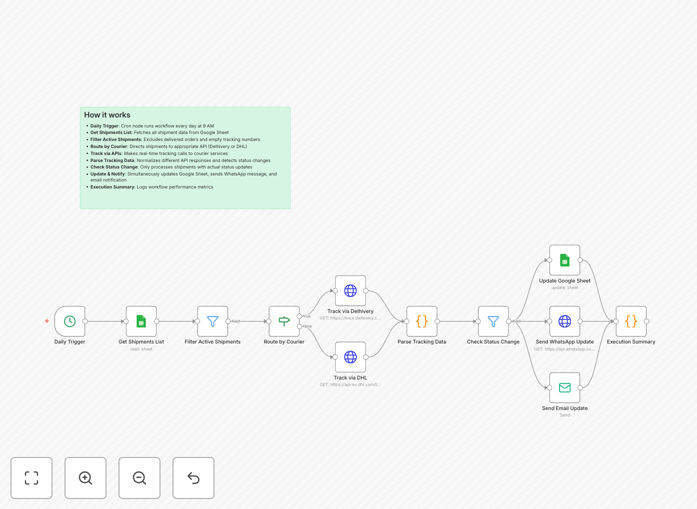
What This Workflow Does
This n8n workflow solves the tedious manual process of tracking shipments across multiple courier services and updating customers. It automatically polls DHL and Delhivery APIs for shipment status changes, updates a centralized Google Sheet, and sends personalized notifications via WhatsApp or Email when statuses change.
Ecommerce businesses, logistics providers, and operations teams use this to eliminate hours of daily tracking work while improving customer communication. The system handles everything from "Order Shipped" notifications to "Out for Delivery" alerts and final delivery confirmations - all without manual intervention.
How It Works
1. API Polling for Shipment Status
The workflow regularly checks DHL and Delhivery APIs using tracking numbers from your Google Sheet. It compares the latest status against previous records to detect changes that require customer notifications.
2. Google Sheets Integration
All shipment data syncs to your master Google Sheet, including timestamps, current status, and location updates. This creates an audit trail and gives your team visibility without logging into multiple courier portals.
3. Smart Notification Logic
The system determines which status changes warrant notifications based on your rules. For example, you might notify customers at "Dispatched", "Out for Delivery", and "Delivered" stages but skip intermediate warehouse scans.
4. Multi-Channel Customer Alerts
Notifications send via WhatsApp (using the Business API) or Email based on customer preferences. Messages include tracking links, estimated delivery windows, and personalized order details from your sheet.
Pro tip: Configure different notification templates for each status type. "Out for Delivery" messages should include time windows while "Delayed" notifications should set proper expectations.
Who This Is For
This automation delivers the most value for:
- Ecommerce stores shipping 50+ orders weekly
- Dropshipping businesses needing to track supplier shipments
- Logistics companies managing multiple courier partners
- Operations teams tired of manual tracking spreadsheets
- Businesses wanting to improve post-purchase customer experience
What You'll Need
- n8n instance (cloud or self-hosted)
- Google Sheets with shipment data (tracking numbers, contacts)
- DHL and/or Delhivery API credentials
- WhatsApp Business API access or Email SMTP credentials
- Basic understanding of n8n workflows (or follow our setup guide)
Quick Setup Guide
- Download the JSON template file
- Import into your n8n instance
- Connect your Google Sheets account
- Configure DHL/Delhivery API credentials
- Set up WhatsApp/Email notification channels
- Map your spreadsheet columns to the workflow fields
- Test with sample tracking numbers
- Activate the workflow
Key Benefits
Save 10+ hours weekly by eliminating manual shipment tracking across multiple courier websites and customer update processes.
Reduce customer service inquiries by 40-60% with proactive, automated status notifications that keep customers informed.
Improve delivery experience scores with timely, personalized updates via customers' preferred channels (WhatsApp or Email).
Centralize tracking data in Google Sheets for easy reporting, exception handling, and team visibility.
Scale effortlessly as your shipment volume grows - the automation handles 10 or 10,000 tracking numbers with equal reliability.