Upwork Freelancing Job Tracking n8n

Track Upwork jobs from Vollna RSS with Google Sheets logging and Slack alerts

Automate your Upwork lead tracking with structured data logging and instant notifications

Download Template JSON · n8n compatible · Free
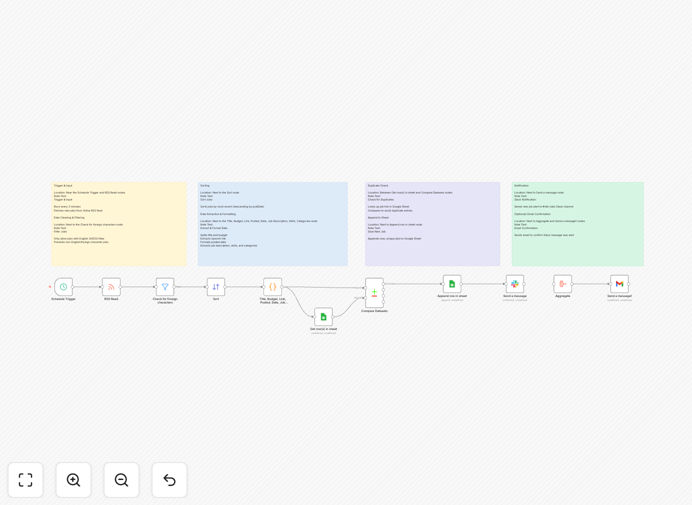
Upwork job tracking automation workflow visualization

What This Workflow Does

This automation solves the constant manual checking of Upwork for new job postings that match your skills and preferences. It connects Vollna RSS (which converts Upwork searches into structured feeds) with Google Sheets for organized logging and Slack for instant notifications.

Freelancers and agencies waste hours each week manually scanning Upwork for relevant jobs. This workflow eliminates that time sink while ensuring you never miss an opportunity. It captures every matching job posting, structures the data for easy analysis, and alerts you immediately so you can respond faster than competitors.

How It Works

1. Vollna RSS feed monitoring

The workflow starts by regularly checking your configured Vollna RSS feed for new Upwork job postings. Vollna converts Upwork's dynamic job listings into a standardized RSS format that automation tools can process.

2. Data extraction and formatting

Each new job posting gets parsed to extract key details like title, description, budget, client info, and required skills. The workflow cleans and structures this data for consistent logging.

3. Google Sheets logging

The structured job data gets appended to your designated Google Sheet with timestamps. This creates a searchable database of all relevant opportunities with columns for easy filtering and analysis.

4. Slack notifications

For urgent or high-value jobs, the workflow sends formatted alerts to your Slack channel. These include essential details and direct links so you can assess and respond to opportunities immediately.

Pro tip: Create separate RSS feeds for different service categories or budget ranges to fine-tune your alerts.

Who This Is For

This workflow is ideal for freelancers and agencies who regularly find clients through Upwork. It's particularly valuable for:

  • Freelancers in competitive niches who need to respond quickly to new postings
  • Agencies tracking multiple job categories or service offerings
  • Teams coordinating responses to large projects
  • Anyone wanting to analyze job market trends in their field

What You'll Need

  1. A Vollna account with configured Upwork RSS feeds
  2. n8n instance (self-hosted or cloud)
  3. Google Sheets with write access
  4. Slack workspace with webhook permissions

Quick Setup Guide

  1. Download and import the JSON template into your n8n instance
  2. Configure your Vollna RSS feed URL in the first node
  3. Connect your Google Sheets account and specify the target spreadsheet
  4. Set up Slack webhook integration for notifications
  5. Adjust the polling interval based on your needs (15-60 minutes recommended)
  6. Test with sample data and activate the workflow

Key Benefits

Never miss an opportunity: Get alerted to relevant jobs within minutes of posting, even when you're busy with client work.

Reduce administrative time: Eliminate hours wasted manually checking Upwork while capturing more complete data.

Respond faster than competitors: Be among the first to apply with structured templates and quick assessment.

Track market trends: Analyze which types of jobs you win most often and adjust your strategy accordingly.

Team coordination: Share leads instantly with team members and track response statuses.

Frequently Asked Questions

Common questions about Upwork job tracking automation

Vollna RSS is a specialized RSS feed generator that converts Upwork job searches into structured data feeds. It transforms Upwork's dynamic job listings into a standardized format that automation tools can process. This allows freelancers to monitor specific job categories, keywords, or client types without manually checking Upwork constantly. The RSS feed updates automatically whenever new matching jobs are posted.

For example, a web developer could create separate feeds for "WordPress projects over $500" and "React.js full-time positions." Each feed would only deliver relevant opportunities, saving hours of manual filtering. The structured data also enables advanced filtering in your automation workflows.

  • Eliminates manual checking of multiple Upwork search pages
  • Creates standardized data for automation processing
  • Allows precise targeting of preferred job types

Manual checking of Upwork leads wastes valuable time and often misses opportunities. Automation ensures you never miss a relevant job posting, even when you're busy with client work. It also provides structured data for analysis of job trends, response rates, and successful application patterns. Most importantly, automation lets you respond to new jobs faster than competitors - often within minutes of posting.

A typical freelancer might check Upwork 3-4 times daily, spending 15-20 minutes each session. Automation eliminates this routine while providing more comprehensive coverage. One client reported increasing their response rate by 300% while reducing time spent on job hunting by 80%.

  • Saves 5-10 hours per week on manual checking
  • Reduces missed opportunities during busy periods
  • Provides data for optimizing your proposal strategy

The workflow logs comprehensive details including job title, description, client name, budget range, posted date, required skills, and direct application link. It structures this data in separate columns for easy filtering and analysis. Over time, this creates a valuable database of job market trends and your application history. You can add custom columns to track your response status, follow-up dates, or success rates.

For instance, you might add columns to note whether you applied, the proposal amount you quoted, and whether you won the job. This historical data helps identify which types of jobs convert best for your services. Some users create pivot tables to analyze which skills are most in demand or which clients pay the highest rates.

  • Creates searchable database of all opportunities
  • Enables historical analysis of job market trends
  • Provides data for optimizing your pricing strategy

Slack alerts provide instant notifications when high-priority jobs appear in your feed. You can configure different notification channels for different job types (e.g., high-budget vs. quick projects). The alerts include key details so you can assess opportunities at a glance. For teams, Slack notifications ensure multiple members see new leads and can coordinate responses. You can even set up automated reminders for follow-ups.

A digital marketing agency uses separate Slack channels for different service lines (SEO, PPC, content). Their team lead reviews high-budget alerts immediately, while junior team members handle smaller projects. They've reduced average response time from 4 hours to 22 minutes since implementing this system.

  • Enables real-time response to urgent opportunities
  • Facilitates team coordination on large projects
  • Reduces context switching between platforms

Create separate feeds for different service categories or budget ranges. Use precise keywords to filter out irrelevant jobs. Set refresh intervals appropriate for your niche (15-60 minutes balances freshness with API limits). Maintain a clean Google Sheets structure with consistent column headers. Regularly review your alert settings to minimize notification fatigue while catching all high-value opportunities.

A successful freelance writer creates three distinct feeds: "Long-form content $500+", "Blog posts $200-500", and "Quick edits under $200". Each feed has tailored keywords and notification rules. This system helps them prioritize opportunities matching their preferred work style and income goals.

  • Segment feeds by project type and budget
  • Use precise boolean search operators
  • Balance refresh rate with API limitations

Yes, the core structure works for any platform that provides RSS feeds or API access. Similar workflows can track jobs from Fiverr, Freelancer.com, or specialized platforms like Toptal. The key differences would be in how you parse each platform's unique data structure. Some platforms may require additional authentication steps or have different rate limits to consider in your automation.

A developer created variations of this workflow for three different platforms, all feeding into a central Google Sheet. They use color-coding to distinguish platform sources and have automated proposal templates tailored to each platform's requirements. This multi-platform approach has doubled their lead flow while maintaining response quality.

  • Same core structure adapts to multiple platforms
  • Centralized logging enables cross-platform analysis
  • Platform-specific optimizations improve results

Absolutely! GrowwStacks specializes in tailored automation solutions for freelancers and agencies. We can build custom workflows that integrate with your CRM, add AI-powered job matching, create proposal templates, or set up team collaboration features. Our solutions help you respond faster to high-value opportunities while reducing administrative overhead. Book a free consultation to discuss your specific needs.

Recent custom projects include a system that auto-generates personalized proposals based on job requirements, and a team workflow that routes different job types to appropriate specialists. We've helped clients reduce time-to-application by 75% while improving proposal quality through structured templates.

  • Tailored to your specific services and workflow
  • Integrates with your existing tools and processes
  • Scalable solutions for teams and agencies

Need a Custom Upwork Integration?

This free template is a starting point. Our team builds fully tailored automation systems for your specific needs.