Moz API Google Sheets SEO Analytics n8n

Track website SEO metrics with Moz API and Google Sheets integration

Automatically collect Domain Authority and Page Authority scores for any website. This n8n workflow saves hours of manual SEO analysis by pulling Moz metrics directly into your spreadsheet for tracking and reporting.

Download Template JSON · n8n compatible · Free
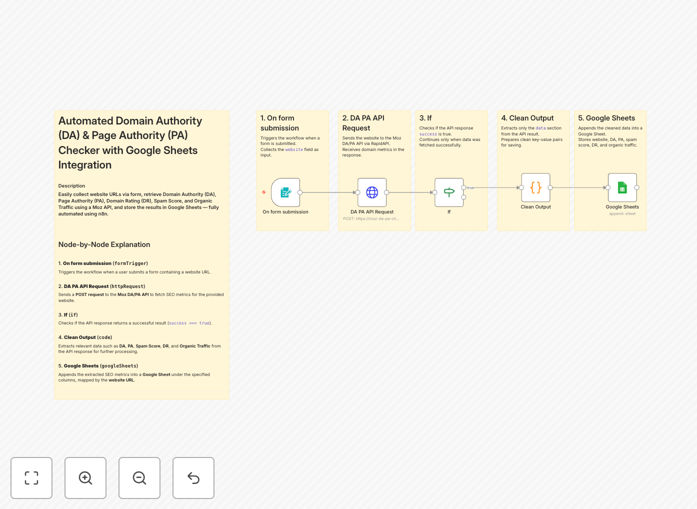
SEO metrics tracking workflow diagram showing Moz API integration with Google Sheets

What This Workflow Does

This automation solves the time-consuming process of manually checking and recording SEO metrics for websites. Marketing teams, agencies, and website owners often waste hours each month collecting Domain Authority (DA) and Page Authority (PA) scores from Moz to track performance trends.

The workflow automatically retrieves these key SEO indicators whenever a new website URL is submitted, then logs the data in Google Sheets with timestamps. This creates a historical record of metric changes, enabling data-driven SEO strategy adjustments without spreadsheet busywork.

How It Works

1. URL Collection

The workflow starts by receiving website URLs through your preferred input method - this could be a form submission, spreadsheet update, or direct API call. Each URL triggers the automation sequence.

2. Moz API Connection

The system authenticates with your Moz API credentials and requests the latest Domain Authority and Page Authority metrics for the submitted URL. Moz's servers process the request and return the current scores.

3. Data Processing

The workflow extracts the relevant DA and PA scores from Moz's API response, along with any additional available metrics like spam score or linking root domains.

4. Google Sheets Update

The processed SEO metrics are appended to your designated Google Sheet, including the URL, scores, and collection timestamp. This builds a searchable historical database of your website's authority metrics.

Pro tip: Add conditional formatting in Google Sheets to highlight significant DA/PA changes (≥5 points) for quick visual analysis.

Who This Is For

This automation delivers the most value for digital marketing agencies managing multiple client websites, eCommerce stores monitoring category page performance, and content teams tracking article authority over time. SEO consultants will appreciate the automated record-keeping for client reporting.

Businesses with investor reporting requirements benefit from the consistent metric tracking, while SaaS companies can use it to monitor landing page optimization efforts. Any organization with multiple web properties needing regular SEO health checks will save significant time.

What You'll Need

  1. Moz Pro account with API access (minimum Campaigns plan)
  2. Google Sheets document prepared with column headers
  3. n8n instance (cloud or self-hosted)
  4. Basic understanding of API authentication

Quick Setup Guide

  1. Download the JSON template file
  2. Import into your n8n instance
  3. Configure Moz API credentials in the HTTP Request node
  4. Connect your Google Sheets account
  5. Test with sample URLs to verify data flow
  6. Schedule automatic runs (daily/weekly)

Key Benefits

Save 5-8 hours monthly by eliminating manual SEO metric collection and spreadsheet updates. The automation handles all data gathering and recording.

Improve decision timing with immediate visibility into DA/PA changes rather than waiting for monthly manual checks. Catch ranking drops early.

Enhance client reporting with consistent, timestamped metric history that demonstrates SEO progress and justifies strategy adjustments.

Scale monitoring effortlessly by adding unlimited URLs to your tracking list without increasing workload. The system handles volume automatically.

Create audit trails with permanent records of metric changes that help analyze the impact of SEO campaigns and content updates.

Frequently Asked Questions

Common questions about SEO tracking integration and automation

The Moz API provides Domain Authority (DA) and Page Authority (PA) scores which are crucial SEO metrics. DA measures a website's overall strength on search engines (0-100 scale), while PA evaluates individual page strength. These metrics help predict ranking potential and benchmark against competitors.

Beyond authority scores, Moz's API can return spam scores, linking root domains count, and other backlink data. These additional metrics provide deeper insights into why a site's authority might be changing over time, helping diagnose SEO issues.

  • DA scores update monthly
  • PA reflects current page strength
  • Scores are comparative, not absolute

For most businesses, tracking SEO metrics monthly is ideal. This frequency captures meaningful changes without creating data overload. Agencies managing multiple clients may check weekly for high-value accounts. Seasonal businesses should increase monitoring during peak periods when rankings impact revenue most.

Automation makes frequent tracking practical by eliminating manual work. While Moz updates DA monthly, PA can fluctuate more often based on link profile changes. Regular monitoring helps correlate metric changes with marketing activities like content publishes or backlink campaigns.

Automating SEO tracking saves 5-10 hours monthly by eliminating manual checks. It provides consistent data collection at scheduled intervals, reduces human error in recording metrics, and enables historical trend analysis. Automated reports help identify ranking drops immediately for faster response.

Beyond time savings, automation creates reliable datasets for performance analysis. Marketing teams can correlate DA/PA changes with campaign timelines, while executives get dashboard views of digital asset strength. Automated alerts for significant changes prevent surprises during reporting periods.

  • Eliminates spreadsheet errors
  • Enables trend visualization
  • Provides audit-ready records

Yes, this workflow can monitor competitors by adding their URLs to your tracking list. Competitive analysis helps benchmark your performance, identify link-building opportunities, and uncover content gaps. Tracking 3-5 key competitors provides valuable market insights without overwhelming your data.

When tracking competitors, focus on pages directly competing with your offerings. Note that some competitors may block Moz's crawlers, limiting available data. Combine Moz metrics with other signals like organic traffic estimates for comprehensive competitive intelligence.

Moz's DA scores are highly reliable for relative comparisons between sites, though not perfect absolute measures. They use a machine learning model trained on thousands of ranking factors. While Google doesn't use DA directly, it correlates strongly with actual search performance across industries.

DA works best for comparing sites within the same niche. A 10-point difference between two eCommerce sites reliably indicates stronger search potential, while comparing a DA 50 news site to a DA 30 B2B site has less meaning. Focus on trends rather than absolute numbers.

Beyond DA/PA, APIs can collect keyword rankings, backlink profiles, crawl errors, and content suggestions. Advanced integrations pull Google Search Console data, page speed metrics, and SERP features. Combining multiple data sources creates comprehensive SEO dashboards for strategic decision-making.

For maximum value, connect SEO data with business metrics like conversion rates. An eCommerce site might track how DA changes affect product page conversions, while publishers could correlate PA scores with article engagement metrics. This reveals which SEO improvements actually impact business outcomes.

  • Keyword ranking trends
  • Backlink acquisition rates
  • Technical SEO health indicators

Yes, GrowwStacks specializes in custom SEO automation solutions. We can build workflows that combine Moz data with your CRM, CMS, or internal reporting systems. Our team creates tailored dashboards, alert systems for metric changes, and automated reports for stakeholders.

Custom solutions might integrate SEO metrics with your content calendar, link-building tracker, or PPC performance data. We design automations that fit your existing tools and workflows, ensuring seamless adoption by your marketing team without disruptive process changes.

  • Custom alert thresholds
  • Executive dashboards
  • Cross-platform integrations

Need a Custom SEO Tracking Integration?

This free template is a starting point. Our team builds fully tailored automation systems for your specific needs.