What This Workflow Does
Manual keyword tracking is one of the most time-consuming tasks in SEO. Marketing teams waste hours each week checking Google search results, copying positions into spreadsheets, and trying to spot trends. This workflow eliminates that manual grind by automating the entire process.
The system queries Google search results via the Serper API for your target keywords, checks where your pages rank, and automatically updates a Google Sheet with current positions. It maintains 12 weeks of historical data, allowing you to see ranking trends over time without any manual data entry.
Beyond just saving time, this automation ensures data consistency, eliminates human error in SERP interpretation, and provides reliable historical data for SEO strategy decisions. You'll know exactly which keywords are improving, which need attention, and how your optimization efforts are paying off.
How It Works
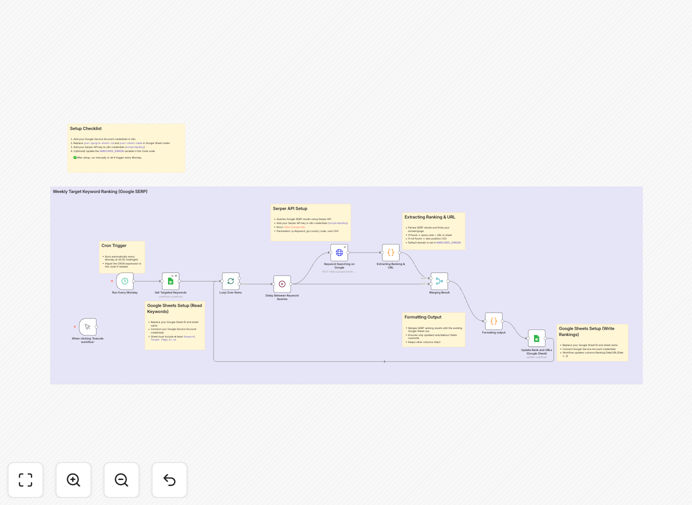
1. Schedule & Trigger
The workflow runs automatically every Monday at midnight via a schedule trigger. You can adjust this frequency to daily, weekly, or any interval that matches your reporting needs.
2. Read Keyword List
It reads your keyword tracking list from a Google Sheet that includes columns for keyword, target URL, and unique identifiers. This keeps your source data organized and easy to update.
3. Query Google SERP
For each keyword, the workflow sends a request to the Serper API (Google Search Results API) to fetch current search results. It checks both exact URL matches and domain-level rankings based on your configuration.
4. Process & Match Results
A code node processes the API response, scanning through search results to find where your target page appears. It handles both exact matches and partial domain matches, returning the position number.
5. Update Google Sheets
The ranking data is written back to your Google Sheet, with new columns added for each week's data. The system maintains 12 weeks of history before cycling, giving you a full quarter of trend data.
6. Error Handling & Logging
If any keyword fails to return results or encounters API limits, the workflow logs the error and continues with remaining keywords, ensuring partial failures don't break the entire process.
Who This Is For
This automation is ideal for SEO specialists, content marketers, digital agencies, and growth teams who need to track keyword performance systematically. If you're managing 50+ keywords across multiple clients or projects, manual tracking becomes unsustainable.
Marketing managers who need to report on SEO performance to stakeholders will benefit from the consistent, historical data this workflow provides. Content teams can use it to measure the impact of their optimizations. Agencies can scale keyword tracking across multiple client accounts without proportional increases in manual work.
Even small business owners managing their own SEO can use this to stay on top of their most important keywords without dedicating hours each week to manual checks.
What You'll Need
- A Google Sheet with columns for: Keyword, Target Page URL, and unique row identifiers
- Google Service Account credentials (for n8n to access your Sheets)
- Serper API key (sign up at serper.dev for Google Search API access)
- n8n instance (cloud or self-hosted) to run the workflow
- Basic understanding of how to import JSON workflows into n8n
Pro tip: Start with your 20 most important keywords first. Once the automation is running smoothly, expand to track more. This prevents API cost surprises and helps you refine the process.
Quick Setup Guide
1. Download the template using the button above and import it into your n8n instance.
2. Update the Google Sheets nodes with your actual Sheet ID and tab name.
3. Add your Google Service Account credentials to authenticate Sheet access.
4. Add your Serper API key to the HTTP Request node credentials.
5. (Optional) Modify the code node if you want to track domain-level vs. exact URL rankings.
6. Run the workflow once manually to verify everything works, then activate the schedule trigger.
7. Check your Google Sheet after the first run to confirm data is populating correctly.
Key Benefits
Save 5-10 hours weekly that would be spent manually checking rankings and updating spreadsheets. That's 250-500 hours annually that can be redirected to actual SEO strategy and content creation.
Eliminate human error in SERP interpretation. The API returns consistent, accurate position data every time, unlike manual checks that can miss rankings or misinterpret results.
Maintain reliable historical data for 12 weeks automatically. Spot trends, measure campaign impact, and prove SEO ROI with clean, consistent data over time.
Scale keyword tracking effortlessly from 20 to 200+ keywords without additional manual work. The automation handles the volume increase seamlessly.
Improve SEO decision-making with timely, accurate data. Know which keywords to prioritize, which content to update, and where to focus optimization efforts.