n8n Airtable Crypto Automation

Tracking Your Crypto Portfolio in Airtable

Automatically sync your cryptocurrency investments with Airtable. This n8n workflow updates your portfolio values, calculates ROI, and creates visual dashboards - saving hours of manual tracking each month.

Download Template JSON · n8n compatible · Free
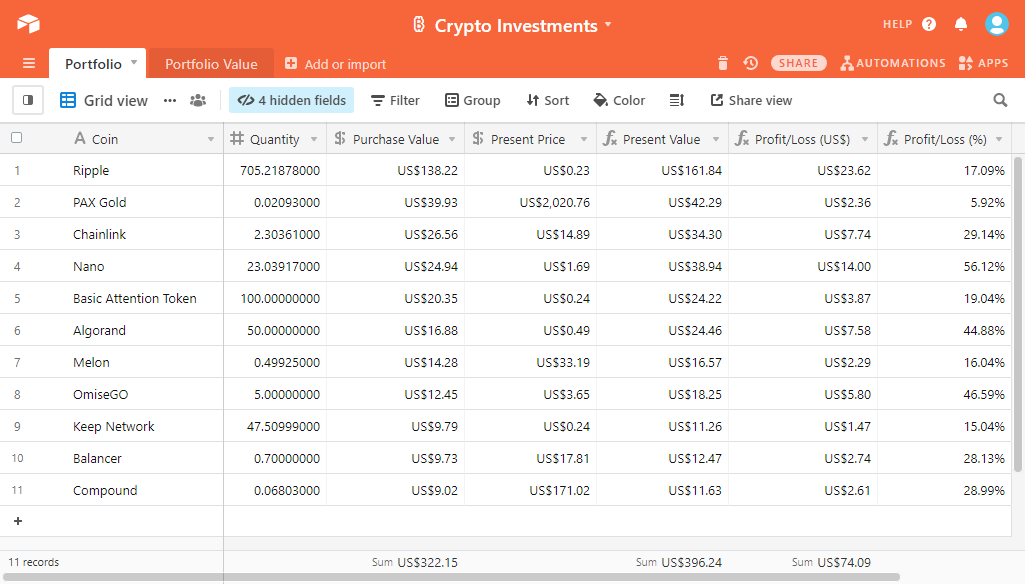
Airtable crypto portfolio dashboard showing current values and performance metrics

What This Workflow Does

Managing cryptocurrency investments manually is time-consuming and prone to errors. This automation connects your crypto holdings to Airtable, automatically fetching current prices and updating your portfolio value. It eliminates the need for manual spreadsheet updates while giving you a powerful visual dashboard to track performance.

The workflow pulls data from cryptocurrency APIs (like CoinGecko or CoinMarketCap), calculates your current portfolio value based on your holdings, and updates your Airtable base on a schedule you set. You can track ROI, allocation percentages, and historical performance - all automatically updated without lifting a finger.
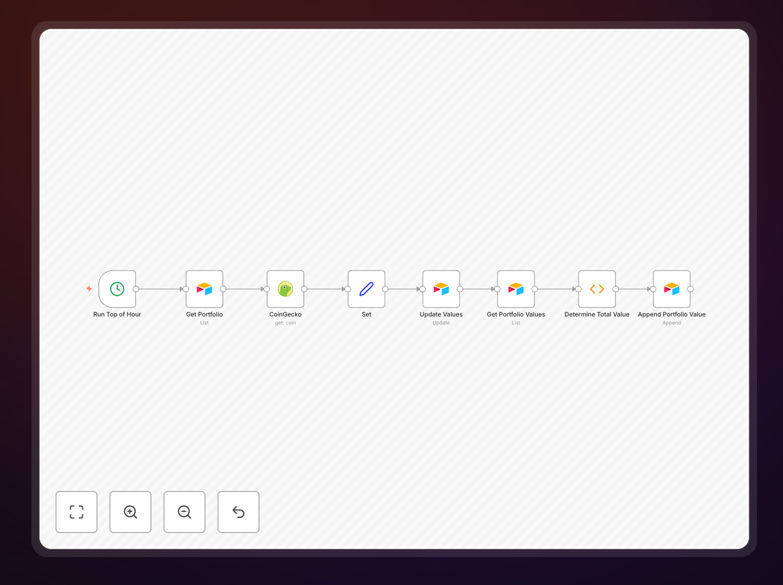
n8n workflow diagram showing crypto price API integration with Airtable
The workflow connects crypto APIs to Airtable with automated data processing

How It Works

1. Fetch current crypto prices

The workflow connects to cryptocurrency APIs to get real-time or delayed price data for all coins in your portfolio. It handles API authentication and processes the raw data into a standardized format.

2. Calculate portfolio values

Using your recorded holdings (stored in Airtable), the workflow multiplies coin quantities by current prices to calculate the current USD value of each position and your total portfolio value.

3. Update Airtable records

The workflow updates your Airtable base with the new values, preserving historical data while refreshing current prices. It can also calculate metrics like ROI, daily/weekly changes, and allocation percentages.

4. Schedule automatic updates

Configure the workflow to run on your preferred schedule - daily, hourly, or weekly. Each run refreshes all values automatically, keeping your dashboard current without manual intervention.

Pro tip: Add a "Last Updated" field in Airtable to track when each price refresh occurred. The workflow can automatically timestamp each update.

Who This Is For

This workflow is ideal for cryptocurrency investors who want better visibility into their portfolio performance without constant manual updates. It's particularly valuable for:

  • Crypto traders tracking multiple positions across exchanges
  • Long-term holders monitoring portfolio allocation
  • Financial advisors managing client crypto assets
  • Businesses holding crypto on their balance sheet
  • Anyone tired of manually updating spreadsheets

What You'll Need

  1. An n8n instance (cloud or self-hosted)
  2. An Airtable account with a base for your crypto portfolio
  3. API keys for CoinGecko, CoinMarketCap, or your preferred crypto data source
  4. A list of your cryptocurrency holdings (coins and quantities)

Quick Setup Guide

  1. Download the template file and import it into your n8n instance
  2. Connect your Airtable account in the workflow settings
  3. Configure your crypto API connection (CoinGecko/CoinMarketCap)
  4. Map your Airtable fields to the workflow data structure
  5. Set your preferred update schedule (daily recommended)
  6. Test the workflow with a small subset of your portfolio
  7. Activate the workflow for automatic updates

Key Benefits

Save 5-10 hours monthly by eliminating manual portfolio tracking and spreadsheet updates. The automation handles all calculations and data entry.

Make better investment decisions with always-current data. Spot trends and rebalance your portfolio based on real-time information rather than stale spreadsheets.

Reduce human error in calculating values and performance metrics. The workflow performs all math consistently and accurately every time.

Create custom dashboards in Airtable to visualize your portfolio allocation, performance over time, and individual asset ROI.

Scale effortlessly as your portfolio grows. The same workflow handles 5 coins or 500 without additional effort on your part.

Frequently Asked Questions

Common questions about crypto portfolio tracking and automation

Airtable provides a flexible, visual way to track your cryptocurrency investments with real-time price updates. Unlike spreadsheets, Airtable allows you to create custom views, set up alerts, and visualize your portfolio performance across different time periods.

The automation ensures your data stays current without manual updates. You can create gallery views to see coin logos, kanban boards to categorize by investment thesis, or calendar views to track purchase dates - all impossible with traditional spreadsheets.

Most investors update their crypto portfolio values daily or weekly. This workflow can be scheduled to run automatically at your preferred frequency - from every hour for active traders to weekly for long-term holders.

More frequent updates help spot trends but may trigger API rate limits with some exchanges. We recommend daily updates for most investors, with additional manual triggers when making significant trades.

  • Active traders: 4-24x daily
  • Regular investors: Daily
  • Long-term holders: Weekly

This workflow uses CoinGecko or CoinMarketCap APIs which support most major cryptocurrencies. For exchange-specific data, you can modify the workflow to connect directly to APIs from Binance, Coinbase, Kraken or other exchanges where you hold assets.

The template includes documentation for these modifications. Exchange-specific APIs provide more accurate balance data but require additional authentication setup. For most users, CoinGecko provides sufficient data with simpler configuration.

Yes, the workflow can aggregate data from multiple wallets and exchanges into one Airtable base. You'll need to configure separate API connections for each wallet or exchange, then combine the data before updating Airtable.

The template includes sample configurations for tracking multiple sources. This is particularly useful for investors who use hardware wallets alongside exchange accounts, or who trade across multiple platforms.

  • Supports unlimited wallets/exchanges
  • Consolidates all holdings in one view
  • Maintains separate records by source

Beyond current value, track purchase price, quantity, date acquired, ROI percentage, and allocation percentage. Advanced metrics include 24h/7d price changes, trading volume, and market cap.

The workflow can calculate these automatically and create visual dashboards in Airtable to monitor your portfolio health. We recommend tracking both absolute USD values and percentage changes to understand both dollar impact and relative performance.

The workflow only needs read-only API access to price data, not wallet access. API keys are encrypted in transit and at rest. For maximum security, use exchange APIs with view-only permissions and never store private keys in Airtable.

The template follows security best practices for financial data. All connections use HTTPS, API keys are stored securely in n8n's credential system, and the workflow doesn't require access to your actual wallets - just price data.

Yes, GrowwStacks specializes in custom crypto tracking solutions. We can build workflows that integrate with your specific exchanges, add tax reporting features, create alerts for price movements, or develop private dashboards for client portfolios.

Our team has built custom crypto automation for hedge funds, financial advisors, and blockchain businesses. We can tailor the solution to your exact requirements, whether you need multi-user access, institutional-grade security, or specialized reporting.

  • Custom dashboards and reporting
  • Enterprise-grade security
  • White-label solutions available

Need a Custom Crypto Portfolio Integration?

This free template is a starting point. Our team builds fully tailored automation systems for your specific needs.