Zapier FileFlows OpenAI Audio Processing

Transcribe Long Audio Files Beyond 25MB Limit

Automate transcription of large audio files using FileFlows and OpenAI Whisper

Download Template JSON · n8n compatible · Free
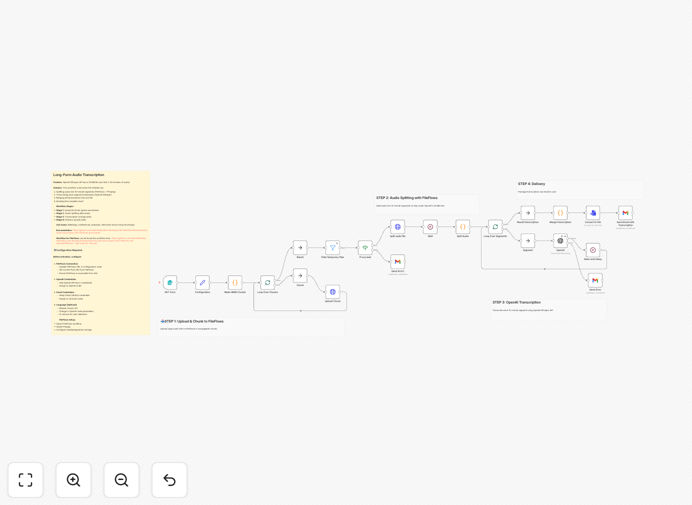
Workflow diagram showing audio file transcription process

What This Workflow Does

This automation solves a critical limitation in audio transcription services - the 25MB file size limit imposed by most APIs including OpenAI Whisper. It enables businesses and creators to process lengthy recordings like podcasts, interviews, or lectures without manual splitting.

The workflow automatically segments large audio files, processes each segment through OpenAI's Whisper API, then combines the results into a single transcript. This eliminates hours of manual work while maintaining accuracy across the entire recording.

How It Works

1. File Upload and Preparation

Users upload MP3 files through a simple web interface. The workflow checks file size and prepares it for processing.

2. Automated Chunking

FileFlows splits the audio into 15-minute segments (under 25MB) using FFmpeg, ensuring optimal processing size for the Whisper API.

3. Parallel Transcription

Each audio segment is sent to OpenAI Whisper simultaneously, dramatically reducing total processing time.

4. Results Compilation

The workflow merges all transcript segments while maintaining proper timing and sequence, producing a unified document.

5. Delivery

The final transcript is emailed to the user in their preferred format (TXT, DOCX, or SRT for captions).

Who This Is For

This template is ideal for:

  • Podcast producers needing show notes
  • Academic researchers transcribing interviews
  • Media companies processing long recordings
  • Legal firms documenting proceedings
  • Content creators making video captions

Pro tip: For best results, ensure your audio recordings are clear with minimal background noise. The workflow includes basic noise reduction, but source quality significantly impacts accuracy.

What You'll Need

  1. n8n instance (self-hosted or cloud)
  2. FileFlows with Docker and FFmpeg installed
  3. OpenAI API key with Whisper access
  4. Email service configured (Gmail recommended)
  5. Network connectivity between services

Quick Setup Guide

  1. Download and import the JSON template
  2. Configure FileFlows connection details
  3. Add your OpenAI API credentials
  4. Set up email delivery preferences
  5. Test with a sample audio file

Key Benefits

Save 80%+ time compared to manual transcription services or piecemeal processing.

Cost-effective at just $0.36 per hour of audio compared to $15-30 for human transcription.

Scalable processing handles batches of files automatically without supervision.

Consistent formatting across all transcripts regardless of file size.

Customizable output with options for raw text, formatted documents, or caption files.

Frequently Asked Questions

Common questions about audio transcription automation and integration

For files over 25MB, the most effective method is to split the audio into smaller chunks before processing. This workflow combines FileFlows for audio segmentation with OpenAI Whisper for accurate transcription.

The automated approach ensures consistent formatting across segments while maintaining proper timing and sequence in the final transcript.

OpenAI Whisper provides near-human accuracy, especially for clear audio. The accuracy can reach 95%+ for well-recorded content in supported languages.

Accuracy factors include audio quality, speaker clarity, background noise, and technical terminology. The workflow includes optional post-processing to improve results for challenging audio.

Podcast producers, academic researchers, media companies, legal firms, and content creators see the most benefit from automated transcription workflows.

These businesses typically process large volumes of audio content where manual transcription would be prohibitively expensive or time-consuming. The automation scales to handle growing needs without additional staffing.

AI transcription costs about $0.006 per minute, making it 10-20x cheaper than human transcription services while being nearly as accurate for clear audio.

For a 1-hour recording, expect to pay approximately $0.36 with this automated workflow versus $15-30 for human transcription. The savings compound significantly for businesses processing multiple files weekly.

MP3 and WAV formats yield the best results. This workflow automatically converts incompatible formats for optimal transcription quality.

The system supports most common audio formats including M4A, FLAC, and OGG. For best accuracy, use lossless formats when possible and ensure adequate bitrate (128kbps or higher recommended).

Provide a glossary of technical terms, ensure high-quality audio recording, and consider post-processing with custom dictionaries for niche terminology.

The workflow includes optional steps to boost accuracy for specialized content. These include speaker identification, custom vocabulary injection, and multi-pass verification for critical sections.

Yes, GrowwStacks specializes in building tailored audio processing workflows for specific business needs, including custom integrations and post-processing.

Our team can create solutions for unique requirements like multi-language transcription, real-time processing, specialized formatting, or integration with your existing systems. We handle everything from initial consultation to deployment and maintenance.

Need a Custom Audio Processing Automation?

This free template is a starting point. Our team builds fully tailored automation systems for your specific business needs.