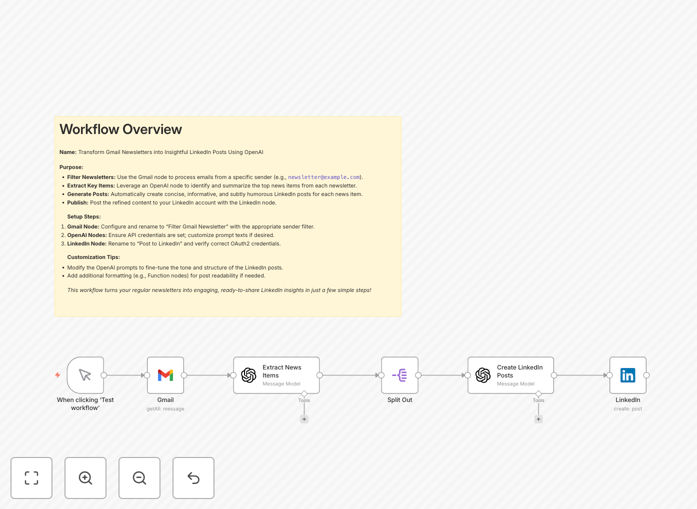
What This Workflow Does
This automation solves the common challenge of extracting value from the dozens of newsletters professionals receive but rarely have time to fully process. It automatically transforms Gmail newsletters into polished LinkedIn posts, helping you maintain an active professional presence without manual content creation.
The workflow identifies incoming newsletters, extracts their core insights using OpenAI's natural language processing, and reformats them into engaging social media posts. It preserves the original value while adapting the content for LinkedIn's professional audience and algorithm preferences.
How It Works
1. Newsletter Identification
The workflow monitors your Gmail inbox for incoming messages matching your newsletter subscriptions. It uses filters to distinguish newsletters from regular emails based on sender, subject patterns, or labels.
2. Content Extraction
Key content is extracted from the email body, removing headers, footers, and promotional sections. The system preserves the main article text while discarding boilerplate content that wouldn't be relevant for LinkedIn.
3. AI Processing
OpenAI analyzes the extracted content to identify key points, summarize complex information, and determine the most valuable insights worth sharing. The AI reformats the content using professional tone and LinkedIn-optimized structure.
4. Post Generation
The system generates a complete LinkedIn post draft including formatted text, relevant hashtags, and optional calls-to-action. You can configure length, style preferences, and inclusion of specific elements like quotes or statistics.
5. Review & Publishing
The generated post is saved to your preferred destination (Draft folder, Google Doc, or directly to LinkedIn via API). This gives you the option to review and edit before publishing while still saving the bulk of creation time.
Who This Is For
This workflow is ideal for content creators, marketers, and business professionals who:
- Receive valuable industry newsletters but struggle to process them all
- Want to maintain an active LinkedIn presence without daily content creation
- Seek to establish thought leadership by sharing curated insights
- Need to maximize the ROI of their newsletter subscriptions
What You'll Need
- An n8n instance (cloud or self-hosted)
- Gmail account with newsletter subscriptions
- OpenAI API key (GPT-3.5 or GPT-4)
- LinkedIn account (personal or company page)
- Basic understanding of n8n workflows
Quick Setup Guide
- Download the JSON template file
- Import into your n8n instance
- Configure Gmail node with your credentials
- Add your OpenAI API key
- Set up LinkedIn destination (API or storage option)
- Test with sample newsletter emails
- Adjust AI prompt parameters as needed
Key Benefits
Save 5-10 hours weekly by automating content repurposing from newsletters to LinkedIn. What previously took 30-60 minutes per post now happens automatically.
Increase LinkedIn engagement through consistent posting of valuable insights. The algorithm rewards regular, quality content with greater visibility.
Never miss valuable content from your subscriptions. Even when busy, your automation ensures key insights get shared with your network.
Establish thought leadership by consistently sharing curated industry knowledge. Position yourself as someone who stays current and adds value.