What This Workflow Does
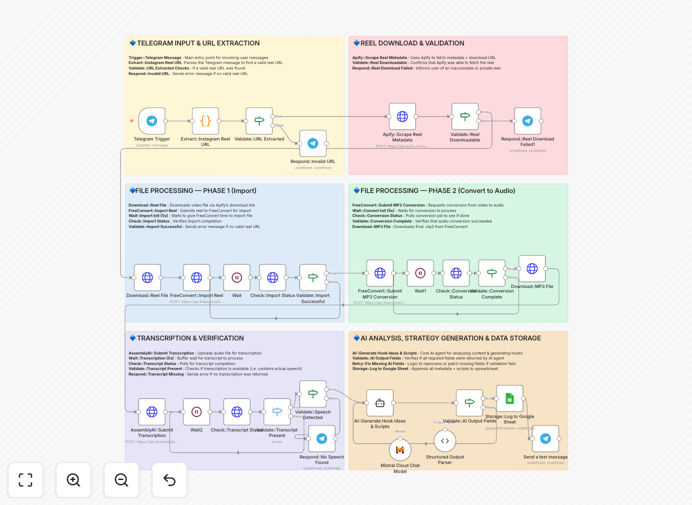
This n8n workflow automates the transformation of Instagram Reels into repurposable content using AI-powered analysis. It solves the time-consuming process of manually reviewing, transcribing, and extracting insights from your video content - a critical task for creators and marketers who want to maximize their content's reach.
The system automatically processes new Reels by extracting the audio, generating accurate transcriptions with AssemblyAI, analyzing content themes with Mistral AI, and organizing all data in Google Sheets for easy repurposing into blog posts, tweets, or future video ideas. This creates a searchable database of your best-performing content elements.
How It Works
1. Instagram Reel Detection
The workflow monitors your Instagram account for new Reels posts, either through scheduled checks or webhook triggers. When a new Reel is detected, it captures the video URL and metadata.
2. Audio Extraction & Transcription
The system extracts the audio track from the Reel and sends it to AssemblyAI for high-accuracy speech-to-text conversion. This creates a searchable transcript of all spoken content.
3. AI Content Analysis
Mistral AI processes the transcript to identify key topics, emotional tone, memorable quotes, and potential content angles. It generates actionable insights about what makes the content engaging.
4. Data Organization
All extracted information - including transcript, analysis results, and performance metrics - is automatically logged in Google Sheets with timestamps and categorization for easy reference.
Who This Is For
This workflow is ideal for content creators, social media managers, and digital marketing agencies who regularly produce Instagram Reels. It's particularly valuable for:
- Creators who want to repurpose video content across multiple platforms
- Teams managing multiple Instagram accounts who need content insights at scale
- Marketers analyzing what messaging resonates with their audience
- Businesses building content libraries for future reference
What You'll Need
- An n8n instance (cloud or self-hosted)
- Instagram professional account with Reels content
- AssemblyAI API key for transcription
- Mistral AI API access
- Google Sheets with write permissions
Quick Setup Guide
- Download the JSON template file
- Import into your n8n instance
- Connect your Instagram, AssemblyAI, Mistral AI, and Google Sheets credentials
- Configure your target Google Sheet and desired data columns
- Test with an existing Reel to verify all connections
- Set your preferred trigger schedule (daily/weekly)
Key Benefits
Save 5-7 hours per week by automating the manual work of reviewing and analyzing Reels content. The AI handles transcription and insight generation instantly.
Increase content repurposing by 3x with automatically organized transcripts and identified highlights ready for adaptation into other formats.
Improve future content strategy by building a searchable database of what topics and styles perform best with your audience.
Enhance accessibility by automatically generating accurate captions and transcripts for all your video content.
Pro tip: Use the generated transcripts to create SEO-optimized blog posts from your video content, doubling your content output from the same creative effort.