n8n AI Gmail Text-to-Speech Telegram

Transform Emails into Podcasts Automatically

Convert promotional emails and newsletters into listenable audio summaries. Save time, consume content hands-free, and never miss an update again.

Download Template JSON · n8n compatible · Free
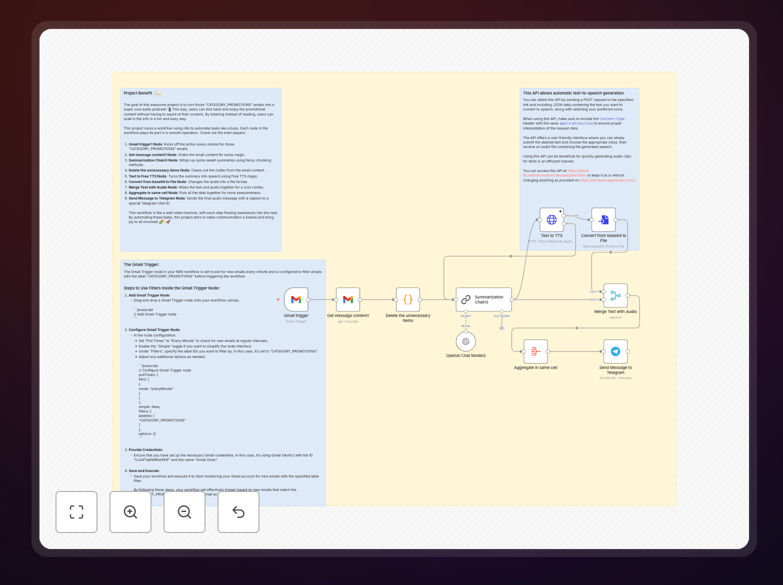
n8n workflow diagram showing email to podcast automation with Gmail, AI summarization, text-to-speech, and Telegram nodes

What This Workflow Does

This n8n automation transforms your cluttered promotional email inbox into a personalized, on-demand podcast. Instead of spending time reading marketing emails, newsletters, and updates, you can listen to them while commuting, working out, or doing chores.

The workflow automatically fetches emails labeled as "CATEGORY_PROMOTIONS" from your Gmail, uses AI to summarize the content, converts the summary to speech using a text-to-speech API, and delivers the audio file directly to your Telegram chat. It turns passive inbox management into an active, hands-free learning opportunity.

For businesses, this automation can be adapted to convert internal team updates, customer feedback digests, or industry news roundups into audio briefings, improving information accessibility and team productivity.

How It Works

The workflow follows a clear, sequential process to transform text into engaging audio content.

1. Trigger & Email Fetching

A Gmail Trigger node monitors your inbox every minute, specifically filtering for emails with the "CATEGORY_PROMOTIONS" label. This ensures only relevant promotional content is processed, keeping your personal and work emails separate.

2. Content Extraction & AI Summarization

The "Get Message Content" node extracts the full email body. This raw text is then passed to an AI summarization chain (like OpenAI), which condenses lengthy marketing copy into key bullet points or a concise paragraph, removing fluff and focusing on the core message.

3. Text-to-Speech Conversion

The cleaned, summarized text is sent to a free Text-to-Speech API (like TikTok TTS). You can select from various voices and languages. The API returns an audio file in base64 format, which is then converted into a playable file format like MP3 or OGG.

4. Delivery & Notification

The final audio file, along with a caption (like the email subject line), is sent via the Telegram Bot node to a specified chat or channel. You receive a listenable podcast episode directly in your messaging app, ready to play.

Pro tip: You can modify the Gmail filter to catch newsletters from specific senders (like "[email protected]") instead of the promotions category, creating a custom audio digest from your favorite sources.

Who This Is For

This automation is ideal for busy professionals, commuters, content creators, and teams who want to reclaim time and consume information more efficiently.

Marketing Professionals & Founders can stay updated on competitor campaigns and industry trends without touching their inbox. Agency Owners can convert client update emails into quick briefs for their team. Individuals with overflowing subscription lists can finally "read" their newsletters during their daily walk or drive.

It's also perfect for accessibility – providing an audio alternative for those who prefer or require listening over reading.

What You'll Need

  1. An n8n instance (cloud or self-hosted).
  2. Gmail account with promotional emails you want to convert.
  3. OpenAI API key (or another LLM service) for the summarization step.
  4. Access to a free Text-to-Speech API (the template references a working endpoint).
  5. A Telegram account and Bot Token (created via @BotFather) to receive the audio files.
  6. Basic understanding of how to import a JSON workflow and add credentials in n8n.

Quick Setup Guide

Get this automation running in your n8n instance in under 15 minutes.

  1. Download & Import: Click the "Download Template" button above and save the JSON file. In your n8n dashboard, go to Workflows > Import from File and select the downloaded JSON.
  2. Configure Credentials: In the workflow canvas, click the credential icons on the Gmail Trigger, OpenAI, and Telegram nodes. Add your respective API keys and bot tokens.
  3. Test the Trigger: Send a test promotional email to yourself or trigger the workflow manually once to ensure the Gmail connection works and fetches an email.
  4. Adjust Filters (Optional): In the Gmail Trigger node, you can change the label filter from "CATEGORY_PROMOTIONS" to a custom label or sender address.
  5. Activate the Workflow: Toggle the workflow to "Active". It will now run on its defined schedule (every minute by default), checking for new emails and converting them.

Check your Telegram chat; you should receive a test audio file. Congratulations, your personal email podcast is now live!

Pro tip: For better audio organization, modify the Telegram node's caption to include the date and sender. You can also add a "Split In Batches" node to process multiple emails at once and send them as a daily digest.

Key Benefits

Reclaim 30+ Minutes Daily: Stop skimming emails. Listen to summarized versions while doing other tasks, turning downtime into productive learning time.

Never Miss a Promotion: Automated processing ensures you catch every sale, offer, or important update buried in promotional emails, which are often ignored or deleted.

Improve Content Accessibility: Provides an audio format for visual learners, busy individuals, or those with accessibility needs, making information consumption more flexible.

Centralized Knowledge Delivery: Delivers all audio summaries to one place (Telegram), creating a searchable, listenable archive of important updates outside your chaotic inbox.

Fully Customizable Pipeline: This is a foundation. Easily adapt it to process internal reports, RSS feeds, or web articles into audio, building your own personalized news network.

Frequently Asked Questions

Common questions about email-to-podcast automation and integration

Email-to-podcast automation converts text-based promotional or newsletter emails into audio files you can listen to. It's useful for busy professionals, commuters, or anyone who wants to consume content hands-free while driving, exercising, or multitasking, turning wasted inbox time into productive learning.

Instead of manually opening and reading dozens of emails, this automation delivers the key information directly to your ears. It's particularly valuable for digesting long-form industry newsletters, product updates, or marketing material that you want to stay informed about but lack the time to read.

You need a Gmail account (or another email service with API access), a text-to-speech service (like the free TikTok TTS API or OpenAI), a messaging app for delivery (like Telegram), and an automation platform like n8n to connect everything. This template provides the n8n workflow structure to tie these services together.

Most services offer free tiers or credits to get started. The n8n platform itself can be self-hosted for free or used via their cloud plan. The primary ongoing cost may be for AI summarization if you process a high volume of emails, but many providers have generous free allowances.

Absolutely. While the template filters 'CATEGORY_PROMOTIONS', you can modify the trigger to catch any email label or sender. It's perfect for daily digests, industry newsletters, company updates, or any regular text-based content you'd rather listen to than read, saving significant time each week.

For example, you could create a filter for emails from "[email protected]" or with the label "Newsletter". The workflow is highly adaptable. You can even set up multiple parallel workflows for different types of content, creating separate audio channels for news, personal updates, and work memos.

AI summarization condenses lengthy emails into key points before conversion to speech. This removes fluff, advertisements, and legal disclaimers, delivering only the core message. It makes the audio shorter, more engaging, and increases information retention compared to listening to the full, unedited email text.

Without summarization, a 10-minute email read might contain only 2 minutes of valuable information. AI extraction ensures your audio podcast is concise and respect your time. You can also instruct the AI to summarize in a specific style, like "in a bullet-point style" or "as a 30-second news brief."

Yes. The workflow can be scheduled to run at specific times (e.g., every morning at 8 AM). You can batch process all promotional emails from the last 24 hours into a single daily podcast episode, or create separate episodes per sender. n8n's scheduler node gives you complete control over timing and frequency.

This is ideal for creating a "Morning Briefing" podcast from your overnight emails. You can also trigger it on-demand via a webhook if you prefer manual control. The scheduling flexibility means the automation works around your routine, not the other way around.

This automation reclaims time spent reading emails, allows for passive content consumption, ensures you never miss important promotional offers or updates, and can be repurposed for team briefings. For businesses, it can transform customer newsletters into an audio format, potentially increasing engagement and accessibility.

Imagine converting your weekly company update email into a 3-minute audio message for your remote team. Or turning customer feedback summaries into a listenable report for your product team during their commute. It unlocks new, efficient channels for internal and external communication.

  • Time Savings: Cuts email processing time by up to 80%.
  • Increased Engagement: Audio can be more engaging than text for many people.
  • Accessibility: Makes information available to team members with different learning preferences.

Yes, GrowwStacks specializes in building tailored automation solutions. We can create a custom workflow that filters your specific email categories, uses your preferred AI voice and language, integrates with your team's communication tools (Slack, Teams), and adds branding or intro/outro music. Book a free consultation to discuss your needs.

Our experts can extend this template to include sentiment analysis on emails, priority filtering, multi-language support, or aggregation into a private podcast RSS feed. We handle the complex logic and integration so you can focus on consuming the content, not building the system.

  • Custom voice and language selection for your brand.
  • Integration with Slack, Microsoft Teams, or internal dashboards.
  • Advanced filtering rules based on sender, keywords, or importance.
  • Dedicated support and maintenance for the automated pipeline.

Need a Custom Email-to-Podcast Automation?

This free template is a starting point. Our team builds fully tailored automation systems for your specific business needs.