Google Drive DeepL Document Automation n8n

Translate PDF documents from Google Drive folder with DeepL

Automatically translate all PDFs in a Google Drive folder to your desired language with AI-powered DeepL integration

Download Template JSON · n8n compatible · Free
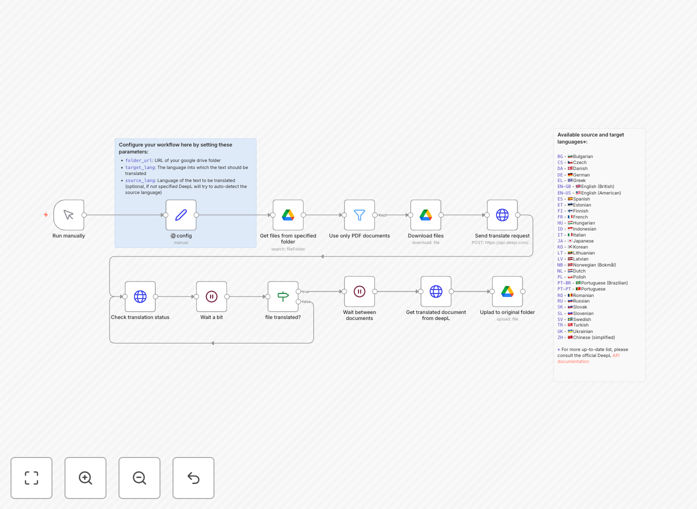
Workflow diagram showing Google Drive to DeepL PDF translation automation

What This Workflow Does

This automation solution eliminates the manual process of translating business documents by automatically converting all PDF files in a specified Google Drive folder to your target language using DeepL's advanced AI translation. It's designed for businesses that regularly deal with multilingual documents, international clients, or global teams.

The workflow monitors your designated Google Drive folder for new PDF uploads, processes them through DeepL's translation engine, and saves the translated versions back to your Drive. This creates a seamless pipeline for document localization without any manual intervention, saving hours of repetitive work while ensuring consistent translation quality.

Screenshot showing the workflow steps for PDF translation automation
The automated workflow steps for translating PDF documents from Google Drive

How It Works

1. Folder Monitoring

The workflow continuously monitors your specified Google Drive folder for new PDF files. You can set up multiple folders for different languages or departments if needed.

2. Document Processing

When a new PDF is detected, the system extracts the text content while preserving the original formatting. The workflow handles various PDF types including scanned documents (using OCR when necessary).

3. AI Translation

The extracted text is sent to DeepL's translation API, which converts it to your specified target language with industry-leading accuracy. You can customize terminology preferences for consistent business vocabulary.

4. File Reconstruction

The translated text is reconstructed into a new PDF document that maintains the original layout and formatting as closely as possible.

5. Delivery & Organization

The translated document is saved back to your Google Drive, either in the same folder or a designated translations subfolder. The workflow can optionally notify team members via email or Slack when translations are complete.

Who This Is For

This automation is ideal for legal firms translating contracts, international businesses localizing reports, e-commerce companies managing multilingual product documentation, and any organization with global operations. It's particularly valuable for:

  • Legal departments handling international contracts
  • HR teams managing multilingual employee documents
  • Marketing teams localizing content for different regions
  • Academic researchers sharing papers internationally
  • Global startups managing documents across multiple languages

What You'll Need

  1. A Google Workspace account with Drive access
  2. DeepL API credentials (free tier available)
  3. n8n instance (self-hosted or cloud)
  4. A designated Google Drive folder for documents to translate
  5. Target language(s) selected

Pro tip: Create separate folders for different languages to keep translations organized. The workflow can be duplicated and modified for each language pair you need.

Quick Setup Guide

  1. Download the template file and import it to your n8n instance
  2. Connect your Google Drive account in the credentials section
  3. Enter your DeepL API key in the designated node
  4. Specify your source folder ID and target language
  5. Test with a sample PDF document
  6. Activate the workflow for continuous monitoring

Key Benefits

Reduce translation costs by 80% compared to manual translation services while maintaining high quality for business documents.

Process documents 10x faster with instant automated translation instead of waiting for human translators.

Ensure consistency across languages by using the same AI translation engine for all your documents.

Eliminate manual file handling with automatic processing of all new PDFs in your designated folder.

Scale your international operations without proportional increases in translation overhead.

Frequently Asked Questions

Common questions about document translation automation

Automated document translation saves businesses significant time and resources by eliminating manual translation processes. It enables real-time multilingual communication with international clients and partners.

Companies can localize contracts, reports, and marketing materials instantly while maintaining consistency across languages. This automation is particularly valuable for global teams, legal firms, and e-commerce businesses dealing with international customers.

  • Reduces translation turnaround from days to minutes
  • Maintains consistent terminology across documents
  • Enables scalable multilingual operations

Automated translation works best with structured business documents like contracts, reports, manuals, and presentations. PDFs with clear text formatting translate most accurately.

Technical documents, legal agreements, and marketing materials benefit from this automation when they follow consistent formatting. However, highly creative content or documents with complex layouts may require additional human review after automated translation.

  • Best for: Contracts, manuals, reports
  • Good for: Presentations, product specs
  • Needs review: Creative content, complex layouts

DeepL is considered one of the most accurate AI translation tools available, especially for European languages. It achieves near-human quality for business and technical documents, with accuracy rates around 90-95% for common business languages.

The system understands context better than basic translators, preserving formatting and business terminology. For critical legal or medical documents, professional human review is still recommended after automated translation.

  • 90-95% accuracy for business documents
  • Excels at European languages
  • Understands business terminology

Yes, this workflow can be modified to produce translations in multiple target languages simultaneously. Each language version can be saved as a separate file or combined into multilingual documents.

Businesses often use this for creating parallel versions of contracts, product manuals, or training materials. The system can maintain a central repository of all language versions automatically organized in Google Drive.

  • Create multiple language versions at once
  • Organize translations in structured folders
  • Maintain version control across languages

Automated translation is significantly faster and more cost-effective for high-volume business documents, reducing translation costs by 80-90%. While professional translators provide perfect accuracy for critical documents, AI translation suffices for internal communications, draft versions, and documents where perfect nuance isn't essential.

Many businesses use automation for first drafts followed by selective human review for important final documents. This hybrid approach combines speed with quality control where it matters most.

  • 80-90% cost reduction vs human translators
  • Instant results vs days/weeks wait time
  • Hybrid approach recommended for critical docs

The workflow maintains document security by processing files directly between Google Drive and DeepL without intermediate storage. Both platforms use enterprise-grade encryption for data in transit and at rest.

For highly sensitive documents, you can implement additional security layers like restricted folder access, two-factor authentication, and automatic deletion of temporary files after translation. The system never stores your documents permanently on third-party servers.

  • End-to-end encryption for all documents
  • No permanent third-party storage
  • Optional additional security layers available

Yes, GrowwStacks specializes in building custom document automation solutions tailored to your specific business needs. We can create workflows that integrate with your existing systems, add quality control steps, implement specialized terminology databases, and automate your entire multilingual document workflow.

Our solutions help businesses scale their international operations while maintaining consistency and reducing translation costs. We'll work with you to understand your document flows, security requirements, and quality standards to build the perfect automation system.

  • Tailored to your specific document workflows
  • Integration with existing business systems
  • Specialized terminology and quality controls

Need a Custom Document Translation Automation?

This free template is a starting point. Our team builds fully tailored automation systems for your specific needs.