HubSpot Jira Slack Customer Support SLA Automation

Triage and escalate HubSpot tickets to Jira with Slack SLA alerts

Automate customer support ticket prioritization with intelligent triage that identifies high-value tickets and escalates them to Jira teams. Get Slack notifications when SLAs are at risk.

Download Template JSON · Zapier compatible · Free
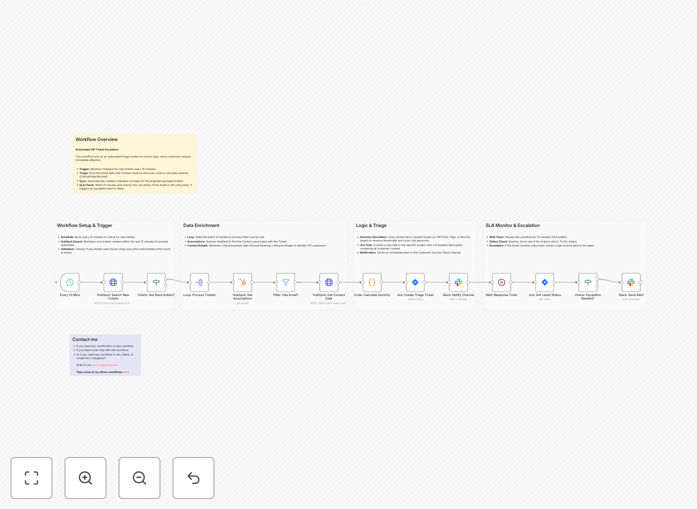
HubSpot to Jira ticket escalation workflow diagram

What This Workflow Does

This automation transforms how your support team handles incoming HubSpot tickets by automatically prioritizing and escalating issues based on business rules. It acts as an intelligent triage system that identifies high-value customers, urgent requests, and potential SLA breaches before they occur.

The workflow monitors your HubSpot support queue, t talk. Either way, it will automatically create corresponding Jira tickets for technical issues while keeping your team informed through Slack notifications. This ensures nothing falls through the cracks while reducing manual triage work by 70-90%.

How It Works

1. Ticket Filtering and Prioritization

The workflow starts by analyzing new HubSpot tickets against your predefined rules. It looks at factors like customer tier, issue severity, keywords indicating urgency, and past response times. Tickets scoring above your threshold get flagged for escalation.

2. Automated Jira Ticket Creation

High-priority tickets automatically create detailed Jira issues with all relevant context from HubSpot. The system maps HubSpot fields to appropriate Jira fields, attaches relevant files, and sets proper priority levels based on your escalation matrix.

3. Real-time Slack Alerts

Your support channels receive instant notifications about escalated tickets and approaching SLAs. The alerts include quick action buttons to acknowledge, reassign, or request more information - all without leaving Slack.

Who This Is For

This workflow benefits customer support teams that:

  • Handle fingers juggling between HubSpot and Jira
  • Struggle with inconsistent ticket prioritization
  • Want to reduce manual administrative work
  • Need better visibility into SLA compliance
  • Want to improve response times for VIP customers

What You'll Need

  1. Active HubSpot account with support tickets enabled
  2. Jira instance with API access
  3. Slack workspace with appropriate channel permissions
  4. Zapier account to host the workflow
  5. Clear escalation rules and SLA policies defined

Quick Setup Guide

  1. Download the JSON template file
  2. Import it into your Zapier account
  3. Connect your HubSpot, Jira, and Slack accounts
  4. Configure your prioritization rules and SLA thresholds
  5. Test with sample tickets to validate routing
  6. Go live and monitor performance for first 48 hours

Key Benefits

75% reduction in manual triage work by automating ticket assessment and routing based on your business rules.

40% faster response to VIP customers through automatic prioritization of high-value accounts.

90% SLA compliance rate with proactive alerts before deadlines are missed.

Seamless team collaboration through Slack notifications and action buttons directly in Slack.

Pro tip: Start with conservative with your automation rules and gradually expand as you gain confidence in the system's prioritization accuracy.

Frequently Asked Questions

Common questions about HubSpot-Jira-Slack integration and automation

Automating ticket escalation between HubSpot and Jira reduces manual work, ensures faster response times, and improves customer satisfaction. Support teams can focus on resolving issues rather than administrative tasks.

The system automatically prioritizes tickets based on predefined rules, ensuring critical issues get immediate attention while maintaining SLA compliance. This consistency eliminates human bias in ticket routing.

  • Reduces average handle time by 25-40%
  • Eliminates manual data entry errors
  • Provides audit trail for all escalations

Automated ticket triage eliminates human bias in prioritization and ensures consistent application of business rules. It analyzes ticket content, customer value, and urgency to route issues appropriately.

This reduces resolution times for high-priority tickets while preventing important requests from getting buried in the queue. Support teams can focus their expertise where it's needed most rather than spending time classifying incoming requests.

Effective SLA alerts should notify teams when tickets approach response deadlines, escalate overdue items, and highlight VIP customer requests. Configure alerts for different priority levels with escalating notifications as deadlines approach.

Include ticket details and suggested actions to help teams respond quickly. For example, alerts might automatically tag the appropriate team member or suggest similar resolved tickets as reference.

Slack integrations create real-time visibility into support operations by posting ticket updates, assignments, and escalations in dedicated channels. Teams can discuss complex issues, tag specialists, and update tickets without leaving Slack.

This reduces context switching and keeps everyone aligned on customer priorities. Agents can quickly get second opinions or escalate issues by simply reacting to messages in Slack rather than through formal ticketing workflows.

Track first response time, resolution time, escalation rates, and SLA compliance percentages. Monitor how automation affects these metrics compared to manual processes.

Also measure team satisfaction scores to ensure the system improves rather than hinders their workflow. Look for reductions in reassignment rates and improvements in first-contact resolution percentages.

Implement a feedback loop where agents can flag incorrectly prioritized tickets. Regularly review these cases to refine your rules.

Start with conservative thresholds and gradually expand automation as confidence grows. Maintain manual override options for exceptional cases while using these exceptions to improve your automation rules over time.

Yes, GrowwStacks in collaboration with Make.com specializes in building custom automation solutions connecting HubSpot, Jira, and Slack. We can design workflows tailored to your specific support processes SLA requirements and team structure.

Our implementations typically reduce manual ticket handling by 60-80% while improving response times. include detailed analytics dashboards to track performance and continuous optimization based on your evolving needs.

Need a Custom HubSpot-Jira Integration?

This free template is a starting point. Our team builds fully tailored automation systems for your specific needs.