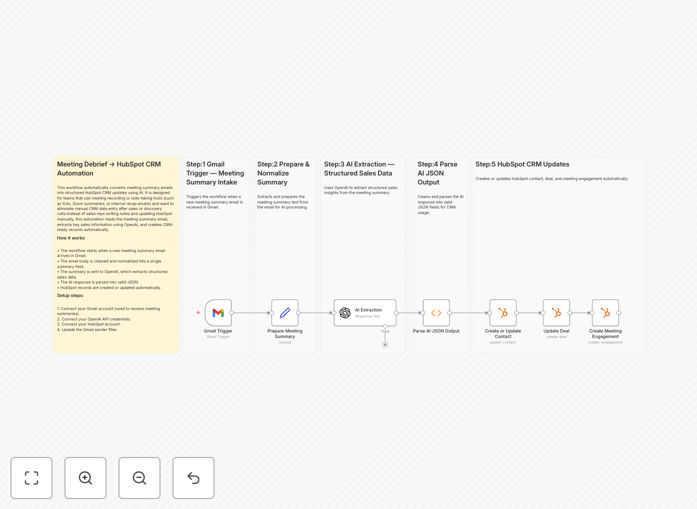
What This Workflow Does
Sales teams spend countless hours manually transcribing meeting notes and updating CRM records after customer calls. Critical details get lost, data entry becomes inconsistent, and valuable selling time is wasted on administrative tasks. This automation solves that problem by creating a seamless pipeline from meeting summaries to actionable CRM data.
The workflow automatically processes meeting summary emails received in Gmail, extracts structured sales intelligence using AI, and updates HubSpot CRM with contacts, deals, and engagement records. It transforms unstructured meeting notes into organized, searchable CRM data that drives better sales decisions and follow-up actions.
By eliminating manual data entry, sales teams can focus on building relationships and closing deals rather than administrative work. The system ensures every customer conversation is captured accurately and immediately available for sales managers, forecasting, and personalized follow-up.
How It Works
The automation follows a logical sequence that mimics how a sales operations specialist would process meeting information, but does it instantly and consistently every time.
1. Trigger on Meeting Summary Email
The workflow monitors your Gmail inbox for new meeting summary emails from specific senders (like Zoom, Gong, or sales assistants). When a new summary arrives, it automatically triggers the process without any manual intervention.
2. Prepare and Normalize Meeting Notes
The email content is extracted and cleaned, removing signatures, disclaimers, and irrelevant formatting. The core meeting discussion is isolated and prepared for AI analysis, ensuring the AI receives clear, focused content.
3. Extract Structured Sales Insights with AI
OpenAI analyzes the meeting text to identify key sales intelligence: company details, pain points discussed, budget ranges, decision-makers involved, timeline expectations, competitors mentioned, and specific next steps. The AI converts unstructured notes into structured JSON data.
4. Parse and Validate AI Response
The AI's JSON output is validated and parsed into individual data fields that HubSpot can understand. This step ensures data quality and formats information correctly for CRM import.
5. Update HubSpot CRM
The system creates or updates contact records with attendee information, updates related deals with new budget and timeline data, and logs a meeting engagement with discussion highlights and action items—all automatically synchronized in real-time.
Who This Is For
This automation is ideal for sales teams, account executives, sales operations managers, and customer success professionals who regularly conduct discovery calls, sales meetings, or customer check-ins. It's particularly valuable for:
- B2B Sales Teams: Who need to capture detailed meeting intelligence for complex sales cycles
- Sales Operations: Looking to improve data quality and reduce administrative burden on reps
- Growing Companies: Where manual CRM updates are becoming a scalability bottleneck
- Remote Sales Teams: Who rely on recorded meetings and need consistent follow-up processes
- Companies Using Meeting Tools: Like Zoom, Gong, Chorus, or Fireflies that generate summary emails
What You'll Need
- n8n Instance: Either self-hosted or n8n.cloud account
- Gmail Account: With meeting summary emails arriving in your inbox
- HubSpot Account: With appropriate permissions to create/update contacts, deals, and engagements
- OpenAI API Key: For AI-powered meeting analysis (GPT-3.5 or GPT-4)
- Meeting Summary Source: A tool that sends meeting summaries via email (Zoom, Gong, etc.)
Quick Setup Guide
- Download the Template: Click the download button above to get the JSON workflow file.
- Import to n8n: In your n8n instance, create a new workflow and import the JSON file.
- Configure Gmail Trigger: Set up the Gmail trigger node with your credentials and specify the sender(s) of meeting summary emails.
- Connect HubSpot: Add your HubSpot credentials and map the relevant contact properties, deal stages, and engagement types.
- Set Up OpenAI: Add your OpenAI API key and configure the prompt for meeting analysis based on your sales process.
- Test with Sample Email: Send a test meeting summary to your Gmail and verify the workflow processes it correctly.
- Activate the Workflow: Turn on the workflow and let it run automatically for all future meeting summaries.
Pro tip: Customize the AI prompt to extract specific sales intelligence relevant to your industry. Include your unique qualification criteria, product terminology, and deal stage definitions for more accurate results.
Key Benefits
Eliminate 2-3 hours of manual data entry per sales rep each week. By automating CRM updates, your sales team gains back valuable time that can be redirected toward selling activities and customer engagement.
Improve CRM data accuracy by 90%. Automated extraction eliminates human errors, inconsistent formatting, and missed details that plague manual note-taking and data entry processes.
Capture 100% of meeting intelligence instantly. No more forgotten details or delayed updates—every discussion point, action item, and qualification criteria is immediately recorded in your CRM.
Enable real-time sales coaching and forecasting. Managers get immediate visibility into deal progress, customer sentiment, and team performance based on actual meeting data rather than self-reported updates.
Scale your sales process without adding administrative staff. As your team grows, the automation handles the increased volume of meetings without additional overhead or complexity.