n8n DataForSEO Asana SEO Automation

Turn new high-volume ranked keywords into Asana tasks with DataForSEO

This weekly workflow automatically discovers new high-volume, ranked keywords for your domain and converts them into prioritized Asana tasks for your content team

Download Template JSON · n8n compatible · Free
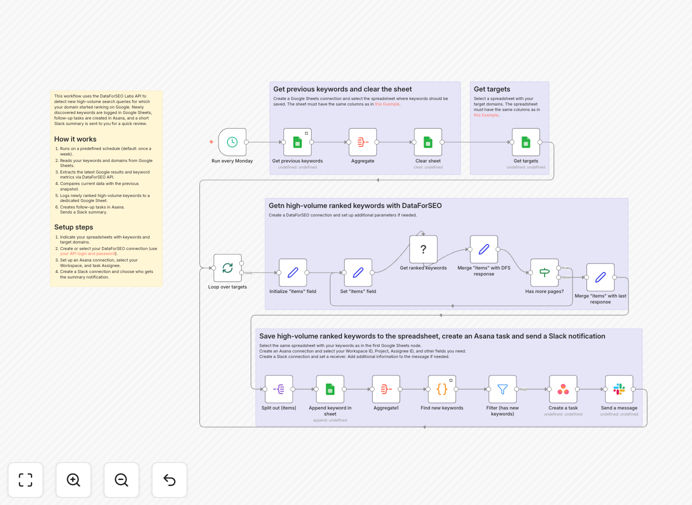
Workflow diagram showing DataForSEO to Asana integration

What This Workflow Does

This automation solves the common problem of discovering valuable keywords that are already ranking but not yet optimized. Most SEO teams manually check rankings and create content tasks, which is time-consuming and inconsistent. This workflow automatically identifies these opportunities and converts them into trackable Asana tasks.

By connecting DataForSEO's ranking data with Asana's task management, you ensure no potential traffic gains are missed. The system filters for high-volume keywords (typically 500+ monthly searches) that rank between positions 5-20 - the "low-hanging fruit" with the highest potential for quick wins when optimized.
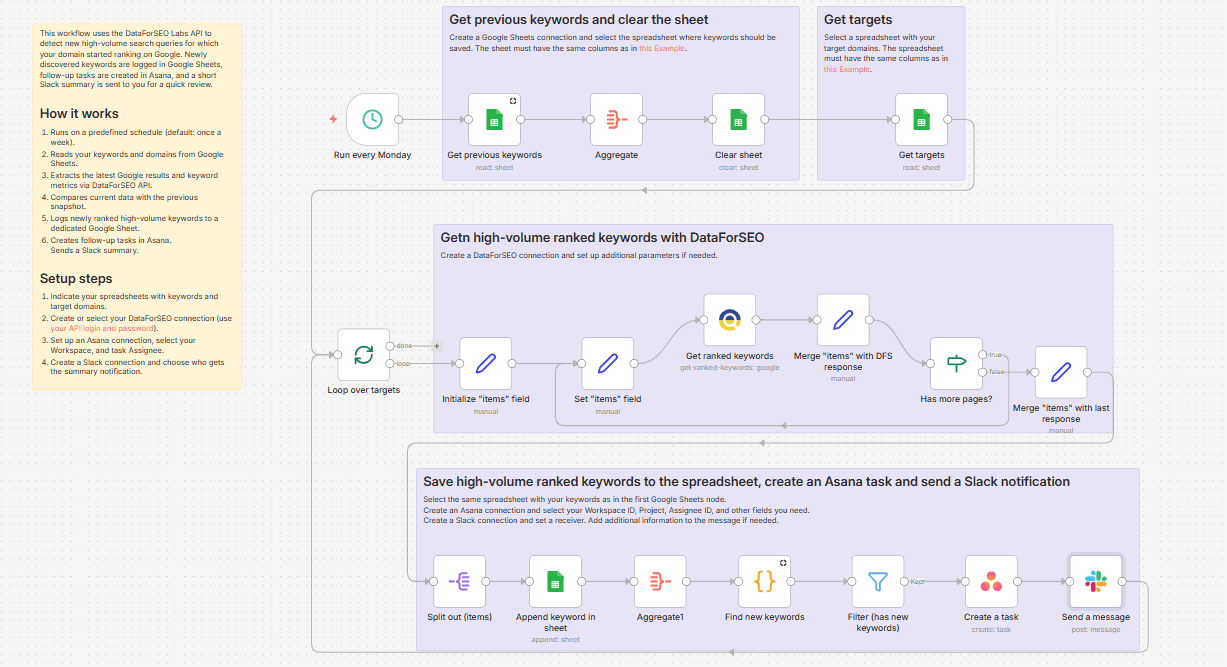
Screenshot of the n8n workflow interface
The workflow connects DataForSEO API with Asana to automate keyword task creation

How It Works

1. DataForSEO API call

The workflow starts by querying DataForSEO's API for your domain's current keyword rankings. It retrieves comprehensive data including search volume, ranking position, and competition level for each keyword.

2. Keyword filtering

The system applies your predefined filters to identify the most valuable opportunities. By default, it looks for keywords with: high search volume (configurable threshold), ranking positions 5-20, and commercial intent matching your business.

3. Asana task creation

Each qualifying keyword becomes a new Asana task with relevant details: keyword, current ranking, search volume, target URL (if ranking), and suggested actions. Tasks are assigned to the appropriate team member based on your rules.

Pro tip: Configure custom fields in Asana to include keyword difficulty and SERP features (like featured snippets) for better prioritization.

Who This Is For

This workflow is ideal for:

  • SEO agencies managing multiple client campaigns
  • In-house marketing teams with content creators
  • Ecommerce businesses optimizing product pages
  • Publishers looking to maximize traffic from existing content
  • Any team using Asana for task management and DataForSEO for keyword tracking

What You'll Need

  1. An n8n instance (cloud or self-hosted)
  2. DataForSEO API credentials
  3. Asana account with API access
  4. List of domains to track (can be multiple)
  5. Configured Asana project for SEO tasks

Quick Setup Guide

  1. Download the JSON template file
  2. Import into your n8n instance
  3. Connect your DataForSEO and Asana credentials
  4. Configure your keyword filters (search volume, position range, etc.)
  5. Set your target Asana project and default assignee
  6. Test with a single domain
  7. Schedule to run weekly (or your preferred frequency)

Key Benefits

Save 5-10 hours weekly by automating manual keyword research and task creation. This workflow replaces the tedious process of exporting, filtering, and manually creating tasks.

Never miss ranking opportunities with systematic weekly checks. Human teams often overlook or deprioritize these valuable "middle ranking" keywords.

Improve content ROI by focusing efforts on keywords already showing traction. These typically convert faster than targeting completely new keywords.

Standardize your process with consistent task formats and prioritization criteria across your team or clients.

Scale your SEO efforts by applying the same workflow across multiple domains or client accounts with minimal additional effort.

Frequently Asked Questions

Common questions about SEO keyword tracking and Asana integration

Keyword ranking automation helps SEO teams by automatically identifying high-value keywords that are ranking but not yet optimized. This workflow converts those opportunities into actionable tasks in Asana, ensuring no potential traffic gains are missed.

Most agencies save 5-10 hours weekly by automating this manual research process. The system applies consistent criteria across all keywords, eliminating human oversight and prioritization bias that often occurs with manual methods.

  • Catches ranking improvements you might miss manually
  • Standardizes task creation across team members
  • Provides audit trail of keyword opportunities over time

DataForSEO provides accurate, real-time keyword ranking data across multiple search engines. Their API delivers comprehensive metrics including search volume, difficulty scores, and SERP features that help prioritize optimization efforts.

Unlike some tools that sample data, DataForSEO provides complete ranking histories and daily updates. This granularity helps identify subtle ranking changes that indicate optimization opportunities. Their data covers 200+ search engines worldwide.

  • Tracks rankings at the city level for local SEO
  • Includes mobile vs desktop ranking differences
  • Provides competitor ranking data for comparison

Weekly analysis is ideal for most businesses. This frequency catches new ranking opportunities while allowing enough time for content teams to act on findings. Daily checks create too much noise, while monthly checks may miss timely opportunities.

High-competition industries may benefit from bi-weekly checks, while seasonal businesses should adjust frequency based on their cycles. The workflow includes scheduling options to match your content production capacity.

  • Align schedule with your content calendar
  • Increase frequency during peak seasons
  • Reduce frequency for stable, evergreen content

Focus on keywords with: 1) High search volume (500+ monthly searches), 2) Ranking position 5-20 (indicating potential to move up), 3) Low-to-medium competition, and 4) Commercial intent matching your offerings.

The workflow lets you set these filters automatically. You can also add custom scoring based on conversion rates or revenue potential from historical data. Many teams weight rankings near page one (positions 11-20) highest as they're closest to breakthrough.

  • Prioritize keywords with featured snippet opportunities
  • Filter by question-type keywords for content ideas
  • Exclude branded terms unless monitoring for abuse

Asana integration creates accountability by turning data into tasks. Each keyword becomes a trackable assignment with: 1) Priority based on potential value, 2) Due dates for content updates, 3) Team assignments, and 4) Progress tracking.

This bridges the gap between SEO insights and execution. Teams can see the direct business impact of their work as tasks are completed and rankings improve. The workflow automatically includes all relevant keyword data in each task for context.

  • Links tasks to performance metrics over time
  • Enables workload balancing across team members
  • Provides visibility into SEO work for stakeholders

Yes, this workflow lets you customize: 1) Task titles with keyword details, 2) Descriptions with ranking metrics, 3) Custom fields for priority levels, 4) Assignees based on keyword categories, and 5) Due dates based on content calendars.

The template includes configuration options for all these elements. You can map different keyword types to different teams (product keywords to product team, blog keywords to content team) and set dynamic due dates based on priority levels.

  • Add custom fields for estimated traffic impact
  • Include competitor ranking comparisons
  • Attach relevant content brief templates

Absolutely. GrowwStacks specializes in custom SEO automation solutions. We can build workflows that: 1) Integrate with your existing tools, 2) Apply your specific keyword scoring models, 3) Route tasks to appropriate teams, and 4) Include reporting dashboards.

Our team will analyze your current processes and design an automation system that fits your workflow perfectly. We handle everything from API connections to user training, ensuring you get maximum value from the automation.

  • Tailored to your tech stack and team structure
  • Includes onboarding and support
  • Scalable as your needs evolve

Need a Custom Keyword Tracking Automation?

This free template is a starting point. Our team builds fully tailored automation systems for your specific SEO workflow needs.