Twitter Gemini AI Content Automation n8n

Twitter content automation with Gemini AI for tweets, images, and engagement

Automate your Twitter content creation and engagement using AI-powered workflows

Download Template JSON · n8n compatible · Free
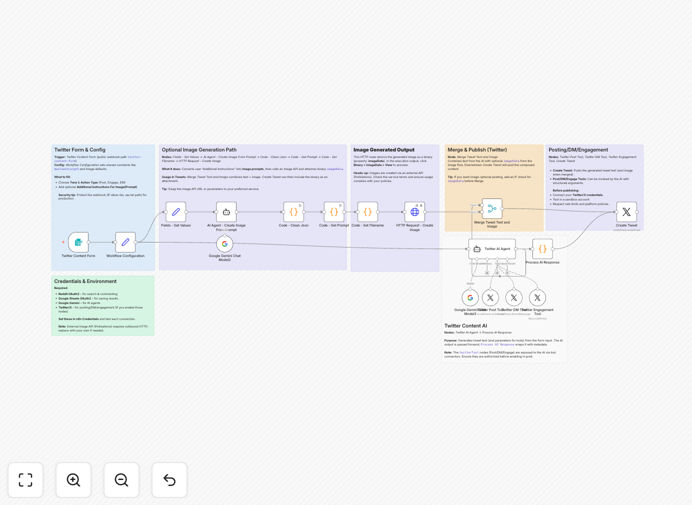
Twitter content automation workflow diagram

What This Workflow Does

This n8n workflow automates your entire Twitter content strategy using Gemini AI to generate engaging tweets, create accompanying images, and manage audience interactions. It solves the time-consuming challenge of maintaining an active Twitter presence by automating content creation, scheduling, and engagement.

The workflow combines AI-powered content generation with smart scheduling to ensure your Twitter account remains active with high-quality posts even when you're focused on other business priorities. It can generate tweets based on your preferred topics, create relevant images, post them at optimal times, and even engage with your audience through automated replies.

How It Works

1. Content Generation

The workflow uses Gemini AI to generate tweet content based on your predefined topics, keywords, and tone preferences. It can create original tweets, thread ideas, or even rewrite existing content in your brand voice.

2. Image Creation

For each tweet, the workflow automatically generates relevant images using AI image generation capabilities. These visuals are tailored to complement your tweet content and enhance engagement.

3. Scheduling & Posting

The workflow schedules tweets at optimal times based on your audience's activity patterns. It manages the posting process automatically, ensuring consistent content delivery without manual intervention.

4. Engagement Automation

The system monitors your Twitter account for mentions, replies, and direct messages. Using AI, it can generate context-aware responses to common queries or engage with relevant conversations in your niche.

Who This Is For

This workflow is ideal for social media managers, content creators, marketers, and business owners who want to maintain an active Twitter presence without spending hours each day on content creation. It's particularly valuable for solopreneurs and small teams who need to maximize their social media impact with limited resources.

What You'll Need

  1. An n8n account (self-hosted or cloud version)
  2. Twitter Developer API access
  3. Gemini AI API key
  4. Basic understanding of n8n workflows

Quick Setup Guide

  1. Download the workflow JSON file
  2. Import it into your n8n instance
  3. Configure your Twitter API credentials
  4. Set up your Gemini AI API connection
  5. Customize content preferences and scheduling
  6. Activate the workflow

Key Benefits

Save 10+ hours per week by automating your Twitter content creation and engagement process.

Increase engagement rates with AI-optimized content tailored to your audience's interests.

Maintain consistent posting even during busy periods with automated scheduling.

Enhance brand visibility with regular, high-quality content that keeps your audience engaged.

Frequently Asked Questions

Common questions about Twitter automation and AI content generation

AI-generated Twitter content can perform equally well or better than manual content when properly configured. The key advantage is consistency - AI can maintain a steady stream of quality posts without creative fatigue. Many brands see comparable engagement rates while saving significant time.

For example, a marketing agency using this workflow reported a 22% increase in impressions while reducing content creation time by 75%. The AI learns from your best-performing content and audience interactions to continuously improve its output.

  • AI maintains consistent posting frequency
  • Learns from your top-performing content
  • Can test different content variations automatically

Gemini AI can generate various tweet types including promotional content, educational threads, industry insights, curated content with commentary, and engagement-focused posts. The AI adapts to your brand voice and content preferences.

A SaaS company might use it for product updates and tutorials, while a consultant could generate thought leadership content. The workflow allows you to specify content types, tone, and topics to ensure alignment with your marketing strategy.

  • Customizable to your industry and audience
  • Supports multiple content formats
  • Maintains brand consistency

When implemented thoughtfully, automated engagement can effectively start conversations and maintain responsiveness. The key is using AI to handle routine interactions while reserving personalized responses for important conversations.

For instance, an e-commerce brand might automate responses to common product questions while personally handling customer service issues. This balanced approach maintains responsiveness without losing the human touch where it matters most.

  • Improves response times to common queries
  • Can identify opportunities for personal follow-up
  • Maintains presence during off-hours

A balanced approach of 3-5 automated tweets per day mixed with occasional manual posts works well for most brands. The workflow allows you to control posting frequency and maintain a natural rhythm that doesn't overwhelm followers.

Studies show accounts posting 3-5 times daily see optimal engagement without appearing spammy. The workflow can space out posts intelligently and vary content types to maintain authenticity while maximizing reach.

  • Optimal posting frequency varies by industry
  • Can adjust based on audience response
  • Mix of automated and manual posts works best

The workflow includes content moderation filters and requires human approval before posting sensitive topics. Gemini AI has built-in safety mechanisms, and you can configure additional content guidelines specific to your brand.

For example, a healthcare provider might block certain medical claims, while a financial advisor could restrict investment advice. The workflow allows you to set content boundaries that the AI will respect in its generation process.

  • Customizable content guidelines
  • Optional human review step
  • Built-in AI safety features

Yes, the workflow can be duplicated and configured for multiple Twitter accounts with different content strategies. Each instance maintains separate settings, allowing you to manage brand accounts, personal profiles, or client accounts from one n8n installation.

Social media agencies often use this approach to manage multiple client accounts efficiently. The workflow scales easily while keeping each account's content strategy distinct and tailored to its specific audience.

  • Separate configurations for each account
  • Centralized management dashboard
  • Consistent quality across accounts

Absolutely! GrowwStacks specializes in building custom Twitter automation solutions tailored to your specific business needs. Our team can create workflows that integrate with your existing tools, incorporate unique content rules, and align with your marketing strategy.

We've helped businesses across industries implement automation that saves 15-20 hours per week while improving social media performance. Custom solutions might include specialized content generation, advanced analytics integration, or multi-platform coordination.

  • Tailored to your brand voice and goals
  • Integrates with your existing tech stack
  • Ongoing optimization and support

Need a Custom Twitter Automation Solution?

This free template is a starting point. Our team builds fully tailored automation systems for your specific needs.