Twitter Airtable Social Media

Twitter Keyword & Public-Figure Monitor with Automated Airtable Archiving

Automatically track brand mentions, industry trends, and public figures on Twitter while building a searchable archive

Download Template JSON · n8n compatible · Free
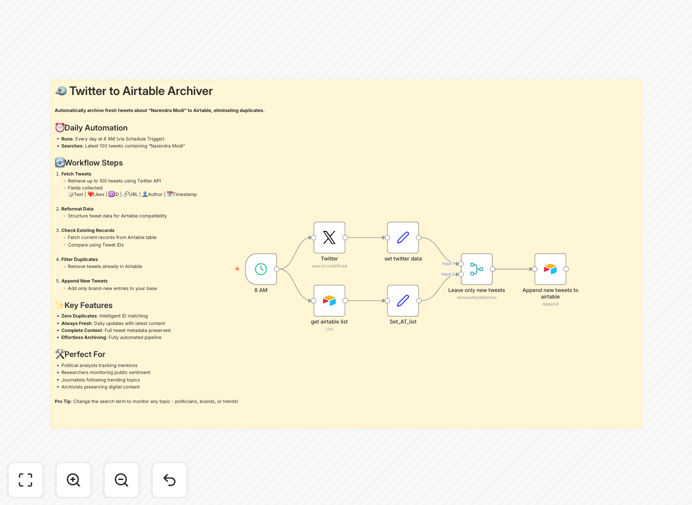
Twitter monitoring workflow diagram showing data flow from Twitter to Airtable

What This Workflow Does

This automation solves the challenge of manually tracking Twitter conversations about your brand, competitors, or industry topics. It eliminates the need for constant manual monitoring while creating a structured archive of social media data for analysis.

The workflow automatically searches Twitter for specified keywords (including people, brands, or hashtags), filters out duplicate entries, and stores new tweets in Airtable with complete metadata. This creates a searchable historical record of Twitter mentions that can be used for sentiment analysis, trend spotting, or competitive intelligence.

How It Works

1. Scheduled Trigger

The workflow activates daily at 8 AM (customizable) to search Twitter for your configured keywords.

2. Twitter API Search

Pulls the 100 most recent tweets matching your search criteria, including full text and engagement metrics.

3. Data Structuring

Reformats the raw Twitter data into a consistent structure with:

  • Tweet text content
  • Engagement metrics (likes, retweets)
  • Unique tweet ID
  • Direct URL to the tweet
  • Author details
  • Timestamp

4. Airtable Lookup

Retrieves existing tweet IDs from your Airtable base to identify duplicates.

5. Deduplication

Compares new tweets against existing records to prevent duplicate entries in your archive.

6. Data Archiving

Appends only new, unique tweets to your Airtable base with all metadata preserved.

Who This Is For

This workflow is ideal for:

  • Social media managers tracking brand mentions
  • Marketing teams monitoring campaign hashtags
  • Journalists following public figures or news topics
  • Researchers analyzing public sentiment on specific subjects
  • Competitive intelligence teams tracking industry conversations

What You'll Need

  1. Twitter developer account with API credentials
  2. Airtable account with a base and table ready for tweet data
  3. n8n instance (cloud or self-hosted) to run the workflow
  4. Basic understanding of API authentication

Quick Setup Guide

  1. Import the JSON template into your n8n instance
  2. Configure your Twitter API credentials in the Twitter node
  3. Set up your Airtable connection details
  4. Customize the search keyword (e.g., your brand name)
  5. Adjust the schedule timing if needed
  6. Run initial test to verify connection
  7. Activate the workflow for automatic daily execution

Key Benefits

Time Savings: Automates what would otherwise require manual daily Twitter searches and data entry.

Comprehensive Archive: Builds a complete historical record of Twitter mentions with all metadata preserved.

Customizable Monitoring: Easily adjust search terms to track different brands, people, or topics.

No Duplicate Data: Built-in deduplication ensures your archive stays clean and analysis-ready.

Extendable Foundation: Can be enhanced with sentiment analysis, alerts, or additional data processing.

Pro tip: Combine this with our sentiment analysis workflow to automatically categorize tweets as positive, negative, or neutral.

Frequently Asked Questions

Common questions about Twitter monitoring automation and integration

Twitter monitoring helps track brand mentions, industry trends, and competitor activity. Automated archiving creates a searchable database for reputation management, customer service, and market research.

For example, a retail brand might use this to track customer complaints or identify influencers discussing their products, while a financial firm could monitor executive mentions for market-moving comments.

You can archive tweet text, engagement metrics (likes/retweets), author details, timestamps, and URLs. The workflow preserves all metadata for future analysis.

The structured format in Airtable makes it easy to sort by date, popularity, or author influence. You can also extend the workflow to capture additional data points like media attachments or hashtag usage.

By default it runs daily, but you can customize the schedule to run hourly or weekly based on your monitoring needs and Twitter API limits.

For high-volume topics, daily checks are usually sufficient. For crisis communications or live events, you might increase frequency temporarily.

Yes, it includes error handling for rate limits and implements best practices for API consumption to maximize data collection within Twitter's constraints.

The workflow automatically pauses if rate limits are approached and can be configured to retry failed requests after appropriate delays.

Yes, the workflow can be extended with additional filters for language, geolocation, or sentiment analysis by modifying the Twitter search parameters.

For global brands, adding language filters helps focus on relevant regional conversations. Geolocation filters are valuable for local businesses or event tracking.

All data remains within your Airtable base with access controlled by your Airtable permissions. The workflow doesn't store data externally.

For enhanced security, you can implement additional measures like encrypted fields or restricted access to sensitive tweet collections.

Yes, we specialize in building tailored Twitter monitoring solutions with advanced filtering, alerting, and integration with your existing tools.

Our custom implementations often include features like:

  • Sentiment analysis and categorization
  • Integration with CRM or support systems
  • Real-time alerts for critical mentions
  • Competitor comparison dashboards

Need a Custom Twitter Monitoring Automation?

This free template is a starting point. Our team builds fully tailored automation systems for your specific business needs.