Pipedrive MySQL CRM Data Sync Automation

Two-Way Sync Pipedrive & MySQL

Automatically keep customer data synchronized between your CRM and database—eliminate manual updates and data discrepancies.

Download Template JSON · n8n compatible · Free
Visual diagram showing data flow between Pipedrive CRM and MySQL database with two-way synchronization arrows

What This Workflow Does

This automation solves a common business problem: customer data trapped in separate systems. Your sales team updates contacts in Pipedrive, while your operations team manages customer records in MySQL. Without synchronization, you face duplicate entries, outdated information, and inconsistent reporting.

The workflow creates a real-time bridge between Pipedrive and MySQL, automatically syncing contacts, deals, and custom fields in both directions. When a new lead is added to either system, it automatically appears in the other. When contact details are updated, changes propagate instantly, ensuring everyone works with the same accurate information.

Beyond simple copying, this automation includes intelligent conflict resolution. If the same contact has different phone numbers in Pipedrive and MySQL, it uses timestamp logic to keep the most recently updated version. This eliminates manual reconciliation and maintains data integrity across your entire organization.

How It Works

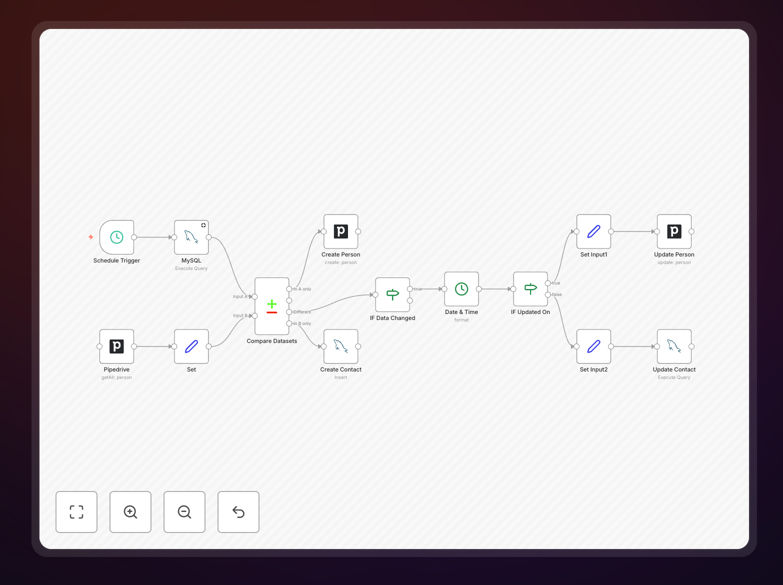
The workflow runs on a scheduled trigger, checking both systems for changes and applying updates where needed.

Step 1: Data Collection

The automation queries both Pipedrive and MySQL for recent changes, comparing timestamps to identify new or modified records. It creates a unified dataset that serves as the source of truth for the sync operation.

Step 2: Record Matching

Using unique identifiers like email addresses or custom IDs, the workflow matches records between systems. It identifies three scenarios: records existing only in Pipedrive, records existing only in MySQL, and records existing in both with potential conflicts.

Step 3: Conflict Resolution

For records existing in both systems with different data, the workflow applies business rules. Typically, it preserves the most recently updated version, but can be configured for field-level priorities or custom logic based on your specific needs.

Step 4: Bidirectional Updates

The automation creates missing records in each system and updates conflicting fields according to the resolution rules. All changes are logged for audit purposes, and error handling ensures data integrity even if one system is temporarily unavailable.

Who This Is For

This automation is ideal for businesses using Pipedrive for sales management while maintaining a MySQL database for operations, reporting, or integration with other systems. Sales teams benefit from having operational data in their CRM, while operations teams get real-time sales insights in their database.

Marketing agencies managing multiple client CRMs will find this invaluable for maintaining consistent customer databases across client accounts. SaaS companies with hybrid sales-operations teams can eliminate data silos between departments. E-commerce businesses using Pipedrive for B2B sales and MySQL for order management can create a unified customer view.

The solution scales from startups with hundreds of contacts to enterprises with complex data structures. It's particularly valuable for companies experiencing growth pains from manual data entry, or those preparing for system migrations where data consistency is critical.

What You'll Need

  1. Active Pipedrive account with API access enabled
  2. MySQL database with appropriate permissions for read/write operations
  3. n8n instance (cloud or self-hosted) with network access to both systems
  4. API credentials for Pipedrive (typically an API token)
  5. Database connection details including host, port, username, and password
  6. Matching strategy decided (email, custom ID, or combination of fields)
  7. Conflict resolution rules established for your business needs

Pro tip: Before running the sync at scale, test with a small subset of data and verify the matching logic works correctly for your specific data structure. Consider adding a manual review step for high-value accounts during initial implementation.

Quick Setup Guide

  1. Download and import the template JSON file into your n8n instance
  2. Configure Pipedrive credentials in the Pipedrive node with your API token
  3. Set up MySQL connection with your database host, credentials, and target table
  4. Map fields between Pipedrive and MySQL, ensuring data types align correctly
  5. Adjust the schedule based on your sync frequency needs (hourly, daily, etc.)
  6. Test with sample data to verify matching and conflict resolution work as expected
  7. Enable the workflow and monitor initial runs for any errors or adjustments needed

Key Benefits

Eliminate 5–10 hours weekly of manual data entry that sales and operations teams typically spend reconciling CRM and database information. This time can be redirected to revenue-generating activities or customer service.

Reduce data errors by 90%+ compared to manual synchronization. Automated validation ensures formatting consistency, prevents duplicate entries, and maintains referential integrity across systems.

Enable real-time reporting with accurate data from both systems. Marketing can see sales pipeline status, finance can access updated customer information, and leadership gets unified dashboards.

Scale your operations seamlessly as customer volume grows. The automation handles hundreds or thousands of records with the same reliability, eliminating the linear time increase of manual processes.

Future-proof your tech stack by creating a flexible integration layer. As you add new systems, the same pattern can be extended, maintaining Pipedrive and MySQL as your central customer data hubs.

Frequently Asked Questions

Common questions about CRM and database synchronization

Two-way sync ensures data consistency across systems, eliminating manual entry errors and providing a single source of truth for customer information. When sales updates a contact in Pipedrive, operations immediately sees it in MySQL, and vice versa.

This consistency improves sales efficiency (no chasing outdated info), enhances customer service (complete interaction history), and enables accurate reporting across departments. Without synchronization, teams work with different data versions, leading to miscommunication and missed opportunities.

Syncing Pipedrive with MySQL combines CRM flexibility with database power. Pipedrive excels at sales pipeline management and user experience, while MySQL offers robust querying, reporting, and integration capabilities with other business systems.

Key benefits include advanced custom reporting beyond Pipedrive's native options, seamless integration with accounting or ERP systems via MySQL, historical data analysis across sales cycles, and maintaining data ownership within your infrastructure rather than solely in a SaaS platform.

Automation eliminates human error in data entry and ensures consistent formatting across systems. It applies the same validation rules every time, handles complex matching logic that humans might miss, and works 24/7 without fatigue or oversight.

For example, when syncing phone numbers, automation can standardize formats (+1 vs 1, spaces vs dashes), validate against country codes, and flag anomalies. Manual processes often introduce variations that break downstream integrations or reporting.

  • Eliminates transcription errors from manual copying
  • Ensures real-time updates without delay
  • Applies consistent data transformation rules

The most critical data includes contact details (name, email, phone), deal stages and values, communication history, custom fields specific to your business, activity logs, and ownership assignments. This creates a complete 360-degree customer view accessible to both sales and operations teams.

Beyond basic contact info, consider syncing lead sources for marketing attribution, customer segmentation tags, support ticket references, and contract renewal dates. The goal is to eliminate data silos so any team member can access the full customer context regardless of which system they primarily use.

Effective conflict resolution typically uses timestamp-based logic where the most recent update wins. However, more sophisticated approaches might assign field-level priorities (Pipedrive controls email, MySQL controls billing address) or implement manual review workflows for critical data discrepancies.

The automation can be configured to log all conflicts for periodic review, send alerts for specific high-value accounts, or apply business rules like "sales data overrides operations data during active deals." The key is establishing clear ownership rules before implementation.

Yes, automation can map and sync custom fields between systems, maintaining field types and values while handling necessary transformations. Dropdown fields in Pipedrive can map to ENUM types in MySQL, date fields can be standardized to UTC, and multi-select options can be parsed appropriately.

The workflow template includes field mapping configuration where you define how each custom field translates between systems. For complex transformations (like splitting a full name into first/last), additional processing nodes can be added to handle the logic before synchronization occurs.

Common mistakes include not planning for data volume (syncing thousands of records without pagination), missing duplicate detection logic, inadequate error handling for API rate limits or timeouts, and failing to establish clear ownership rules for who "wins" in data conflicts.

Other pitfalls include syncing unnecessary historical data that slows performance, not considering timezone differences in timestamp comparisons, and overlooking field type mismatches (text vs varchar length limits). Proper testing with production-like data avoids these issues.

  • Test with realistic data volumes before full deployment
  • Implement comprehensive logging and monitoring
  • Establish data governance rules upfront

Yes, GrowwStacks specializes in building custom automation solutions tailored to your specific business processes, data structures, and integration requirements. While this free template provides a solid foundation, many businesses need adjustments for their unique workflows.

We can modify the sync logic for your specific conflict resolution rules, add integration with third-party systems, implement advanced error handling and notifications, or optimize performance for large datasets. Custom solutions ensure the automation aligns perfectly with your operational needs rather than forcing your process to fit a generic template.

  • Tailored field mapping for your custom data structure
  • Integration with additional systems beyond Pipedrive and MySQL
  • Custom reporting and dashboard creation
  • Ongoing support and optimization as your needs evolve

Need a Custom Pipedrive-MySQL Automation?

This free template is a starting point. Our team builds fully tailored automation systems for your specific business needs.