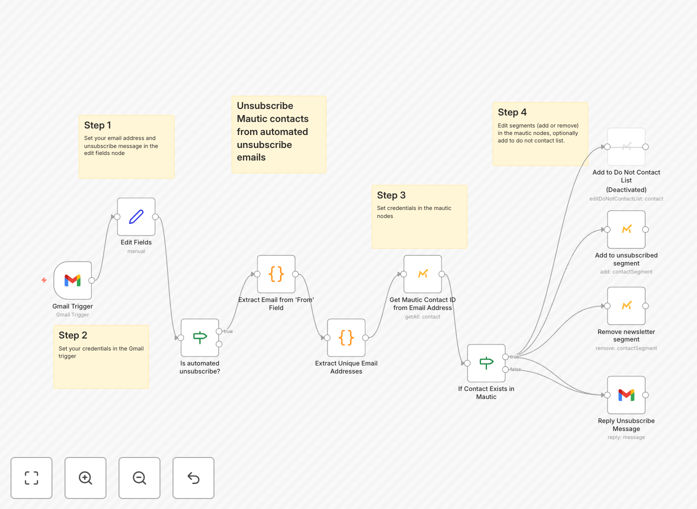
What This Workflow Does
This automation solves a critical challenge for businesses using Mautic for email marketing campaigns. When contacts click unsubscribe links in your emails, they expect to stop receiving communications immediately. However, if they're in active email sequences, they might continue receiving messages until the sequence completes.
The workflow automatically detects unsubscribe actions in Mautic and immediately removes the contact from all automated email sequences. This ensures compliance with email marketing regulations like CAN-SPAM and GDPR while protecting your sender reputation by preventing unwanted emails to unsubscribed contacts.
How It Works
1. Trigger: Unsubscribe Event Detection
The workflow monitors Mautic for unsubscribe events through webhooks or API polling. When a contact clicks an unsubscribe link, Mautic generates an event that triggers this automation.
2. Contact Identification
The system retrieves the contact's details from Mautic, including their ID, email address, and current segment members memberships. This ensures we're acting on the correct contact record.
3. Sequence Removal
The workflow removes the contact from all automated email sequences in Mautic. This prevents any further emails from being sent to this contact through your drip campaigns or nurture sequences.
Pro tip: For maximum compliance, consider adding a step that logs the unsubscribe event in your CRM or marketing database for audit purposes.
Who This Is For
This workflow is essential for any business using Mautic for email marketing, particularly those with:
- Automated email sequences (drip campaigns, nurture flows)
- High email volume where manual processing isn't practical
- Strict compliance requirements (GDPR, CAN-SPAM)
- Concerns about email deliverability and sender reputation
What You'll Need
- An active Mautic instance with API access
- n8n account or self-hosted instance
- Administrator access to configure webhooks or API connections
- Existing email sequences in Mautic that need unsubscribe handling
Quick Setup Guide
- Download and import the JSON template into your n8n instance
- Configure your Mautic API credentials in the workflow
- Set up the webhook or polling method that fits your infrastructure
- Test with a sample contact to verify unsubscribe processing
- Activate the workflow for production use
Key Benefits
Compliance assurance: Meets legal requirements for immediate unsubscribe processing under GDPR, CAN-SPAM, and other regulations by providing immediate opt-out.
Reputation protection: Prevents accidental emails to unsubscribed contacts that could damage your sender score and email deliverability.
Time savings: Eliminates manual processing of unsubscribe requests across multiple sequences.
Audit trail: Creates a clear record of unsubscribe actions for compliance reporting.
Scalability: Handles any volume of unsubscribes automatically as your email list grows.