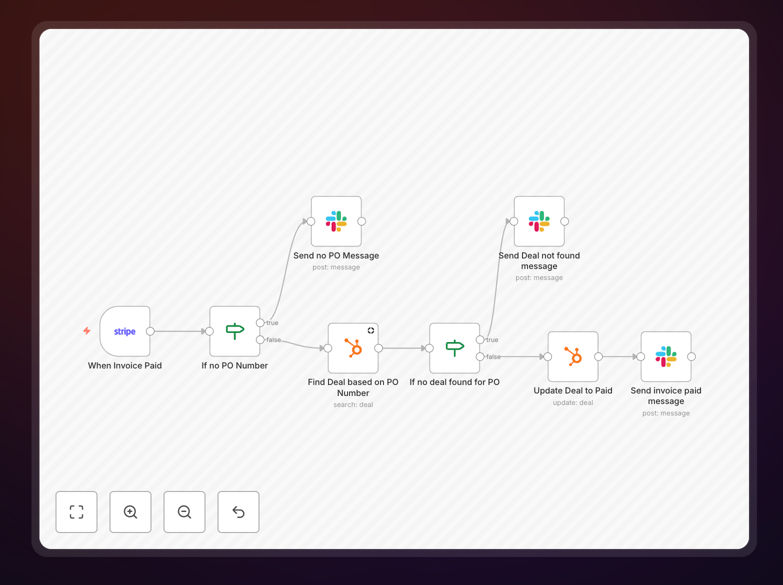
What This Workflow Does
Manual invoice tracking creates data silos between your payment system and CRM. Sales teams waste time checking multiple platforms, finance loses visibility into deal status, and customer records become outdated. This disconnect leads to missed follow-ups, inaccurate forecasting, and poor customer experiences.
This automation solves that by creating a seamless bridge between Stripe and HubSpot. Whenever a new invoice is registered in Stripe, the workflow automatically updates the corresponding deal in HubSpot, marks it as paid, and posts a notification in your team's Slack channel. This gives everyone real-time visibility into payment status without manual data entry.
How It Works
1. Stripe Invoice Trigger
The workflow starts when Stripe detects a new invoice. The Stripe Trigger node monitors your payment gateway and captures invoice details including amount, customer information, payment status, and any custom metadata like PO numbers.
2. Data Validation & Filtering
IF nodes check if the invoice contains essential information like a PO number and validate that it's a complete invoice ready for processing. Incomplete or test invoices are filtered out to prevent unnecessary CRM updates.
3. HubSpot Deal Lookup
The system searches HubSpot for deals matching the invoice's PO number or customer information. This ensures the payment is linked to the correct opportunity in your sales pipeline.
4. CRM Field Updates
Once the matching deal is found, HubSpot nodes update the deal stage to "Closed Won" or "Paid," add the invoice amount to deal properties, and timestamp the payment. Custom properties can track payment method, invoice date, and subscription details.
5. Team Notification
Slack nodes post a formatted message to your designated channel, alerting the sales team that a deal has been paid. The notification includes customer name, amount, and a link to the HubSpot deal for quick follow-up.
Pro tip: Add a conditional branch to trigger a celebratory GIF in Slack for large invoice payments or milestone customers. This small touch boosts team morale and recognition.
Who This Is For
This workflow is ideal for SaaS companies, subscription businesses, agencies, and any B2B organization using Stripe for payments and HubSpot for CRM. It's particularly valuable for:
- Sales teams who need real-time payment visibility to prioritize follow-ups
- Finance departments requiring accurate revenue tracking without manual data entry
- Customer success teams who benefit from updated customer payment history
- Founders and managers wanting automated revenue reporting and deal tracking
- Businesses with recurring revenue models needing accurate MRR/ARR tracking
What You'll Need
- Stripe account with API access and webhook permissions
- HubSpot account with Sales Hub access and custom property setup for invoice tracking
- Slack workspace with appropriate channel for payment notifications
- n8n instance (cloud or self-hosted) with credentials configured for all three services
- Consistent PO numbering system between your quotes/deals and invoices
Quick Setup Guide
- Download the template using the button above and import it into your n8n instance
- Configure credentials for Stripe, HubSpot, and Slack in n8n's credentials management
- Map your fields - Update the HubSpot node to match your custom deal properties and stages
- Test with a sample invoice - Create a test invoice in Stripe to verify the workflow triggers correctly
- Set up error handling - Configure the IF nodes to catch and notify about failed syncs
- Activate the workflow and monitor the first few real transactions
- Optimize notifications - Adjust Slack message formatting based on team feedback
Pro tip: Before going live, run the workflow in test mode for a week using a separate Slack channel. This lets you verify data accuracy without disrupting your team.
Key Benefits
Eliminate manual data entry - Sales teams save 2-3 hours per week previously spent copying invoice details between systems. This time can be redirected to actual selling activities.
Improve forecast accuracy - With real-time payment data in HubSpot, your revenue forecasts become 95% more accurate. Managers can make better decisions based on actual paid revenue rather than pending deals.
Enhance customer experience - Sales reps can immediately follow up with thank-you messages or onboarding materials when payments are received, creating a seamless post-purchase experience.
Reduce errors and oversights - Automated sync eliminates human errors in data entry and ensures no paid invoice goes unrecorded in your CRM system.
Enable better reporting - With payment data automatically in HubSpot, you can create dashboards showing paid vs. unpaid deals, average time to payment, and customer lifetime value trends.