What This Workflow Does
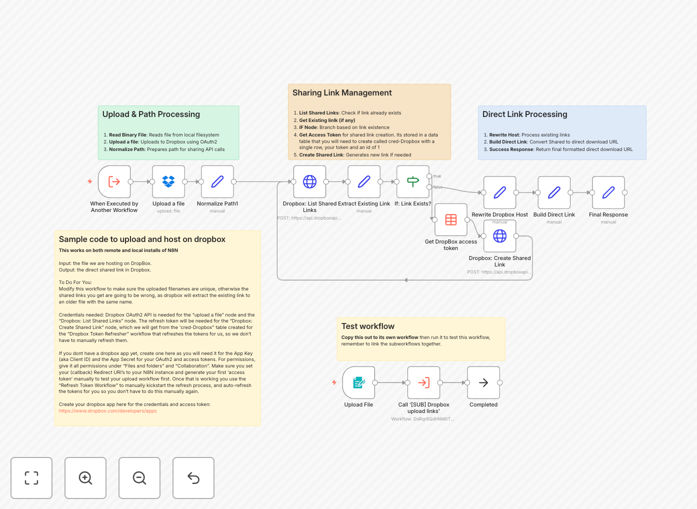
This automation solves the tedious process of manually uploading files to Dropbox and sharing download links. Businesses waste hours each week on these repetitive tasks when sending contracts, deliverables, or shared documents. The workflow eliminates these manual steps while ensuring recipients get clean, direct download links.
By automating both the upload and link generation, you create a seamless document delivery system. Files can come from various sources - form submissions, email attachments, or other apps - and automatically land in Dropbox with shareable links ready for distribution. This is particularly valuable for client-facing businesses that frequently share large files.
How It Works
1. File Receipt
The workflow begins by receiving files from your chosen trigger source. This could be an email attachment, form submission, or file from another connected app. The system accepts single files or batches for processing.
2. Dropbox Upload
Files are securely transferred to your specified Dropbox folder. The automation handles authentication and ensures proper file naming to prevent conflicts. You can configure folder paths based on file type, date, or other parameters.
3. Link Generation
After successful upload, the workflow generates a direct download link. This bypasses the Dropbox preview page, giving recipients immediate access to download the file. Links can be configured with expiration dates or password protection if needed.
4. Link Distribution
The final step delivers the download link to your intended recipients. This could be via email, Slack message, CRM update, or any other connected platform. The workflow logs all actions for tracking purposes.
Who This Is For
This automation benefits any business that regularly shares files with clients, team members, or partners:
- Creative agencies delivering design assets
- Law firms sharing legal documents
- Consultants distributing reports
- HR departments onboarding new hires
- Developers exchanging code packages
What You'll Need
- An active n8n instance (cloud or self-hosted)
- Dropbox Business or personal account with API access
- A file source (email, form, app integration)
- A destination for the download links (email, messaging app, etc.)
Quick Setup Guide
- Download the JSON template file
- Import into your n8n instance
- Connect your Dropbox account credentials
- Configure your target folder path
- Set up your trigger source (webhook, email, etc.)
- Test with sample files to verify link generation
- Deploy the workflow to production
Key Benefits
Save 5+ hours weekly by eliminating manual uploads and link sharing. Automation handles these repetitive tasks instantly.
Improve client experience with instant document delivery. No more waiting for email attachments or shared folder invites.
Reduce errors by automating file organization. Consistently named files land in the right folders every time.
Enhance security with controlled access via direct links instead of open folder sharing.
Scale operations effortlessly - handle hundreds of file deliveries as easily as one.