n8n Pipedrive CRM Automation Lead Management

Upload leads from a CSV file to Pipedrive CRM

Automate lead imports from CSV files to Pipedrive, saving hours of manual data entry while ensuring accurate CRM updates

Download Template JSON · n8n compatible · Free
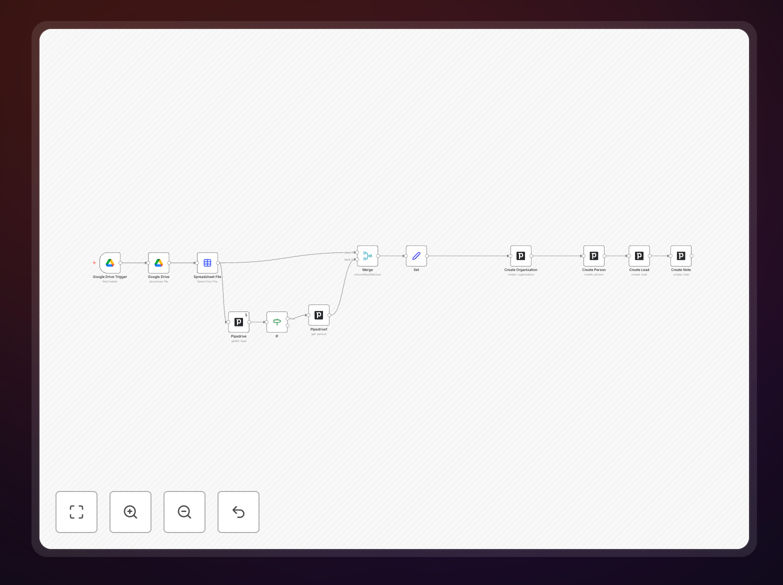
n8n workflow for importing CSV leads to Pipedrive CRM

What This Workflow Does

This automation solves the tedious and error-prone process of manually entering lead data from CSV files into Pipedrive CRM. Many businesses collect leads from events, webinars, or marketing campaigns in spreadsheet format, but transferring this data to their CRM consumes valuable time that could be spent selling.

The workflow automatically processes CSV files containing lead information, creates corresponding organization and person records in Pipedrive, and maps all relevant fields accurately. It handles the entire import process from file parsing to CRM updates without manual intervention, ensuring your sales team always has the freshest lead data at their fingertips.

How It Works

1. CSV File Processing

The workflow begins by reading the uploaded CSV file, parsing its contents, and validating the data structure. It checks for required fields and prepares the information for CRM import.

2. Data Transformation

Lead data undergoes cleaning and standardization to match Pipedrive's expected formats. This includes normalizing phone numbers, splitting full names into first/last components, and handling special characters.

3. CRM Record Creation

The workflow creates organization records first (when company data exists), then associates person records with their respective organizations. All custom fields from the CSV are mapped to corresponding Pipedrive fields.

Who This Is For

This workflow is ideal for sales teams, marketing agencies, and business development professionals who regularly need to import batches of leads into Pipedrive. It's particularly valuable for:

  • Event organizers capturing attendee information
  • Marketing teams running lead generation campaigns
  • Businesses transitioning from spreadsheets to CRM
  • Teams that receive lead lists from partners or affiliates

What You'll Need

  1. An active Pipedrive account with API access enabled
  2. CSV files containing lead data in a consistent format
  3. Basic familiarity with n8n or willingness to learn
  4. A method to deliver CSV files to the workflow (email, cloud storage, etc.)

Pro tip: Structure your CSV with column headers that match Pipedrive field names for automatic mapping. Include a "Lead Source" field to track where each lead originated.

Quick Setup Guide

  1. Download the JSON template file
  2. Import it into your n8n instance
  3. Configure your Pipedrive API connection
  4. Map your CSV columns to Pipedrive fields
  5. Test with a small sample file
  6. Schedule regular imports or trigger manually as needed

Key Benefits

Save 5-10 hours per month by eliminating manual data entry and reducing administrative overhead for your sales team.

Improve data accuracy with automated field mapping that eliminates typos and formatting inconsistencies common in manual entry.

Accelerate lead response times by getting new contacts into your CRM instantly rather than waiting for manual processing.

Scale your lead intake without adding staff, handling hundreds or thousands of leads with the same efficiency as a few dozen.

Maintain CRM hygiene with consistent data formatting and automatic organization-person relationships.

Frequently Asked Questions

Common questions about CSV to Pipedrive integration and automation

CSV to CRM automation streamlines lead management by eliminating manual data entry. It ensures all lead information from events, webinars, or marketing campaigns gets accurately transferred to your CRM. Sales teams gain immediate access to new leads without delays, allowing faster follow-ups and higher conversion rates. The automation also reduces human error in data transfer.

A real estate agency using this workflow reduced their lead processing time from 2 days to 15 minutes, enabling same-day follow-ups with hot leads. Their conversion rate improved by 22% simply by contacting leads while they were still engaged.

  • Eliminates data entry bottlenecks
  • Ensures 100% of leads enter your pipeline
  • Enables faster response times

You can import all standard Pipedrive fields including contact names, email addresses, phone numbers, company information, and custom fields. The workflow maps CSV columns to corresponding Pipedrive fields, handling both person records and organization records. Additional data like lead sources, notes, and deal values can also be included for comprehensive lead profiles.

Marketing teams often include UTM parameters from their campaigns to track lead sources. One SaaS company uses custom fields to capture which product features the lead showed interest in, allowing highly personalized follow-up communications.

  • Supports all Pipedrive field types
  • Handles complex data relationships
  • Preserves marketing attribution data

Ideally, leads should be added to your CRM immediately after collection to maximize sales opportunities. Automated workflows can process leads in real-time or batch process them daily/weekly depending on volume. High-value leads from events or webinars should be imported within 24 hours to capitalize on engagement momentum.

A B2B service provider implemented hourly lead imports after discovering that leads contacted within 1 hour were 7x more likely to convert than those contacted the next day. Their automated system now processes webinar registrants during the event itself.

  • Real-time processing for highest-value leads
  • Batch processing for efficiency with large volumes
  • Schedule based on your sales cycle

n8n provides flexible workflow automation with visual editing and powerful data transformation capabilities. Unlike simpler tools, it handles complex CSV formats and can process conditional logic during imports. Businesses maintain full control over their data flow without vendor lock-in, and can customize workflows as their CRM needs evolve.

An ecommerce company uses n8n to not only import leads but also enrich them with product interest data from their website before creating Pipedrive records. The open-source nature allowed them to build exactly the integration their unique business required.

  • No-code visual workflow builder
  • Advanced data transformation capabilities
  • Complete control over your data

Implement data validation steps in your workflow to check for duplicate emails, format phone numbers consistently, and verify required fields. The workflow can include cleanup steps before import, such as standardizing company names or removing test entries. Regular audits of imported data help maintain CRM hygiene over time.

A financial services firm added validation rules that flag leads missing critical information before import. Their workflow now automatically sends incomplete records back to marketing for follow-up, improving data completeness by 38%.

  • Validate email formats and phone numbers
  • Standardize company naming conventions
  • Implement duplicate checking

Yes, the workflow includes batch processing to handle large lead volumes efficiently. It processes records in manageable chunks to avoid API rate limits while providing progress tracking. For enterprise-scale imports, the workflow can be enhanced with error handling and retry logic for maximum reliability.

A recruitment agency processes files with 5,000+ candidate records weekly using this workflow. The automated system completes the import in about 20 minutes with zero manual intervention, compared to their previous 3-day manual process.

  • Processes leads in efficient batches
  • Includes progress tracking
  • Handles API rate limits gracefully

Absolutely! Our team specializes in building tailored CRM automation solutions. We can create custom workflows that match your specific lead intake processes, data formats, and business rules. Whether you need advanced deduplication, multi-step lead qualification, or integration with other tools, we'll design a solution that fits your sales workflow perfectly.

Recent custom projects include a workflow that combines Zoom webinar attendee data with LinkedIn profile enrichment before creating Pipedrive records, and another that integrates with a client's proprietary lead scoring system. We handle everything from initial consultation to deployment and training.

  • Tailored to your unique business needs
  • Includes setup and training
  • Ongoing support available

Need a Custom CSV to Pipedrive Integration?

This free template is a starting point. Our team builds fully tailored automation systems for your specific needs.