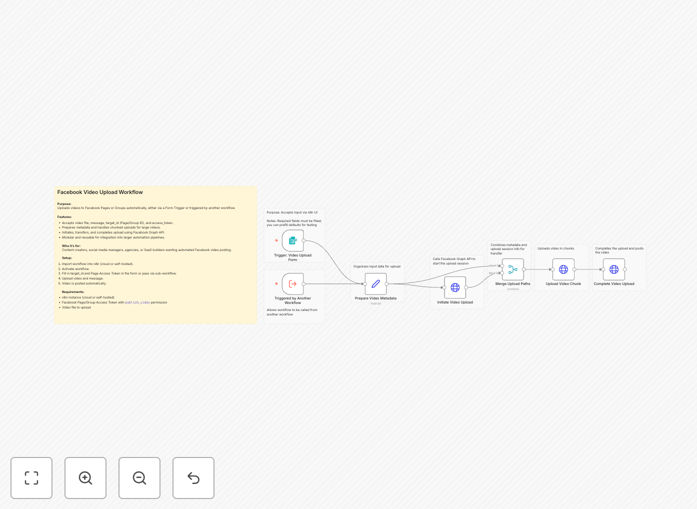
What This Workflow Does
Manual video uploads to Facebook consume valuable time that could be spent on content creation and strategy. This automation workflow eliminates that repetitive task by automatically posting videos to your Facebook Pages or Groups through the Facebook Graph API.
The template accepts video files along with captions, target destination (Page or Group ID), and access credentials, then handles the entire upload process including metadata preparation and chunked transfers for large files. It's designed to work either as a standalone automation triggered by a form, or as a reusable module within larger content publishing pipelines.
Whether you're a social media manager scheduling weekly content, a content creator distributing videos across multiple pages, or a business automating customer testimonial sharing, this workflow transforms a manual 10-15 minute process into a fully automated operation that runs in the background.
How It Works
The workflow follows Facebook's official video upload protocol while handling all the technical complexity for you.
Step 1: Trigger & Input Collection
The workflow starts with either a Form Trigger for manual submissions or can be triggered programmatically via webhook. It collects the video file, caption message, target Facebook Page/Group ID, and the required access token with appropriate permissions.
Step 2: Metadata Preparation
Before upload, the workflow prepares the necessary metadata including file size, MIME type, and upload session parameters. For large videos, it automatically calculates optimal chunk sizes for resumable uploads.
Step 3: Facebook Graph API Integration
The core of the workflow interacts with Facebook's API through three main phases: initiating an upload session, transferring the video data (in chunks if needed), and finalizing the publication with the provided caption and targeting parameters.
Step 4: Error Handling & Confirmation
Comprehensive error checking ensures failed uploads are retried or reported. Upon successful completion, the workflow can trigger notifications or log the result to your preferred system.
Who This Is For
This template is ideal for social media managers, content creators, marketing agencies, and businesses that regularly publish video content to Facebook. If you find yourself spending hours each week manually uploading videos, scheduling posts, or managing multiple Facebook properties, this automation will save you significant time.
Educational institutions, news organizations, e-commerce brands, and community managers running Facebook Groups will particularly benefit from the consistent, reliable posting this workflow enables. It's also valuable for SaaS platforms that need to automate social media posting as part of their service offering.
Pro tip: Combine this workflow with a cloud storage trigger (like Google Drive or Dropbox) to automatically post videos as soon as they're added to a specific folder. This creates a completely hands-off content pipeline.
What You'll Need
- A Facebook Developer Account with an app that has been approved for the required permissions (pages_manage_posts for Pages, publish_to_groups for Groups).
- A Page Access Token with appropriate permissions for your target Page or Group. This must be a long-lived token for reliable automation.
- n8n instance (cloud or self-hosted) with internet access to communicate with Facebook's API endpoints.
- Video files in Facebook-supported formats (MP4, MOV, AVI, etc.) under the platform's size limits (typically up to 10GB with chunked uploads).
- Basic understanding of Facebook Page/Group IDs and how to obtain access tokens through the Graph API Explorer.
Quick Setup Guide
Get this automation running in your n8n instance in under 15 minutes:
- Import the template: Download the JSON file above and import it into your n8n instance via the workflow import function.
- Configure Facebook credentials: Add your Page Access Token and target Page/Group ID to the appropriate nodes. Ensure your token has the 'pages_manage_posts' permission.
- Set up your trigger: Choose between the Form Trigger for manual submissions or replace it with a webhook/interval trigger for automated scheduling.
- Test with a small video: Run the workflow once with a test video to verify all connections and permissions are working correctly.
- Activate and monitor: Turn on the workflow and monitor the first few executions to ensure smooth operation before scaling up.
Important: Facebook's API has rate limits. For high-volume posting, consider adding delays between executions or implementing batch processing during off-peak hours.
Key Benefits
Save 5-10 hours monthly per social media manager by eliminating manual upload processes. What used to be a daily 15-20 minute task becomes completely automated.
Ensure consistent posting schedules regardless of holidays, weekends, or team availability. Maintain your content calendar without manual intervention.
Reduce human error like incorrect captions, wrong destinations, or failed uploads. The workflow validates all inputs and handles retries automatically.
Scale your video content strategy across multiple Pages and Groups without proportional increases in management time. One workflow can serve multiple destinations.
Integrate with existing systems by triggering uploads from your CMS, video editing software, or customer platforms via webhooks or API calls.