Uptime Monitoring Telegram Zapier

UptimeRobot alerts to Telegram with visual verification

Automatically sends Telegram notifications with optional screenshots when monitors change status

Download Template JSON · Zapier compatible · Free
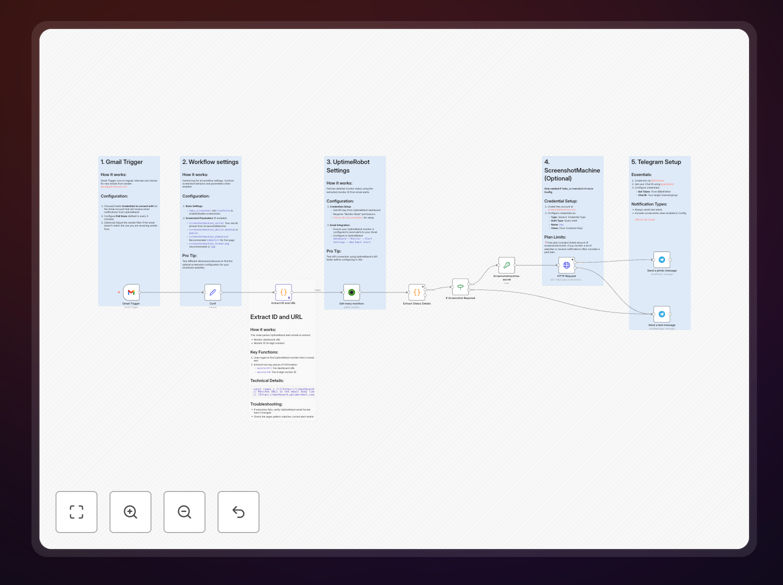
UptimeRobot to Telegram workflow diagram

What This Workflow Does

This automation solves the problem of ambiguous uptime alerts by combining UptimeRobot's monitoring with Telegram notifications that include visual verification. When your website or service goes down, you'll receive an immediate alert in Telegram with a screenshot of the affected page, eliminating guesswork about the nature of the outage.

The workflow captures the critical context most monitoring tools miss. Traditional uptime alerts only tell you a site is down, while this solution shows you exactly what users are seeing - whether it's a 500 error, maintenance page, or partial content failure. This enables faster, more accurate incident response.
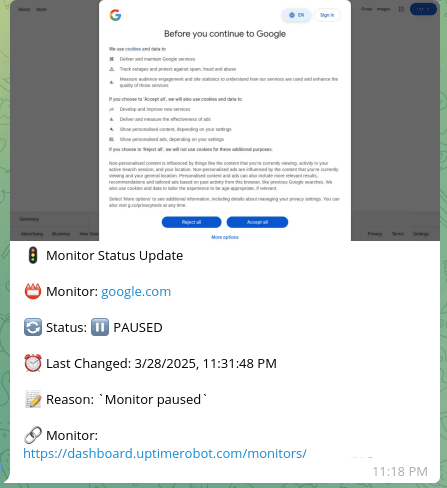
Example Telegram alert with screenshot from UptimeRobot
Example Telegram alert showing visual verification of website downtime

How It Works

1. UptimeRobot detects status change

The workflow triggers when UptimeRobot identifies a monitor status change (up→down or down→up). It captures all relevant details including the monitor name, URL, duration, and error type.

2. Screenshot capture (optional)

For downtime alerts, the system can optionally capture a screenshot of the affected page using a headless browser. This verifies the actual user experience during the outage.

3. Telegram notification delivery

The alert gets formatted with key details and sent to your configured Telegram channel or group. For downtime events, the screenshot gets attached as visual proof.

Pro tip: Configure different Telegram channels for critical vs. non-critical alerts to avoid alert fatigue for your team.

Who This Is For

This solution is ideal for DevOps teams, web agencies managing client sites, and any business where website uptime directly impacts revenue or operations. E-commerce stores, SaaS platforms, and news sites benefit particularly from the visual verification aspect.

It's also valuable for distributed teams who need real-time outage notifications without relying on email. The Telegram delivery ensures alerts get seen immediately on mobile devices.

What You'll Need

  1. UptimeRobot account with monitors configured
  2. Telegram account with a bot created (via BotFather)
  3. Zapier account to host the workflow
  4. Optional: Screenshot API service if using visual verification

Quick Setup Guide

  1. Download the template file and import to your Zapier account
  2. Connect your UptimeRobot and Telegram accounts in Zapier
  3. Configure which monitors should trigger alerts
  4. Set up your Telegram channel or group to receive alerts
  5. Test with manual monitor checks to verify the flow

Key Benefits

Faster incident response: Visual verification eliminates time wasted confirming outages, allowing teams to focus on restoration.

Reduced false positives: Screenshots help distinguish between real issues and temporary blips that resolve automatically.

Better communication: Teams can share the visual proof with stakeholders to demonstrate issues without technical jargon.

Mobile-friendly alerts: Telegram notifications ensure on-call staff see issues immediately, even when away from computers.

Frequently Asked Questions

Common questions about UptimeRobot-Telegram integration and automation

This integration provides instant visibility into website outages with visual verification. When UptimeRobot detects downtime, it sends a Telegram alert with a screenshot of the affected page, allowing teams to quickly verify issues without manually checking multiple systems.

The visual confirmation helps distinguish between real outages and false positives, reducing unnecessary panic and investigation time. For e-commerce sites, this can mean thousands in recovered revenue by shortening outage durations.

  • Combines uptime monitoring with visual proof
  • Reduces mean time to acknowledge (MTTA) incidents
  • Works seamlessly with existing monitoring setups

Visual verification adds a critical layer of context to uptime alerts. Traditional monitoring only confirms if a site is reachable, while screenshots show exactly what users see during an outage.

This helps teams immediately identify common issues like maintenance pages, CDN errors, or partial content failures that might not trigger standard uptime alerts. A support team can see at glance whether the homepage shows a 500 error or just a slow-loading image.

  • Captures render-level issues invisible to ping checks
  • Helps prioritize incidents based on user impact
  • Provides evidence for post-mortem analysis

E-commerce sites, SaaS platforms, and any business with critical web services benefit most. For example, an online store losing $500/minute during downtime needs instant alerts with visual proof to verify issues and coordinate fixes.

Development teams also use this to monitor staging environments and catch deployment errors before they affect production. Agencies managing multiple client sites appreciate the consolidated alerting in one Telegram channel.

  • Critical for revenue-generating web properties
  • Valuable for multi-site management
  • Essential for teams with 24/7 operations

Yes, the workflow allows full customization of alert messages. You can include specific details like outage duration, affected URLs, response codes, and team member tags.

For the screenshot, you can set quality parameters, specify which elements to capture, and even add annotations before sending to Telegram for clearer communication. Different message templates can be used for downtime vs. recovery alerts.

  • Add @mentions for specific team members
  • Include direct links to status pages
  • Format messages with markdown for readability

This solution enhances rather than replaces native alerts. It adds Telegram delivery (which many teams prefer over email) and visual verification that UptimeRobot doesn't provide natively.

The workflow includes error handling to retry failed Telegram deliveries and can be configured to escalate alerts if no one acknowledges them within set timeframes. Delivery receipts in Telegram provide confirmation that alerts were received.

  • Complements existing monitoring infrastructure
  • Adds mobile-friendly notification channel
  • Includes built-in redundancy for alert delivery

Start with conservative thresholds (e.g., 1-minute checks with 2 failures triggering alerts) for critical pages. Less vital endpoints can use longer intervals. Always configure maintenance windows to avoid false alerts during deployments.

For visual verification, set the screenshot delay to 3-5 seconds to ensure full page loading before capture. Consider geographical distribution of monitoring nodes if your audience is global to account for regional network variations.

  • Balance alert sensitivity with signal-to-noise ratio
  • Adjust thresholds based on business impact
  • Document your monitoring strategy for new team members

Absolutely. GrowwStacks specializes in custom monitoring solutions tailored to your infrastructure. We can integrate additional data sources like server metrics, create escalation workflows for critical outages, and build dashboards that combine uptime stats with business impact metrics.

This template is just a starting point - we'll design a system matching your exact operational needs. Our engineers will work with your team to identify key performance indicators and build automated responses for common failure scenarios.

  • End-to-end monitoring system design
  • Integration with existing tools and processes
  • Ongoing optimization and maintenance

Need a Custom Uptime Monitoring Integration?

This free template is a starting point. Our team builds fully tailored automation systems for your specific needs.