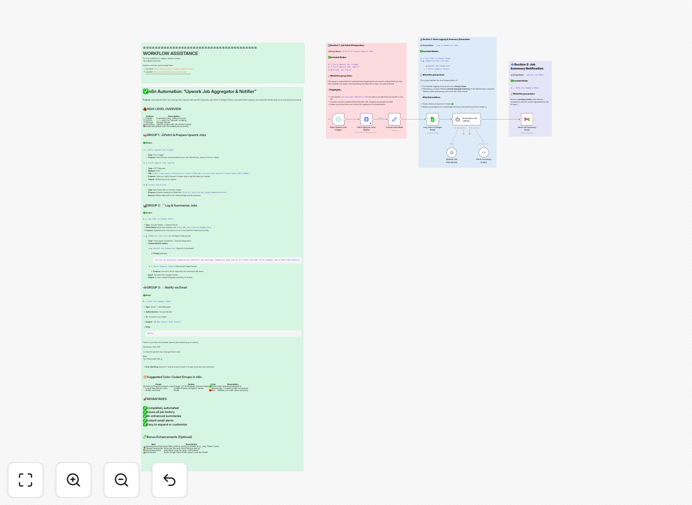
What This Workflow Does
For freelancers, agencies, and recruiters, manually searching for relevant projects on Upwork is a massive time sink. You might spend hours each day refreshing search results, reading vague job descriptions, and still miss high-quality opportunities that get filled within minutes. This creates inconsistent income, competitive pressure, and burnout from constant platform monitoring.
This automated workflow solves that problem by acting as your 24/7 job hunting assistant. It continuously scans Upwork for new postings that match your specific criteria—keywords, budget range, job type, and client history. When it finds a match, it uses OpenAI to generate a concise summary of the job requirements, filters out duplicates, and then delivers a personalized alert through your preferred channels: email, Slack, Microsoft Teams, or others. You get notified about perfect opportunities first, with all the information needed to decide whether to apply—all without ever logging into Upwork.
How It Works
The automation follows a logical sequence to transform raw job postings into actionable intelligence.
Step 1: Scheduled Upwork Search
The workflow triggers on a schedule you set (e.g., every 30 minutes). It connects to Upwork's RSS feeds or uses web scraping techniques (within terms of service) to fetch the latest job postings based on your configured search queries.
Step 2: Initial Filtering & Deduplication
Each new posting is checked against your saved filters and compared to previously seen jobs. Irrelevant postings are discarded immediately, and duplicates are filtered out to prevent notification spam.
Step 3: AI-Powered Analysis & Summarization
Qualifying job descriptions are sent to OpenAI's API. The AI extracts key details: project scope, required skills, budget indications, client expectations, and potential red flags. It returns a concise, easy-to-scan summary.
Step 4: Multi-Channel Notification Delivery
The enriched job data—including the AI summary, direct link, budget, and client rating—is formatted and sent to your chosen notification endpoints. You can configure multiple channels for redundancy.
Step 5: Logging & Continuous Improvement
All processed jobs are logged to a Google Sheet or database. This creates a searchable history of opportunities and provides data to refine your filters over time based on what types of jobs you actually pursue.
Who This Is For
This automation delivers value to anyone who sources work or talent through Upwork:
Individual Freelancers: Developers, designers, writers, marketers, and consultants who want to spend less time searching and more time doing billable work.
Small Agencies & Studios: Teams that need to consistently fill their project pipeline with qualified leads matching their service offerings.
Recruiters & Talent Sourcers: Professionals who help place contractors and need to quickly identify candidates for newly posted roles.
Digital Nomads & Side Hustlers: Individuals managing freelance work across time zones who can't constantly monitor the platform.
Business Owners: Those looking to hire contractors for specific projects and want to be alerted when relevant talent becomes available.
Pro tip: Start with broader filters and narrow them down over a week. Watch which notifications you actually act on, then adjust your criteria to match your ideal project profile more closely.
What You'll Need
- An Upwork Account: To access job feeds and understand the platform's data structure.
- n8n Instance: Either self-hosted or using n8n.cloud. The workflow requires a running n8n environment.
- OpenAI API Key: A paid API key from OpenAI to power the job summarization step. Costs are minimal per request.
- Notification Channel Credentials: Depending on your chosen output: Gmail/SMTP credentials for email, Slack webhook URL, Microsoft Teams incoming webhook, etc.
- Optional Storage: Google Sheet or database credentials if you want to maintain a historical log of processed jobs.
Quick Setup Guide
You can have this automation running in under 15 minutes.
- Download & Import: Click the "Download Template" button above. In your n8n instance, go to Workflows → Import from File and select the downloaded JSON file.
- Configure Upwork Search: In the "Upwork Search" node, enter your specific search keywords, preferred job categories, and any other filters relevant to your niche.
- Set Up OpenAI: Add your OpenAI API key in the "OpenAI Chat Model" node. You can adjust the prompt to tailor the summary output to your preferences.
- Connect Notification Channels: In the final nodes, replace the placeholder webhooks or email settings with your actual Slack, Teams, or email credentials. Test that notifications work.
- Activate & Schedule: Turn the workflow ON. Set the Schedule Trigger node to run at your desired frequency (e.g., every 30 minutes).
- Monitor & Refine: For the first few days, check the logs to ensure jobs are being matched correctly. Tweak your filters based on the quality of alerts you receive.
Key Benefits
Save 5–10 Hours Weekly on Manual Searching: Reclaim the time you spend scrolling and reading through Upwork. The automation does the tedious scanning for you, freeing up hours for actual client work or business development.
Increase Your "First to Apply" Advantage: On competitive platforms, being among the first qualified applicants dramatically improves your chances. Automated, near-real-time alerts give you that edge consistently.
Improve Proposal Quality with AI Insights: The AI summary helps you quickly understand the core client need. This allows you to craft more targeted, relevant proposals that directly address the project's requirements, boosting your conversion rate.
Never Miss a Perfect Opportunity: Whether you're asleep, in meetings, or focused on deep work, the system works continuously. Multi-channel notifications ensure critical alerts reach you wherever you are.
Build a Searchable Opportunity Pipeline: By logging all processed jobs, you create a valuable database of market trends, client budgets, and in-demand skills in your niche, informing your future business strategy.