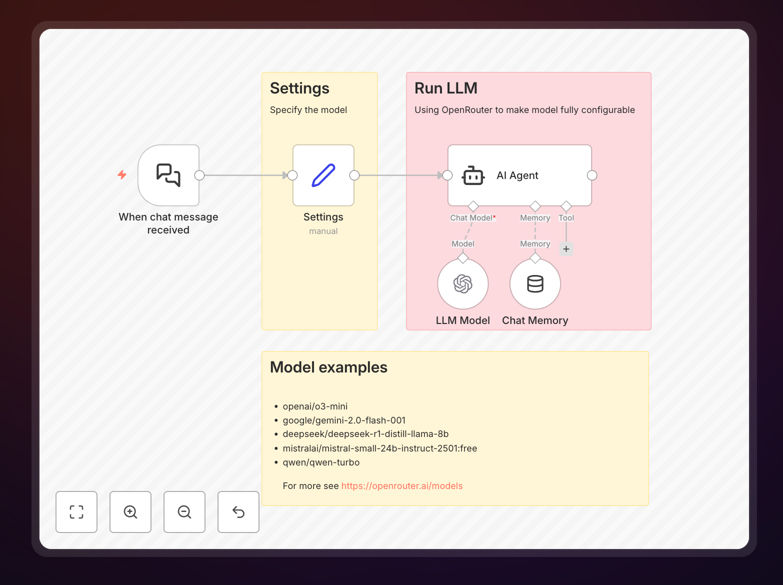
What This Workflow Does
This template solves a specific technical challenge: accessing the OpenRouter service in n8n versions before 1.78. OpenRouter provides a unified API to dozens of AI models from different providers, but n8n only introduced a dedicated OpenRouter node in version 1.78. If you're running an older version, this workflow gives you the same capability through a clever workaround.
The automation configures the existing OpenAI node in n8n to connect to OpenRouter's API instead. This lets you dynamically switch between different large language models (LLMs) like GPT-4, Claude, Gemini, and open-source alternatives—all within your existing n8n workflows. You can change models on the fly based on cost, performance needs, or specific task requirements.
For businesses using AI automation, this means you're no longer locked into a single AI provider. You can optimize costs by using cheaper models for simple tasks and reserve expensive models for complex reasoning. The workflow maintains all the flexibility of n8n's visual automation while giving you access to the broader AI ecosystem.
How It Works
The workflow uses n8n's existing OpenAI integration with modified configuration to route requests through OpenRouter instead.
1. Credential Configuration
You create OpenAI-type credentials in n8n but set the Base URL to OpenRouter's API endpoint. This simple change redirects all AI requests to OpenRouter while maintaining compatibility with n8n's OpenAI node structure.
2. Model Selection
The workflow includes a settings node where you specify which OpenRouter model to use. You can hardcode a specific model or make this dynamic—changing models based on input content, cost considerations, or performance requirements.
3. API Communication
When the workflow runs, it sends requests to OpenRouter's unified API. OpenRouter then routes these to the appropriate AI provider (OpenAI, Anthropic, Google, etc.) based on your model selection, handles the API differences, and returns standardized responses.
4. Response Processing
The AI responses come back through the same OpenAI node structure, so all your existing n8n logic for handling AI outputs continues to work seamlessly.
Who This Is For
This template is ideal for businesses and developers who need AI automation flexibility but are constrained by their n8n version. It's particularly valuable for:
Teams running stable n8n deployments who can't immediately upgrade to version 1.78 but want access to multiple AI models. Many enterprises maintain specific software versions for stability and compliance reasons.
Cost-conscious AI implementers who want to compare different models and choose the most economical option for each task. OpenRouter lets you see pricing across providers and switch models as needed.
AI automation specialists building complex workflows that require different models for different steps—like using a fast model for classification and a powerful model for generation.
Businesses experimenting with AI who want to test multiple providers without rebuilding their automation infrastructure each time.
What You'll Need
- n8n instance (version before 1.78) - either self-hosted or cloud
- OpenRouter account with API credits - free tier available for testing
- OpenRouter API key - obtained from your OpenRouter dashboard
- Basic n8n knowledge - understanding of how to import workflows and configure credentials
- Clear use case - know what AI tasks you want to automate (content generation, classification, analysis, etc.)
Pro tip: Start with OpenRouter's free credits to test different models before committing to a paid plan. Monitor your usage in the OpenRouter dashboard to understand cost patterns for your specific use cases.
Quick Setup Guide
Follow these steps to implement this OpenRouter workaround in your n8n environment:
- Import the workflow into your n8n instance using the downloaded JSON file.
- Create an OpenRouter account at openrouter.ai and generate an API key from your dashboard.
- Configure n8n credentials by creating new OpenAI-type credentials. Set the Base URL field to "https://openrouter.ai/api/v1" and use your OpenRouter API key as the password.
- Select your model in the workflow's settings node. Choose from OpenRouter's model list based on your needs and budget.
- Test the connection with a simple prompt to ensure everything is working correctly.
- Integrate with your existing workflows by connecting this OpenRouter setup to your automation logic.
Key Benefits
Model flexibility without upgrading: Access dozens of AI models while staying on your stable n8n version. No need to risk upgrading your entire automation platform just for AI capabilities.
Cost optimization: Compare pricing across AI providers and choose the most economical model for each task. OpenRouter shows real-time pricing, so you can make informed decisions about where to spend your AI budget.
Future-proofing: When you do upgrade to n8n 1.78+, transitioning to the native OpenRouter node is straightforward. Your workflow logic remains largely the same.
Reduced vendor lock-in: By abstracting AI model selection, you're not tied to any single provider's pricing changes, API limitations, or service disruptions.
Consistent integration pattern: All AI interactions use the same n8n node structure, making your workflows easier to maintain and understand compared to using multiple different AI integrations.