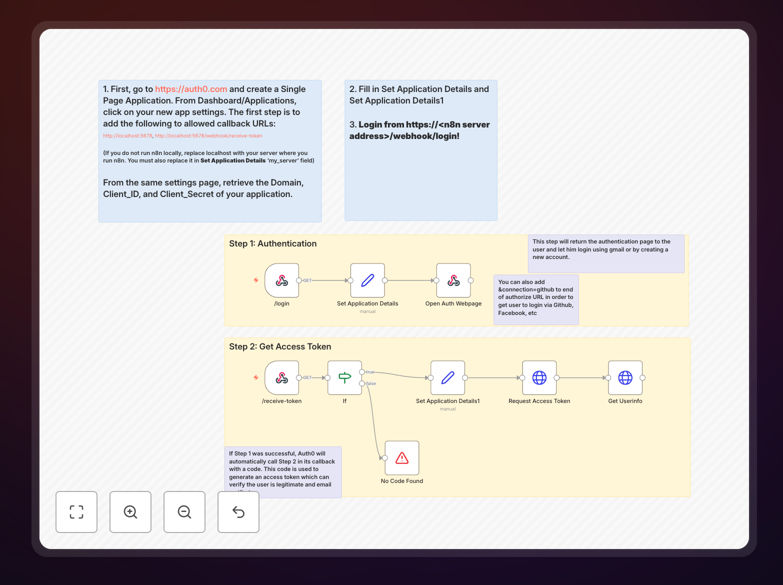
What This Workflow Does
Managing user login and authentication is a critical but often painful process for businesses. Building secure login systems requires significant development time, ongoing security maintenance, and manual user management. This workflow solves that problem by leveraging Auth0—a professional identity platform—to provide a simple, secure authentication solution.
The automation handles user login via email or Google accounts, verifies authentication tokens, and triggers subsequent business processes. It eliminates the need to build and maintain custom login infrastructure while ensuring industry-standard security practices. Whether you need login for internal colleagues, customer-facing applications, or partner portals, this workflow provides a ready-to-use solution.
How It Works
Step 1: Auth0 Authentication Setup
You create a Single Page Application in Auth0 and configure allowed callback URLs. The workflow uses your Auth0 domain, client ID, and secret to establish a secure connection.
Step 2: User Login Initiation
Users access a dedicated login URL hosted on your n8n instance. They are presented with Auth0's professional login interface, choosing email or Google authentication.
Step 3: Token Verification & Processing
After successful login, Auth0 returns an authentication token to your workflow. The workflow validates this token, extracts user information (email, name, etc.), and prepares it for downstream actions.
Step 4: Trigger Business Actions
The verified user data triggers automated processes: creating user records in your database, sending welcome emails, updating CRM contacts, or granting access to internal resources.
Who This Is For
This automation is ideal for businesses that need secure user login without building custom infrastructure. Internal tool administrators who manage colleague access to company systems. SaaS companies requiring customer authentication for their platforms. Development teams prototyping applications with professional login capabilities. Any organization that wants to implement standardized, secure login for users, employees, or partners while connecting authentication events to their business workflows.
What You'll Need
- An Auth0 account (free tier available)
- A running n8n instance (cloud or self-hosted)
- Basic understanding of webhook URLs
- Your business applications ready to receive user data (CRM, email system, database)
Quick Setup Guide
- Sign up at Auth0 and create a Single Page Application.
- Add your n8n server URLs to Auth0's allowed callback list.
- Copy your Auth0 domain, client ID, and client secret.
- Import this workflow template into your n8n instance.
- Configure the workflow with your Auth0 credentials and server address.
- Test login via your n8n webhook URL and verify user data flow.
- Connect successful login events to your business applications.
Pro tip: Extend this workflow easily to support login via GitHub, Facebook, or enterprise directories by adding those connections in your Auth0 application settings. The automation will handle them seamlessly.
Key Benefits
Reduce development time by 80%: Implementing professional login typically takes weeks of development. This workflow provides a working solution in under ten minutes.
Enhance security compliance: Auth0 handles password security, multi-factor authentication, and compliance requirements (GDPR, HIPAA) that are difficult to implement correctly yourself.
Automate user onboarding: Connect login events directly to your CRM, email systems, and internal tools to create seamless onboarding workflows without manual steps.
Scale effortlessly: Auth0 manages scalability and performance as your user base grows, eliminating infrastructure concerns for your team.
Maintain consistency: All users experience the same professional login interface, improving user experience and reducing support requests.