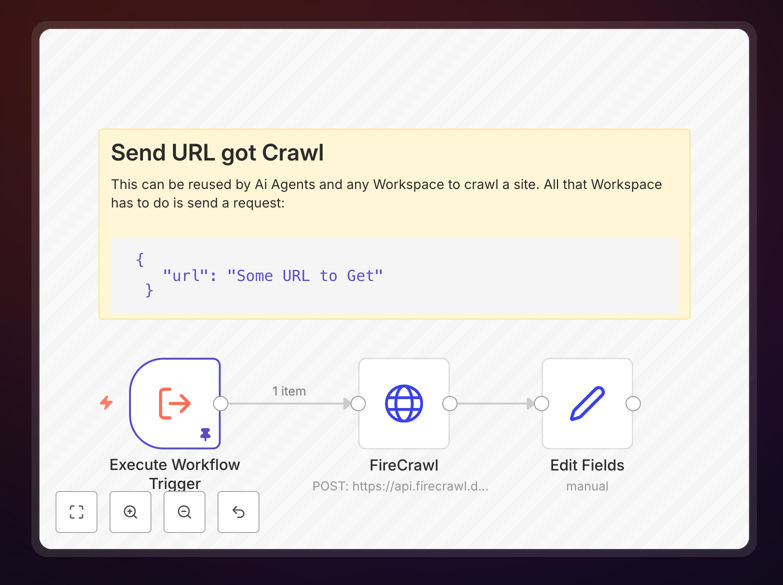
What This Workflow Does
This template solves the common problem of rebuilding the same automation logic across multiple workflows. Instead of recreating web scraping, AI processing, or data validation routines every time you need them, this approach lets you build them once as standalone tools and call them from any workflow.
Think of it like creating a library of specialized functions for your automations. Need to scrape a webpage? Call your "Scrape Page" tool. Need to generate an image with AI? Call your "Image Generator" tool. This modular approach reduces development time by up to 70% for complex automation projects and ensures consistent results across your entire automation ecosystem.
The business value is substantial: teams can share proven components, new automations build on existing work rather than starting from scratch, and maintenance becomes centralized. When you update a tool, all workflows using it automatically benefit from the improvements.
How It Works
1. Create the Tool Workflow
Start by building a specialized workflow with an "Execute Workflow Trigger" node. This node defines the interface—what data your tool expects as input. Inside the tool, add the nodes that perform the actual work, whether that's making HTTP requests, processing data with AI, or transforming information.
2. Define Consistent Outputs
Every tool should end with a "Set" or "Edit Fields" node that formats the output consistently. This standardization is crucial—it ensures that calling workflows know exactly what data structure to expect, making integration predictable and reliable.
3. Integrate into Main Workflows
From your main automation, use the "Execute Workflow" node to call your tool. Pass the required parameters (like a URL for a scraper or a prompt for an AI tool), and receive the processed results back. The tool executes independently but feels like a native part of your main workflow.
4. Scale Your Tool Library
As you identify common patterns across your automations, build additional tools. Soon you'll have a comprehensive library of tested components that can be mixed and matched to create complex automations in hours instead of days.
Who This Is For
This approach benefits automation teams, SaaS companies building integration features, agencies managing multiple client automations, and businesses with recurring data processing needs. If you find yourself copying nodes between workflows or rebuilding similar logic, reusable tools will transform your automation strategy.
Technical teams appreciate the reduced code duplication and easier maintenance. Business users benefit from faster automation deployment and more reliable results. The modular design particularly suits organizations scaling their automation efforts or those with compliance requirements needing consistent data handling.
What You'll Need
- An n8n instance (cloud or self-hosted)
- Basic understanding of workflow triggers and data flow
- Clear definition of the processes you want to modularize
- Standardized data formats for inputs and outputs
- Documentation practices for your tool library
Quick Setup Guide
- Download the template and import it into your n8n instance
- Examine the example tool structure with its trigger and output nodes
- Identify a process in your existing workflows that could become a tool
- Build your first tool with clear input requirements and formatted outputs
- Test the tool from a simple calling workflow before integrating into production
- Document the tool's purpose, inputs, outputs, and any dependencies
- Gradually expand your library as you identify additional reusable components
Key Benefits
70% faster development for new automations by reusing proven components instead of building from scratch every time.
Consistent results across all workflows using the same tools, eliminating variation and improving data quality.
Centralized maintenance – update a tool once and all dependent workflows automatically benefit from improvements.
Knowledge sharing across teams through a shared library of tested automation components.
Scalable architecture that grows with your automation needs without becoming unmanageable.
Pro tip: Start with 2-3 high-value tools that address your most repetitive tasks. Document them thoroughly with example inputs and outputs. This creates immediate value while establishing patterns for future tool development.