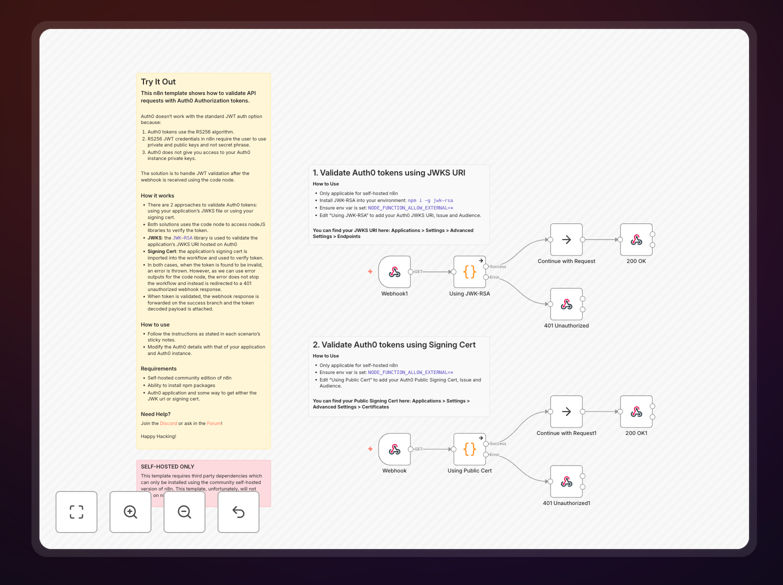
What This Workflow Does
This n8n workflow provides a secure method to validate JSON Web Tokens (JWT) issued by Auth0, either using JSON Web Key Sets (JWKS) or signing certificates. It solves the critical security challenge of verifying API requests by ensuring tokens are authentic, unexpired, and properly signed by your Auth0 tenant.
The workflow handles the complete validation process including fetching public keys from Auth0's JWKS endpoint, verifying the token signature, checking standard claims (issuer, audience, expiration), and returning validation results. This prevents unauthorized API access while maintaining compatibility with Auth0's security best practices.
How It Works
1. Receives JWT Token
The workflow starts by accepting a JWT token from an API request header or body. This token contains the user's authentication information and permissions in a cryptographically signed format.
2. Decodes Token Header
The workflow decodes the JWT header to identify the key ID (kid) and signing algorithm used. This determines whether to use JWKS or certificate-based validation.
3. Fetches Verification Key
For JWKS validation, the workflow retrieves the current public keys from Auth0's JWKS endpoint. For certificate validation, it uses your configured signing certificate.
4. Validates Token Signature
The cryptographic signature is verified using the appropriate public key, ensuring the token wasn't tampered with and was issued by your Auth0 tenant.
5. Checks Standard Claims
The workflow verifies the token hasn't expired (exp claim), was issued by your Auth0 domain (iss claim), and is intended for your API (aud claim).
6. Returns Validation Result
The workflow outputs whether the token is valid along with decoded claims, allowing your API to make authorization decisions.
Who This Is For
This workflow is essential for developers and businesses using Auth0 for authentication who need to secure their APIs with proper JWT validation. It's particularly valuable for:
- Companies building internal tools with n8n that require authentication
- Developers creating APIs protected by Auth0
- Teams migrating from session-based to token-based authentication
- Organizations needing to validate tokens in backend services
What You'll Need
- A self-hosted n8n instance (community or enterprise edition)
- Auth0 tenant with configured API
- JWKS endpoint URL or signing certificate from Auth0
- Basic understanding of JWT authentication concepts
Pro tip: For production environments, always use JWKS validation as it automatically handles key rotation from Auth0, providing better security than static certificates.
Quick Setup Guide
- Download the JSON template file
- Import into your self-hosted n8n instance
- Configure your Auth0 domain and API audience
- Set up either JWKS endpoint or paste your signing certificate
- Connect the workflow to your API endpoint
- Test with valid and invalid tokens to verify behavior
Key Benefits
Enhanced API security by preventing unauthorized access through proper token validation, reducing risk of data breaches.
Time savings with pre-built validation logic that would take days to develop and test manually.
Auth0 best practices implemented out-of-the-box including proper key rotation handling.
Flexible deployment works with both JWKS (recommended) and certificate validation methods.
Transparent validation provides clear pass/fail results with detailed error information.