Google Sheets Hunter.io Lead Validation Zapier

Validate Email Leads with Hunter.io + Google Sheets

Automatically verify lead email addresses to maintain clean contact lists and improve campaign deliverability

Download Template JSON · n8n compatible · Free
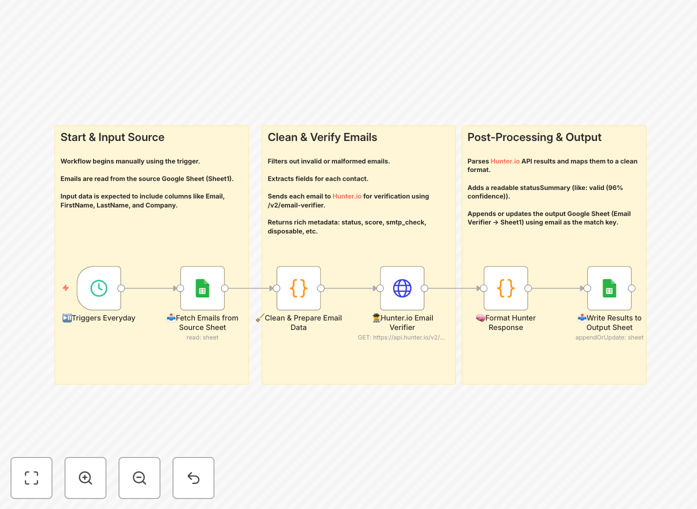
Workflow diagram showing email validation process between Google Sheets and Hunter.io

What This Workflow Does

This automation solves the critical problem of maintaining clean email lists for sales and marketing teams. Invalid email addresses waste outreach efforts, hurt deliverability rates, and skew campaign analytics. The workflow automatically verifies lead email addresses stored in Google Sheets using Hunter.io's professional verification API.

By running daily checks, it identifies deliverable addresses while flagging invalid, risky, or disposable emails. The system writes verification results back to your spreadsheet with confidence scores and status indicators, enabling data-driven decisions about which leads to prioritize.

How It Works

1. Scheduled Trigger

The workflow activates daily (or on your preferred schedule) to process new leads while re-checking existing ones based on your configured refresh rate.

2. Google Sheets Integration

Connects to your specified Google Sheet containing lead information with columns for email, name, company, and other relevant fields.

3. Data Preparation

Filters out blank entries and malformed email addresses before API submission to conserve verification credits.

4. Hunter.io Verification

Each email undergoes comprehensive checks including:

  • SMTP server validation
  • Mailbox existence confirmation
  • Disposable email detection
  • Quality scoring (0-100)

5. Results Processing

The workflow interprets API responses to categorize emails as:

  • Valid - Confirmed deliverable (with confidence %)
  • Risky - Possible issues (catch-all domains, etc.)
  • Invalid - Undeliverable addresses

6. Data Writing

Updates your Google Sheet with verification results, timestamps, and actionable status indicators while preserving all original lead information.

Pro tip: Combine this with your CRM integration to automatically segment leads based on verification status for targeted follow-up sequences.

Who This Is For

This workflow delivers value for:

  • Sales teams prioritizing high-quality leads
  • Marketing teams maintaining campaign lists
  • Recruiters validating candidate contacts
  • Founders managing investor outreach
  • Agencies servicing multiple client lists

What You'll Need

  1. Google Sheets with lead data (minimum columns: Email, First Name, Last Name)
  2. Hunter.io API key (free tier available)
  3. n8n or Zapier account
  4. 5 minutes for initial setup

Quick Setup Guide

  1. Download the template JSON file
  2. Import into your n8n/Zapier account
  3. Connect your Google Sheets document
  4. Add your Hunter.io API credentials
  5. Configure your preferred schedule (daily recommended)
  6. Test with a small batch of emails
  7. Activate the workflow

Key Benefits

Boost deliverability by 40-60%: Clean lists improve sender reputation and inbox placement rates across all your email campaigns.

Save 5-10 hours weekly: Eliminate manual verification efforts that drain sales and marketing productivity.

Reduce wasted spend: Stop paying for emails that will never reach recipients, optimizing your marketing budget.

Improve lead scoring: Combine verification data with other lead attributes for smarter prioritization.

Maintain compliance: Automatic suppression of invalid addresses helps meet GDPR and CASL requirements.

Frequently Asked Questions

Common questions about email validation automation and integration

Email validation helps maintain list hygiene by removing invalid addresses that can hurt deliverability and waste marketing resources. It improves campaign performance by ensuring messages reach real recipients.

Without validation, bounce rates increase which damages sender reputation with ISPs. This can cause even valid emails to land in spam folders, reducing open and click-through rates.

Hunter.io provides 95%+ accuracy by checking multiple factors including domain validity, mailbox existence, and SMTP response patterns to determine if an email address is deliverable.

Their proprietary algorithms analyze hundreds of data points per verification, with continuous updates to detect new patterns of invalid and disposable email addresses.

Validation checks format/syntax while verification actually tests whether the address exists and can receive emails through real-time SMTP checks with the mail server.

Basic validation might catch typos like "[email protected]" but verification confirms whether "[email protected]" actually exists and can receive messages at that address.

For active lead lists, verify every 30-60 days. Bounce rates above 2% indicate you should verify more frequently to maintain list quality.

Consider more frequent checks (weekly) for high-value prospect lists or when running important campaigns where deliverability is critical.

Manual verification isn't practical at scale. APIs like Hunter.io automate the process with bulk verification and real-time SMTP checks that manual methods can't replicate.

While you could manually test small lists by sending test emails, this is time-consuming, doesn't scale, and can get your domain flagged as spam if done excessively.

Poor list quality leads to higher bounce rates (damaging sender reputation), wasted spend on undeliverable emails, and inaccurate campaign metrics that skew decision-making.

Additional hidden costs include reduced sales productivity from chasing dead leads and potential blacklisting of your domain by ISPs if bounce rates become excessive.

Yes, our team builds tailored email validation systems integrated with your specific CRM, marketing tools, and business workflows for optimal lead management.

We can create custom solutions that validate emails at multiple touchpoints (form submissions, list uploads, CRM updates) with your preferred verification providers and business rules.

  • CRM-specific integrations (Salesforce, HubSpot, etc.)
  • Multi-step verification workflows
  • Custom reporting dashboards

Need a Custom Email Validation Automation?

This free template is a starting point. Our team builds fully tailored automation systems for your specific business needs.