n8n GitHub Mobile Development Automated Testing

Validate mobile app deep links in GitHub PRs with automated testing

Automatically test deep link routing whenever developers submit pull requests

Download Template JSON · n8n compatible · Free
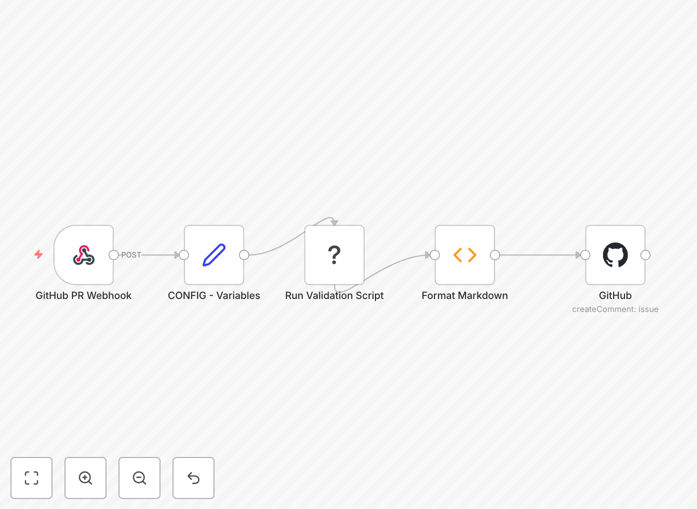
Mobile app deep link validation workflow diagram

What This Workflow Does

This automation solves a critical pain point for mobile development teams - ensuring deep links continue working as expected when new features are added or modified. When developers submit pull requests containing deep link changes, this workflow automatically tests all affected URL routes and posts verification results directly in the GitHub PR.

The system prevents broken navigation from reaching production by catching routing issues during code review. It eliminates manual testing overhead while providing developers with immediate feedback about which links need attention before merging their changes.

How It Works

1. Trigger on GitHub pull request events

The workflow activates whenever a new pull request is opened or updated in your configured GitHub repository. It analyzes the PR changes to identify modified files containing deep link routing logic.

2. Extract and categorize deep links

The system scans code changes to build a list of affected deep links, categorizing them by route patterns and parameters. It intelligently identifies both new routes and modifications to existing ones.

3. Execute platform-specific tests

Using your mobile app's test build, the workflow executes each deep link through platform-specific test runners. It verifies successful navigation as well as proper handling of invalid or malformed URLs.

4. Generate comprehensive test report

The system compiles test results into a detailed report showing which links passed validation and which failed. For failures, it includes debugging information like stack traces and screenshots.

5. Post results to GitHub PR

The workflow adds the test report as a comment in the GitHub pull request, giving developers immediate visibility into routing issues. The comment includes direct links to test artifacts for further investigation.

Pro tip: Configure this workflow to run on your staging environment with production-like configuration to catch environment-specific routing issues before they reach users.

Who This Is For

This automation benefits mobile development teams of all sizes who need to maintain reliable deep linking functionality. It's particularly valuable for:

  • Apps with complex navigation structures
  • Teams practicing continuous deployment
  • Projects with frequent deep link changes
  • Organizations with strict app quality standards

What You'll Need

  1. n8n instance (cloud or self-hosted)
  2. GitHub repository with pull request workflow enabled
  3. Mobile app test build (iOS and/or Android)
  4. Deep link test runner configured for your platform
  5. GitHub personal access token with repo permissions

Quick Setup Guide

  1. Import the workflow JSON into your n8n instance
  2. Configure GitHub webhook to trigger on PR events
  3. Set up your mobile app test runner credentials
  4. Define your deep link route patterns in the configuration
  5. Test with sample PRs to verify integration

Key Benefits

Catch routing issues before they reach users - Automated validation prevents broken deep links from making it to production, protecting user experience and app store ratings.

Reduce manual testing by 70-90% - Developers get immediate feedback without waiting for QA teams to manually verify deep links.

Standardize routing quality checks - Every PR gets consistent testing coverage, eliminating human oversight in manual verification processes.

Accelerate release cycles - Automated checks allow teams to merge PRs faster with confidence that core navigation functionality remains intact.

Frequently Asked Questions

Common questions about mobile deep link validation and GitHub automation

Deep link validation ensures mobile app navigation works correctly when users click links. Broken deep links create poor user experiences and can lead to app store rejections. Automated validation catches routing issues before they reach production, saving development teams hours of debugging and preventing negative app reviews.

For example, an ecommerce app might break when users click product links from marketing emails if recent changes modified the product detail route structure. Automated validation would catch this during code review rather than after the app update reaches thousands of users.

Automated testing in GitHub PRs provides immediate feedback to developers about potential issues. This prevents broken code from merging into main branches and reduces back-and-forth communication in code reviews. Teams can ship features faster while maintaining quality standards through automated checks.

Consider a team working on a banking app where deep links must maintain strict security parameters. Automated validation ensures no PR accidentally removes required authentication checks while allowing developers to focus on feature implementation rather than manual testing.

This workflow can detect missing route handlers, incorrect URL parameters, authentication failures, and navigation stack problems. It verifies both successful routing scenarios and proper error handling when invalid links are encountered. The tests simulate real user journeys through all supported deep link patterns.

For instance, it would catch if a travel app's hotel booking deep link stopped accepting check-in dates in the expected format, or if a social media app's profile links started crashing when handling special characters in usernames.

  • Validates required URL parameters
  • Tests error handling for malformed links
  • Verifies proper authentication flows

Yes, the workflow can be triggered as part of CI/CD processes. It complements unit tests and UI automation by specifically validating deep linking behavior. Teams can configure it to block PR merges when critical routing failures are detected or provide warnings for non-critical issues.

A media streaming app might configure the workflow to fail CI when episode deep links break but only warn when optional recommendation parameters don't work. This balances release velocity with core functionality protection.

Manual testing is time-consuming and prone to human error. This automation runs consistently on every PR, testing all link variations without developer intervention. It executes tests faster than humans while covering edge cases that manual testers might overlook, especially in complex navigation scenarios.

Where a QA engineer might test 5-10 key deep links manually, this automation can verify hundreds of link variations in minutes. It also tests parameter combinations that humans might not think to check, like special characters in URLs or maximum-length values.

The workflow supports both iOS and Android platforms through platform-specific test runners. It can validate universal links on iOS and intent-based deep links on Android. The GitHub comments clearly indicate which platform encountered failures, helping developers quickly identify and fix platform-specific routing issues.

For cross-platform apps using frameworks like Flutter or React Native, the workflow can test deep link handling consistency across both platforms. This ensures users get the same experience regardless of which device they're using.

  • Tests iOS Universal Links
  • Validates Android Intent filters
  • Supports custom URI schemes

Yes! GrowwStacks specializes in building custom automation solutions for mobile development teams. We can create tailored deep link validation systems that integrate with your specific tech stack, test frameworks, and deployment processes. Our solutions help mobile teams ship with confidence while reducing manual testing overhead.

Whether you need to validate complex navigation flows, test deep link security requirements, or integrate with specialized CI/CD systems, our team can design an automation solution that fits your exact requirements and scales with your app's growth.

Need a Custom Deep Link Validation System?

This free template is a starting point. Our team builds fully tailored automation systems for your specific mobile app architecture and testing needs.