What This Workflow Does
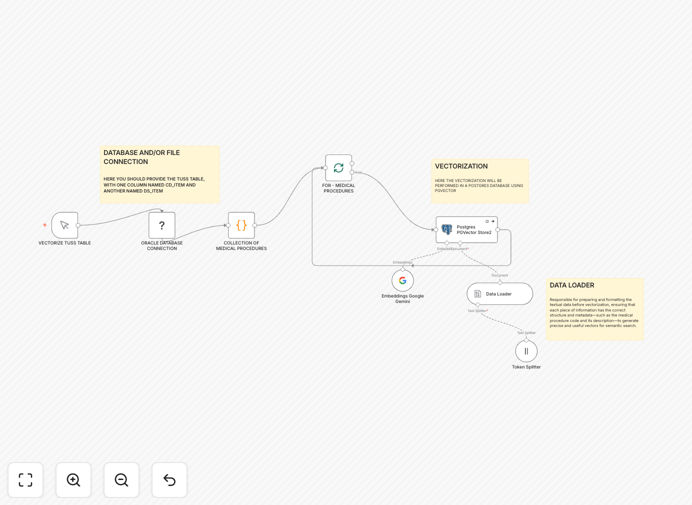
This automation solves a critical problem in healthcare data management: finding relevant medical procedures using traditional keyword search is inefficient and often misses conceptually similar treatments. The workflow transforms the TUSS (Terminologia Unificada da Saúde Suplementar) medical procedure table into semantic vector embeddings using Google Gemini AI.
By converting medical descriptions into numerical vectors that capture meaning rather than just keywords, healthcare providers can search for procedures based on conceptual similarity. This means a search for "heart attack treatment" can automatically find related procedures for "myocardial infarction management" even when the exact terminology differs.
The processed vectors are stored in a PostgreSQL database with pgvector extension, creating a searchable knowledge base that improves over time as more data is added. This enables intelligent clinical decision support, automated procedure coding, and enhanced medical research capabilities.
How It Works
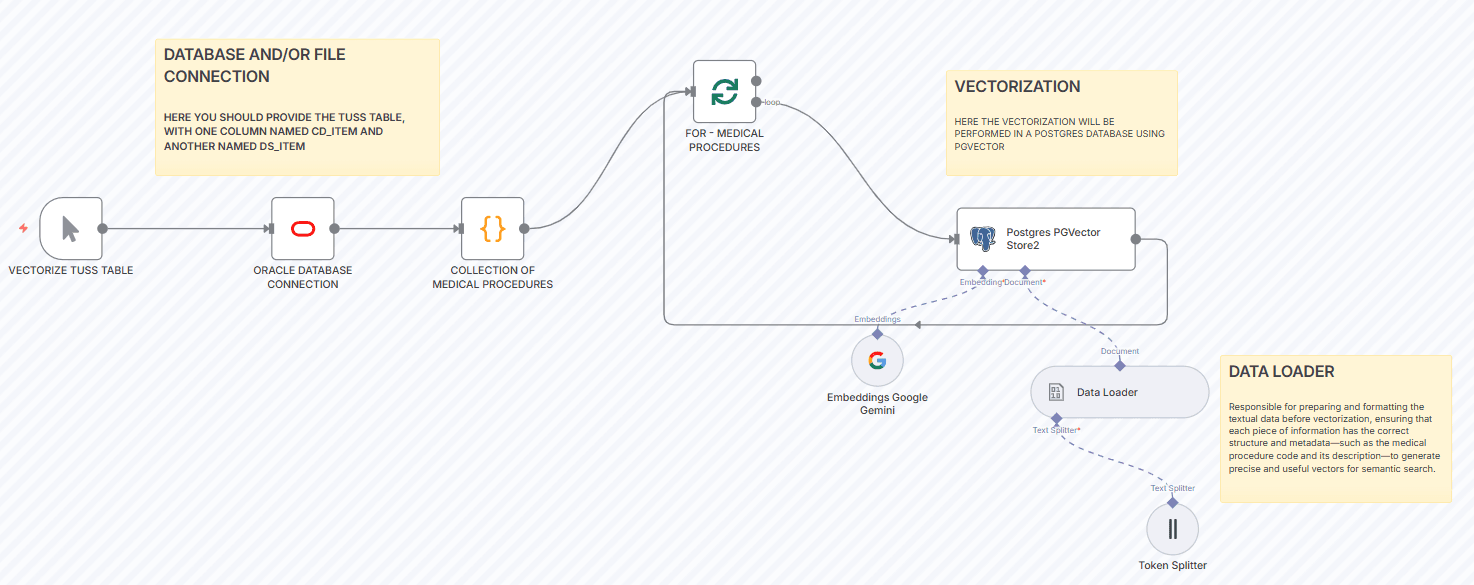
Step 1: Data Extraction and Preparation
The workflow connects to your medical database or CSV file containing TUSS procedure data. It extracts key fields including procedure codes (CD_ITEM) and descriptions (DS_ITEM), then cleans and standardizes the text for optimal AI processing.
Step 2: AI-Powered Vector Generation
Each medical procedure description is sent to Google Gemini's embedding API, which converts the text into a high-dimensional vector (typically 768-1536 dimensions). These vectors mathematically represent the semantic meaning of each procedure.
Step 3: Vector Storage and Indexing
The generated vectors are stored in a PostgreSQL database with the pgvector extension. The system creates optimized indexes for fast similarity searches, enabling sub-second retrieval even across millions of medical procedures.
Step 4: Semantic Search Implementation
When a user searches for a medical concept, their query is also converted to a vector, and the system finds the most similar procedure vectors using cosine similarity or other distance metrics, returning clinically relevant results.
Pro tip: Start with a subset of your most frequently searched procedures to validate accuracy before processing your entire database. This allows you to fine-tune the preprocessing steps for your specific terminology.
Who This Is For
This automation is ideal for healthcare providers, medical billing companies, health insurance organizations, clinical researchers, and healthcare technology platforms. Specifically, it benefits:
Hospital Systems needing to improve clinical documentation and procedure coding accuracy. Health Insurance Companies that process thousands of claims daily and need efficient procedure matching. Medical Research Institutions conducting studies that require identifying similar treatments across different coding systems. Healthcare SaaS Platforms building intelligent features for their users.
The workflow is particularly valuable for organizations dealing with multiple medical coding systems (TUSS, ICD, CPT, SNOMED CT) or operating in multilingual healthcare environments.
What You'll Need
- n8n Instance: Self-hosted n8n installation or n8n.cloud account
- Database Access: PostgreSQL database with pgvector extension enabled
- AI API Credentials: Google Gemini API key or alternative embedding service
- Medical Data Source: TUSS table or similar medical procedure database with procedure codes and descriptions
- Technical Knowledge: Basic understanding of database connections and API authentication
Quick Setup Guide
- Download the template and import it into your n8n instance
- Configure your database credentials in the PostgreSQL node
- Add your Google Gemini API key to the credentials manager
- Update the data source connection to point to your TUSS table or CSV file
- Run the workflow in test mode with a small dataset to verify the pipeline
- Once validated, execute the full workflow to process your entire procedure database
- Implement the search interface using the vector similarity queries provided in the documentation
Important: Ensure your PostgreSQL database has the pgvector extension installed before running the workflow. You can install it using CREATE EXTENSION vector; in your database.
Key Benefits
85-95% Search Accuracy Improvement: Move beyond keyword matching to semantic understanding, dramatically improving clinical search relevance and reducing missed procedure matches.
70% Time Reduction in Procedure Coding: Automate the manual process of looking up and coding medical procedures, allowing staff to focus on higher-value clinical tasks.
Scalable to Millions of Procedures: The vector database architecture handles massive medical datasets efficiently, with search performance that scales logarithmically rather than linearly.
Multilingual Medical Intelligence: AI embeddings understand medical concepts across languages, enabling unified search across international healthcare datasets.
Future-Proof Architecture: Easily swap embedding models or add new medical coding systems without rebuilding your entire search infrastructure.