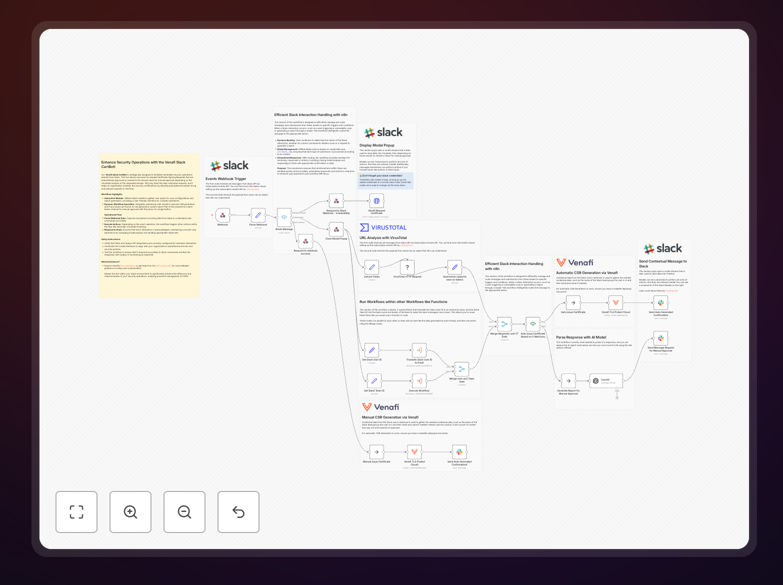
What This Workflow Does
This Venafi Slack Cert Bot automates the entire certificate signing request (CSR) process directly within Slack, transforming how security teams manage digital certificates. Instead of relying on manual ticketing systems or email chains, employees can request certificates through interactive Slack modals, while security operations automatically validate requests against threat intelligence and enforce compliance policies.
The workflow bridges communication gaps between development teams needing certificates and security teams responsible for approval. It automatically scans requested domains against VirusTotal for security threats, routes suspicious requests for manual review, and approves low-risk certificates instantly. This eliminates certificate-related deployment delays while maintaining rigorous security controls.
How It Works
1. Slack Command Initiation
Users trigger the workflow by typing a slash command in Slack (like /request-certificate). This opens an interactive modal where they enter certificate details including domain, purpose, and validity period. The workflow captures this data and begins the automated validation process.
2. Automated Security Validation
The system automatically submits the requested domain to VirusTotal for threat analysis. It checks for malware, phishing associations, and reputation scores. Based on predefined security thresholds, the workflow decides whether to auto-approve the request or escalate it for manual security review.
3. Certificate Generation & Approval
For approved requests, the workflow connects to Venafi Cloud to generate the certificate signing request. If manual review is needed, it creates a detailed security report and posts it to a dedicated security channel in Slack, where team members can review and approve with a single button click.
4. Notification & Audit Logging
Once processed, the workflow notifies the requester of the outcome in Slack and logs all actions for compliance auditing. This creates a complete audit trail of who requested what certificate, when it was approved, and by whom—essential for security compliance requirements.
Who This Is For
This automation is ideal for IT security teams, DevOps engineers, and platform teams in organizations that manage multiple digital certificates. Companies with compliance requirements (PCI DSS, HIPAA, SOC 2) benefit significantly from the audit trail and policy enforcement. Development teams that frequently need SSL/TLS certificates for applications will appreciate the reduced wait times.
Medium to large enterprises using Venafi for certificate management and Slack for internal communication will see immediate value. Security-conscious organizations that want to maintain control while speeding up certificate issuance will find this workflow transforms their certificate lifecycle management.
What You'll Need
- Venafi Cloud Account: API access to generate and manage certificates
- Slack Workspace: With permissions to create slash commands and post to channels
- VirusTotal API Key: For domain security scanning (free tier available)
- n8n Instance: Self-hosted or cloud version with webhook capabilities
- Security Policy Definitions: Clear rules for auto-approval vs manual review thresholds
Quick Setup Guide
Follow these steps to implement the Venafi Slack Cert Bot in your environment:
- Import the Template: Download the JSON file and import it into your n8n instance
- Configure API Connections: Set up credentials for Venafi, Slack, and VirusTotal in n8n
- Create Slack Slash Command: In your Slack workspace, create a new slash command pointing to your n8n webhook URL
- Define Security Rules: Adjust the VirusTotal threshold values in the "If" nodes based on your security policy
- Test the Workflow: Use the slash command in Slack with a test domain to verify the complete flow
- Deploy to Production: Activate the workflow and train your team on the new certificate request process
Pro tip: Start with conservative security thresholds for auto-approval and gradually expand as you gain confidence in the automated validation. Create a dedicated #certificate-requests Slack channel for manual reviews to maintain visibility.
Key Benefits
Reduce certificate issuance time from days to minutes. What previously required ticket submission, manual review, and back-and-forth communication now happens in real-time through automated validation and approval workflows.
Eliminate security risks from expired certificates. Automated processes ensure certificates are managed according to policy, with renewal reminders and consistent enforcement that prevents service outages due to certificate expiration.
Create comprehensive audit trails for compliance. Every certificate request, approval decision, and issuance is automatically logged with timestamps, user information, and security validation results—perfect for compliance audits.
Free up security team bandwidth for strategic work. By automating routine certificate approvals, security professionals can focus on threat hunting, vulnerability management, and security architecture rather than administrative tasks.
Improve developer experience and productivity. Development teams get the certificates they need quickly through a familiar Slack interface, reducing deployment blockers and improving overall development velocity.