What This Workflow Does
This automation solves a critical problem for businesses using Keap/Infusionsoft: maintaining accurate, deliverable mailing addresses in your CRM. Without address verification, you risk wasting significant money on undeliverable direct mail, missing important communications with customers, and working with outdated contact information that hurts your marketing ROI.
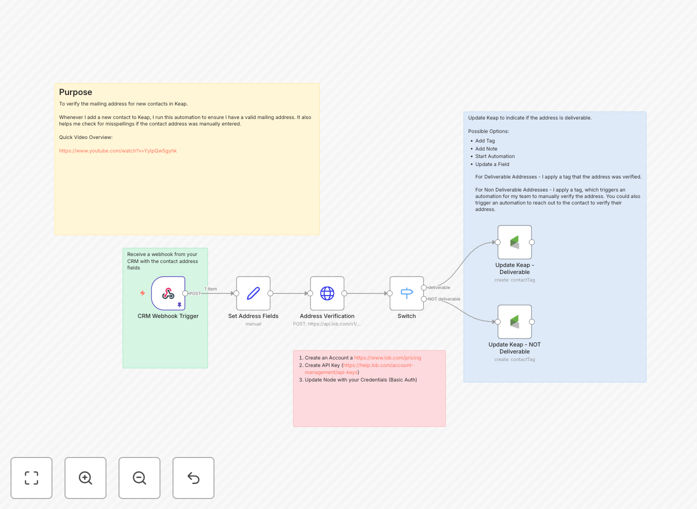
The workflow automatically validates every new contact's mailing address using Lob's professional address verification API. When a contact is created or updated in Keap/Infusionsoft, the system checks the address against USPS databases, confirms deliverability, standardizes formatting, and updates the CRM record with verification status. This happens in real-time, ensuring your database stays clean without manual intervention.
Beyond simple validation, the workflow can trigger follow-up actions based on verification results. Deliverable addresses get marked as verified, while problematic addresses can trigger alerts to your team or automatic requests for corrected information from the contact.
How It Works
Step 1: Contact Creation Trigger
The workflow activates whenever a new contact is created or updated in Keap/Infusionsoft. A webhook captures the contact details, including the mailing address fields that need verification.
Step 2: Address Data Preparation
The system extracts and formats the address components (street, city, state, ZIP) into the structure required by Lob's API. This includes handling potential data inconsistencies and missing information that commonly occur in manual data entry.
Step 3: Lob API Verification
The formatted address is sent to Lob's verification endpoint, which checks it against USPS databases. The API validates the address exists, confirms deliverability, adds missing ZIP+4 codes, standardizes abbreviations, and provides a confidence score for the verification.
Step 4: Result Processing & CRM Update
Based on Lob's response, the workflow updates the Keap/Infusionsoft contact record. Verified addresses get marked with a custom field indicating validation status and confidence level. Undeliverable addresses trigger appropriate follow-up actions defined in your automation rules.
Step 5: Notification & Reporting
Optionally, the system can send notifications to your team about verification results, generate reports on address quality trends, or trigger additional workflows for contacts needing attention.
Who This Is For
This automation is ideal for businesses that rely on accurate mailing addresses for customer communications, marketing campaigns, or fulfillment operations. E-commerce companies sending physical products, service businesses with field teams, marketing agencies running direct mail campaigns, and any organization using Keap/Infusionsoft for CRM will benefit significantly.
Particularly valuable for companies experiencing high undeliverable mail rates, spending significant budget on postage, or struggling with data quality in their CRM. Sales teams that depend on accurate contact information for territory management and customer outreach will see immediate improvements in data reliability.
What You'll Need
- Keap/Infusionsoft Account with API access enabled and appropriate permissions to read contact data and update custom fields.
- Lob Account with API credentials (Lob offers a free tier with 300 US address verifications per month).
- n8n Instance (self-hosted or cloud) with webhook capabilities and HTTP request nodes available.
- Custom Fields in Keap/Infusionsoft to store verification status, confidence scores, and last verification date.
- Webhook Configuration in Keap/Infusionsoft to trigger the workflow on contact creation/updates.
Pro tip: Start with Lob's free tier (300 verifications/month) to test the workflow. Most small businesses find this sufficient for new contact verification, while larger operations can upgrade based on volume needs.
Quick Setup Guide
- Download the template using the button above and import it into your n8n instance.
- Configure Keap/Infusionsoft credentials in the webhook and API nodes with your account's API key.
- Set up Lob authentication with your Live API key from the Lob dashboard (test keys won't work for actual verification).
- Map the address fields from Keap/Infusionsoft to match your contact field structure.
- Create custom fields in Keap/Infusionsoft for verification status, confidence score, and last verified date.
- Test with sample contacts to ensure addresses are being verified correctly and CRM updates are working.
- Activate the webhook in Keap/Infusionsoft to begin automatic verification of new contacts.
Key Benefits
Reduce wasted postage costs by 15-30% by eliminating undeliverable addresses before they enter your mailing campaigns. Every returned piece of mail represents wasted printing, postage, and processing costs that add up quickly.
Improve marketing campaign ROI through higher deliverability rates. Verified addresses ensure your marketing messages reach intended recipients, increasing response rates and conversion opportunities from direct mail efforts.
Maintain CRM data hygiene automatically without manual data cleaning sessions. The workflow validates addresses in real-time, preventing bad data from entering your system and keeping existing records up-to-date.
Save hours of manual verification work each month. What previously required checking addresses against multiple databases or using separate verification tools now happens automatically behind the scenes.
Enhance customer experience by ensuring important communications and shipments reach customers reliably. Nothing damages customer relationships faster than missed deliveries or returned mail.