Telegram Slack AI Translation Voice Automation Multilingual Teams

Voice Translator Bridge: Telegram to Slack with AI

Automatically transcribe and translate voice messages between languages using OpenAI Whisper and GPT-4o-mini. Connect Telegram and Slack for seamless multilingual team communication.

Download Template JSON Β· n8n compatible Β· Free
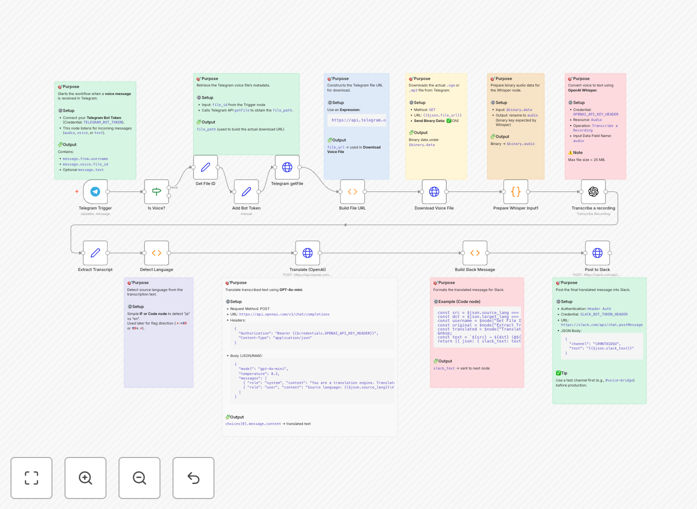
Visual diagram showing voice message flow from Telegram to Slack with AI transcription and translation

What This Workflow Does

This automation solves a common problem for distributed, multilingual teams: voice messages sent in one language on Telegram need to be accessible to everyone in Slack. Manually transcribing and translating these messages is time-consuming and creates communication delays.

The workflow automatically detects when a voice message arrives in a Telegram group or channel, downloads the audio file, transcribes it to text using OpenAI's Whisper model, detects the source language, translates it to your target language using GPT-4o-mini, and posts the cleaned-up translation with attribution into your designated Slack channel. It preserves the speaker's identity and adds appropriate language flags for clarity.

This creates a seamless bridge between voice-based communication in Telegram and text-based collaboration in Slack, breaking down language barriers without changing how team members naturally communicate.

How It Works

The automation follows a logical sequence to transform voice messages into translated text:

1. Telegram Voice Message Trigger

The workflow monitors a specified Telegram channel or group for new voice messages. When a message arrives, it captures the audio file, sender information, and timestamp.

2. Audio Download & Preparation

The audio file is downloaded from Telegram's servers and prepared for processing. The workflow handles various audio formats and ensures the file is within Whisper's size limits (under 25MB).

3. Speech-to-Text Transcription

Using OpenAI's Whisper API, the audio is converted to text. Whisper excels at handling accents, background noise, and conversational speech across numerous languages.

4. Language Detection & Translation

The workflow detects the source language, then uses GPT-4o-mini to translate the text to your target language (default: Japanese ↔ English). GPT provides context-aware translations that preserve meaning better than simple word-for-word translation.

5. Slack Message Formatting & Delivery

The translated text is formatted with the original sender's name, language flags (πŸ‡―πŸ‡΅β†’πŸ‡ΊπŸ‡Έ), and timestamp, then posted to your specified Slack channel. Team members can read the translation alongside any follow-up discussion.

Who This Is For

This workflow is ideal for distributed teams, international companies, bilingual project managers, and global communities that use both Telegram and Slack. It's particularly valuable for:

  • Multilingual project teams with members in different countries
  • Customer support teams handling voice messages from international clients
  • Content creators and agencies collaborating across language barriers
  • Educational institutions with international student communities
  • Development teams using Telegram for quick updates but Slack for documentation

What You'll Need

  1. Telegram Bot Token: Create a bot via @BotFather and add it to your Telegram group/channel
  2. OpenAI API Key: For accessing Whisper and GPT-4o-mini models
  3. Slack Bot Token: Create a Slack app with chat:write, files:write, and channels:history permissions
  4. n8n instance: Self-hosted or n8n.cloud account
  5. Target languages configured: Define which languages to translate between

Pro tip: For sensitive conversations, consider using OpenAI's enterprise API with data processing agreements, or explore self-hosted Whisper alternatives for complete data privacy.

Quick Setup Guide

Get this automation running in under 15 minutes:

  1. Import the template: Download the JSON file above and import it into your n8n instance
  2. Configure credentials: Add your Telegram Bot Token, OpenAI API Key, and Slack Bot Token to n8n's credentials manager
  3. Set channel IDs: Update the Telegram chat ID and Slack channel ID in the workflow nodes
  4. Adjust language settings: Modify the "Detect Language" and "Translate" nodes if you need different language pairs
  5. Test with a voice message: Send a test voice message in your Telegram group to verify the full flow works
  6. Activate the workflow: Toggle the workflow to "Active" and monitor the executions tab for any errors

Key Benefits

Eliminates manual transcription work that typically takes 5-10 minutes per voice message. The automation handles everything in seconds, freeing team members for higher-value work.

Reduces language barriers in real-time by providing instant translations. Team members can communicate naturally in their preferred language without worrying about excluding others.

Improves meeting and update accessibility by creating searchable, translated text records of voice communications that can be referenced later.

Maintains communication context with proper attribution, timestamps, and language indicators, ensuring everyone understands who said what and when.

Scalable across multiple teams and languages – once configured, the workflow can be duplicated for different language pairs or channel combinations without additional development.

Frequently Asked Questions

Common questions about voice translation automation and integration

You can automate voice message translation by using a workflow that connects Telegram and Slack with AI services like OpenAI Whisper and GPT-4o-mini. When a voice message is sent in a Telegram group, the workflow automatically downloads the audio, transcribes it to text using Whisper, detects the language, translates it to your target language using GPT, and posts the translated text into a designated Slack channel. This eliminates manual transcription and translation work.

This approach works particularly well for teams that prefer voice communication for quick updates but need written records for documentation and for members who speak different languages. The automation maintains the natural flow of voice communication while making it accessible to everyone.

Automating voice message translation saves significant time for distributed teams, reduces language barriers in real-time communication, and ensures no important spoken updates are missed. It allows team members to communicate naturally via voice in their preferred language while making the content accessible to everyone in their preferred written format.

Beyond time savings, this automation improves collaboration efficiency and reduces misunderstandings in multilingual environments. It creates searchable archives of voice communications, enables asynchronous participation for team members in different time zones, and maintains the personal touch of voice messages while overcoming language limitations.

OpenAI's Whisper model is excellent for accurate speech-to-text transcription across many languages. For translation, GPT-4o-mini provides high-quality, context-aware translations at a lower cost than larger models. The combination handles accents, background noise, and conversational speech well while maintaining the speaker's intent.

For specialized business terminology, you can fine-tune prompts to improve industry-specific accuracy. Alternative options include Google's Speech-to-Text for transcription and DeepL for translation, though OpenAI's integrated ecosystem often provides simpler implementation and consistent quality across both tasks.

Modern AI translation for business communication is highly reliable for everyday conversations, meeting notes, and updates. While perfect for internal team communication, for legal contracts or highly technical documents, human review is still recommended. The accuracy for common business languages like English, Spanish, Japanese, and German is typically 95%+ for clear audio.

The workflow can include confidence scoring and flag low-confidence translations for review. For critical communications, you can implement a hybrid approach where translations are automatically generated but flagged for human verification when confidence scores fall below a threshold you define.

For short voice messages (under 60 seconds), the complete process from Telegram receipt to Slack delivery typically takes 5-15 seconds. Transcription via Whisper takes 2-5 seconds, translation via GPT-4o-mini adds 2-3 seconds, and API calls between platforms add minimal overhead.

For longer recordings, processing time scales linearly with audio length. The workflow runs in near real-time, making it practical for live team communication. You can optimize performance by processing messages in parallel for high-volume scenarios or implementing queue management for burst traffic.

Yes, the workflow can be configured to handle multiple input and output languages simultaneously. You can set up language detection to automatically identify the source language, then translate to one or multiple target languages.

For teams with members speaking different languages, you could configure the workflow to post translations in English, Spanish, and Japanese in parallel threads, ensuring everyone receives the message in their preferred language. The system can also route messages based on language detectionβ€”for example, Spanish messages to the Spanish-speaking team channel, Japanese to the Japanese channel, with English as the common bridge language.

For sensitive conversations, use OpenAI's API with data processing agreements that ensure your audio and text data isn't used for training. Alternatively, consider self-hosted transcription models like Whisper.cpp for complete data control.

The workflow should be configured to delete audio files after processing, and you can implement end-to-end encryption for the audio transfer between Telegram and your processing server before it reaches external APIs. For highly regulated industries, you can keep all processing on-premises using open-source models, though this requires more technical setup and maintenance.

  • Use API providers with explicit data privacy commitments
  • Implement automatic data deletion policies
  • Consider regional API endpoints for data residency compliance

Absolutely. GrowwStacks specializes in building custom automation solutions for unique business needs. We can create tailored voice translation workflows that integrate with your specific communication stack, add custom language pairs, implement security protocols for sensitive conversations, and optimize for your team's workflow patterns.

We handle the technical implementation so you get a production-ready system without the development overhead. Our team can also add features like sentiment analysis, keyword extraction, automatic summarization, or integration with your CRM and project management tools to create a comprehensive communication automation system.

  • Custom integration with your existing tools
  • Industry-specific terminology optimization
  • Compliance with your security and data policies
  • Ongoing maintenance and support

Need a Custom Voice Translation Automation?

This free template is a starting point. Our team builds fully tailored automation systems for your specific business needs.