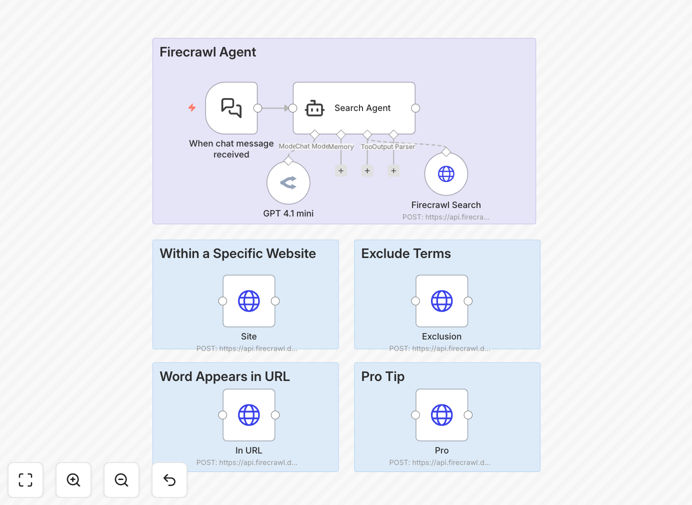
What This Workflow Does
This n8n workflow automates the process of extracting structured data from websites while capturing visual screenshots - all powered by AI. Instead of writing complex scraping code, you simply describe what information you need in natural language. The system handles website navigation, content extraction, and documentation automatically.
Traditional web scraping requires technical expertise to maintain as websites change. This AI-powered approach adapts automatically, understanding page structures and extracting the relevant data you specify. The screenshot functionality provides visual verification alongside structured data outputs - perfect for compliance, research, and competitive analysis.
How It Works
1. Natural Language Query Processing
The workflow starts by processing your natural language query through GPT 4.1 mini, which understands your data requirements and converts them into optimized search parameters for Firecrawl's API.
2. AI-Powered Web Crawling
Firecrawl's intelligent crawler navigates the target website, handling JavaScript rendering, pagination, and dynamic content. It extracts the requested data while maintaining context across pages.
3. Visual Documentation
For each data point extracted, the system captures a screenshot of the source page with highlighted relevant sections. This creates an audit trail and helps verify data accuracy.
4. Structured Output Delivery
The final output combines clean, structured data (in JSON or spreadsheet format) with corresponding screenshot URLs, ready for analysis in your preferred business tools.
Who This Is For
This workflow is ideal for market researchers, competitive intelligence teams, e-commerce managers, and content strategists who need to regularly monitor websites. It eliminates the manual work of copying data and taking screenshots while providing more consistent, reliable results than human researchers.
Pro tip: Use this workflow to automate daily competitor price monitoring while capturing product page screenshots for visual merchandising analysis.
What You'll Need
- An n8n instance (cloud or self-hosted)
- Firecrawl API access (free tier available)
- OpenAI API key for GPT 4.1 mini
- Storage solution for screenshots (S3, Google Drive, etc.)
Quick Setup Guide
- Download the JSON template file
- Import into your n8n instance
- Configure your Firecrawl and OpenAI API credentials
- Set your target URLs and data requirements
- Define output destinations (Google Sheets, database, etc.)
- Test with sample queries
- Schedule regular runs or trigger via webhook
Key Benefits
Reduce research time by 80%: Automate what would take hours of manual copying and screenshotting into minutes of automated processing.
Improve data accuracy: AI extraction reduces human error in data collection and provides visual verification.
Scale monitoring efforts: Track dozens of websites simultaneously without additional staffing.
Stay compliant: Screenshot documentation creates an audit trail for data sources.
Adapt to changes: The AI understands website redesigns better than static scraping rules.