What This Workflow Does
Website and API downtime costs businesses revenue, damages reputation, and frustrates users. Manual monitoring is unreliable and doesn't scale. This automated health monitoring system performs regular HTTP checks on your critical endpoints, validates their responses, and immediately alerts your team when something goes wrong.
The workflow acts as your 24/7 digital watchdog. It sends requests to configured URLs (websites, REST APIs, internal services), analyzes HTTP status codes, checks response times, and can even validate specific JSON fields for APIs. When a service fails or responds slower than your SLA, it triggers notifications through Slack, email, SMS, or other channels you configure.
Beyond simple uptime checking, this template provides actionable diagnostics. It doesn't just tell you something is broken—it tells you why (server error, timeout, incorrect response) and provides the exact failure details needed for rapid troubleshooting.
How It Works
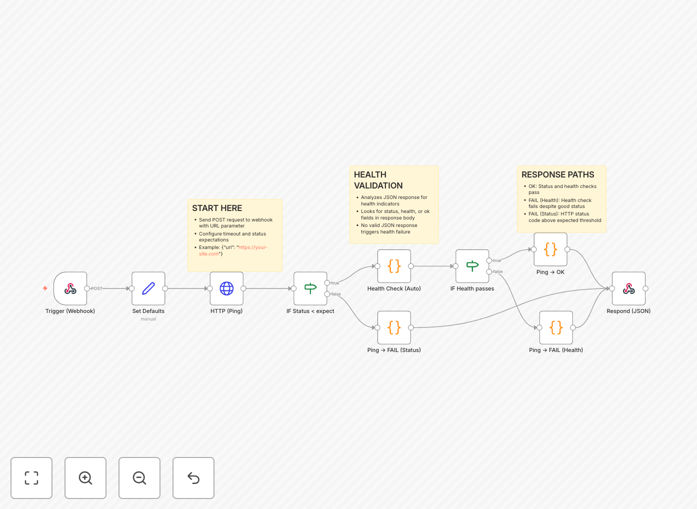
The workflow follows a logical sequence of checks, validations, and notifications.
1. Scheduled Trigger & Target Configuration
A schedule node initiates checks at regular intervals (every 5 minutes, hourly, etc.). You configure the target URLs to monitor—these can be public websites, internal APIs, third-party services, or database health endpoints.
2. HTTP Request Execution
The core HTTP Request node sends GET or POST requests to each configured endpoint. You can customize timeout thresholds, headers, and authentication. The node captures the full response: status code, headers, body, and response time.
3. Response Validation & Analysis
Conditional logic nodes analyze the response. They check if the HTTP status code matches expected values (200-299 for success), verify response times against performance thresholds, and optionally parse JSON responses to validate specific data fields that indicate true service health.
4. Failure Detection & Alert Routing
If any validation fails, the workflow branches to alerting nodes. Different failure types can trigger different responses: critical outages might send SMS alerts, while performance degradation might only notify Slack. The workflow includes retry logic to confirm failures before alerting.
5. Notification Delivery
Alert nodes send formatted messages to your chosen channels. Notifications include the failing URL, error details, status code, response time, and timestamp. For recurring issues, the workflow can suppress duplicate alerts to avoid notification fatigue.
6. Health Status Logging
All check results—both successes and failures—are logged to a database or spreadsheet. This creates an audit trail for compliance and provides historical data for uptime reporting and trend analysis.
Who This Is For
This automation is essential for any business that depends on digital services being available. DevOps teams use it to monitor production infrastructure. E-commerce companies monitor checkout APIs and payment gateways. SaaS businesses ensure their customer-facing APIs meet SLAs. IT departments track internal tool availability. Marketing teams verify landing page uptime during campaigns.
If you manage websites, APIs, microservices, or any digital service where downtime means lost revenue or productivity, this workflow provides the automated oversight you need. It's particularly valuable for small to medium businesses that can't justify expensive enterprise monitoring suites but still require reliable, customizable monitoring.
What You'll Need
- n8n instance – Self-hosted or n8n.cloud account
- Target URLs to monitor – Your website, API endpoints, or third-party services
- Notification channels – Slack, email, SMS, or other alerting services configured in n8n
- Expected response criteria – Know what HTTP status codes and response times indicate healthy vs. unhealthy services
- Optional: Storage – Google Sheets, Airtable, or database to log check results
Quick Setup Guide
- Import the template – Download the JSON file above and import it into your n8n instance.
- Configure target URLs – Edit the HTTP Request node with your website/API endpoints to monitor.
- Set validation rules – Adjust the If nodes to match your expected status codes (200 OK, 201 Created, etc.) and maximum acceptable response times.
- Connect alert channels – Replace placeholder notification nodes with your actual Slack, email, or SMS integrations.
- Adjust schedule – Modify the Schedule Trigger node to run at your desired frequency (every 5, 15, or 60 minutes).
- Test and activate – Execute the workflow manually to verify it works, then activate it to run automatically.
Pro tip: Start with conservative alert thresholds to avoid false positives. Monitor during low-traffic periods first, then adjust based on real performance data.
Key Benefits
Proactive issue detection: Catch problems before users report them, reducing support tickets and minimizing business impact.
Reduced manual oversight: Eliminate the need for staff to manually check services, saving hours per week across your team.
Comprehensive validation: Go beyond simple "is it up?" checks to validate response content, performance SLAs, and business logic.
Customizable alerting: Route different severity issues to appropriate teams (critical to DevOps, performance issues to developers).
Historical reporting: Build uptime reports and identify patterns in service degradation for capacity planning.