Google Sheets Gmail SEO Automation

Website SEO Health Analytics with Google Sheets

Automated monitoring and reporting for your website's SEO metrics

Download Template JSON · n8n compatible · Free
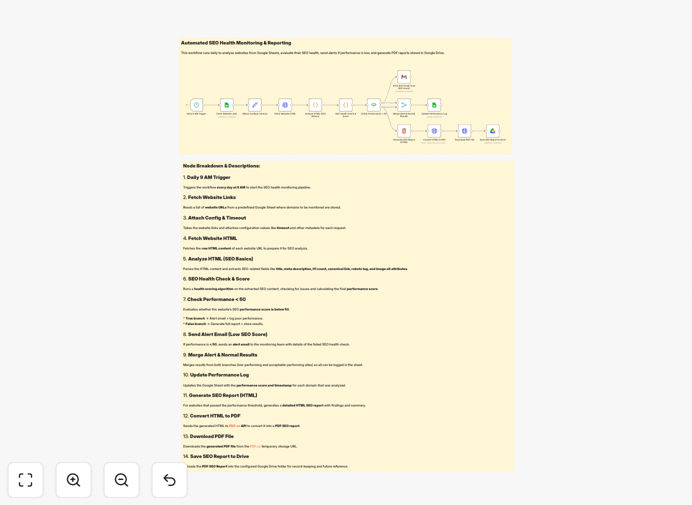
SEO health monitoring workflow interface showing Google Sheets integration

What This Workflow Does

This automated workflow solves the time-consuming task of manually checking SEO metrics across multiple websites. It connects Google Sheets with website crawling and reporting tools to create a comprehensive SEO monitoring system.

The workflow reads a list of website URLs from Google Sheets, fetches each page's HTML, analyzes key SEO elements, scores the page's health, and updates your spreadsheet. For pages scoring below 50, it sends immediate email alerts. For healthy pages, it generates detailed PDF reports stored in Google Drive.

How It Works

1. Daily Website Crawling

The workflow runs on a schedule (default daily) to check all websites in your Google Sheet. It uses HTTP requests to fetch each page's HTML content for analysis.

2. SEO Element Extraction

Key elements like page titles, meta descriptions, H1 tags, canonical URLs, and robots directives are extracted from each page's HTML.

3. Health Scoring

Each page receives a score based on predefined SEO best practices. Missing elements or problematic configurations lower the score.

4. Alert System

Pages scoring below 50 trigger immediate email alerts through Gmail, allowing quick response to critical SEO issues.

5. Reporting

For pages passing the health check, comprehensive PDF reports are generated and saved to Google Drive for historical tracking.

Who This Is For

This workflow is ideal for:

  • SEO agencies managing multiple client websites
  • Marketing teams overseeing company websites
  • Web developers maintaining client sites
  • Content teams ensuring SEO best practices
  • Anyone managing more than 5 websites regularly

What You'll Need

  1. A Google account with Sheets and Drive access
  2. A Gmail account for sending alerts
  3. n8n instance (cloud or self-hosted)
  4. List of website URLs to monitor in Google Sheets
  5. Basic understanding of SEO principles

Quick Setup Guide

  1. Download and import the JSON template into your n8n instance
  2. Connect your Google Sheets, Drive, and Gmail accounts
  3. Configure the URL list in your Google Sheet
  4. Adjust the scoring thresholds if needed
  5. Set your preferred schedule (default is daily)
  6. Test with a few sample URLs
  7. Deploy the workflow

Key Benefits

Save 5-10 hours weekly by automating manual SEO checks across multiple websites.

Never miss critical SEO issues with instant email alerts for problematic pages.

Maintain consistent reporting with automatically generated PDFs stored in Google Drive.

Improve team collaboration by centralizing SEO data in shared Google Sheets.

Customizable to your needs with adjustable scoring and additional metrics.

Frequently Asked Questions

Common questions about SEO automation and integration

Automating SEO monitoring saves hours of manual work by automatically tracking key metrics like page titles, meta descriptions, and canonical tags across multiple websites. It provides consistent reporting and immediate alerts when issues are detected.

For agencies managing dozens of client sites, automation ensures no site gets overlooked while freeing up time for strategic SEO work rather than manual checks.

For most businesses, weekly SEO checks are sufficient. High-traffic sites or those undergoing frequent content updates may benefit from daily monitoring to catch issues quickly.

This workflow lets you easily adjust the monitoring frequency to match your site's needs without increasing manual effort.

Key metrics include page titles (length and uniqueness), meta descriptions, H1 tags, canonical tags, robots directives, and basic performance indicators like page load speed.

The workflow focuses on technical SEO elements that are easily measurable through automation, providing a solid foundation for more advanced SEO strategies.

Yes, this workflow template can be modified to track additional elements like schema markup, image alt text, or specific content patterns that matter for your SEO strategy.

The modular design makes it easy to add new checks or adjust scoring weights based on your priorities.

The workflow generates comprehensive PDF reports using Google Drive integration, compiling all SEO metrics into an easy-to-share format for teams or clients.

Reports include visual indicators for problem areas, trend data when available, and clear recommendations for improving each page's SEO health.

You can modify the workflow to use Airtable, Notion databases, or direct database integrations if you prefer alternatives to Google Sheets for data storage.

The core monitoring functionality remains the same regardless of where you choose to store the collected SEO data.

Yes, our team specializes in building tailored SEO automation solutions that integrate with your existing tools and track the specific metrics that matter most to your business.

We can create custom workflows that include advanced features like competitor tracking, keyword ranking integration, or specialized reporting formats.

Need a Custom SEO Automation?

This free template is a starting point. Our team builds fully tailored automation systems for your specific business needs.