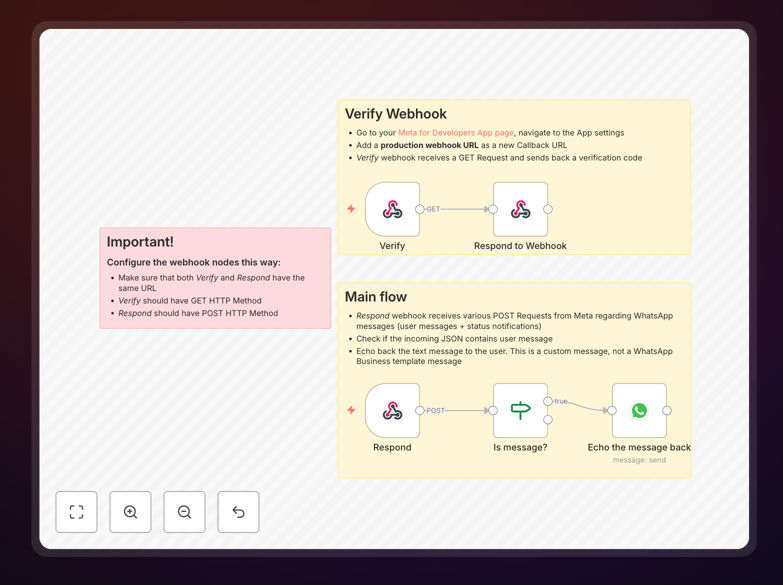
What This Workflow Does
This WhatsApp Starter Workflow solves the challenge of managing high volumes of customer messages on WhatsApp Business. Many businesses struggle to respond quickly to inquiries, leading to frustrated customers and missed sales opportunities. The template provides an automated system that can instantly reply to common questions, route complex queries to the right team, and maintain professional communication standards.
The workflow connects WhatsApp Business with your existing systems through n8n, allowing you to create customized response logic based on message content, customer data, and business rules. It transforms WhatsApp from a basic messaging app into a powerful customer engagement channel that operates 24/7 without constant staff monitoring.

How It Works
1. Message Receiving
The workflow monitors your WhatsApp Business account for new incoming messages. When a message arrives, it captures the content, sender information, and any media attachments. This triggers the automation process.
2. Content Analysis
The system analyzes the message text using predefined keywords and natural language processing. It categorizes the inquiry type (e.g., product question, support request, order status) and determines the appropriate response path.
3. Automated Responses
For common questions, the workflow sends instant replies using your approved message templates. These can include product information, business hours, or FAQ answers. The responses maintain your brand voice while providing accurate information.

4. Complex Query Handling
When messages require human attention, the workflow collects preliminary information and routes the conversation to the appropriate department. It can create support tickets, notify sales teams, or escalate urgent issues based on your business rules.
Pro tip: Combine this workflow with your CRM to personalize responses using customer purchase history and preferences.
Who This Is For
This template is ideal for e-commerce businesses, service providers, and support teams using WhatsApp as a primary communication channel. It works particularly well for:
- Online stores receiving product inquiries
- Service businesses managing appointments
- Support teams handling common technical questions
- Sales teams qualifying leads via WhatsApp
- Local businesses with high message volumes
What You'll Need
- An active WhatsApp Business account
- n8n instance (cloud or self-hosted)
- WhatsApp Business API access
- Approved message templates (for certain response types)
- Basic understanding of n8n workflows
Quick Setup Guide
- Download the template file
- Import into your n8n instance
- Connect your WhatsApp Business account credentials
- Customize the response logic for your business needs
- Test with sample messages
- Deploy the workflow
- Monitor performance and refine as needed
Key Benefits
Reduce response times from hours to seconds by automatically handling common customer inquiries. Customers get instant answers to their questions without waiting for business hours.
Cut support costs by 30-50% while maintaining service quality. The workflow handles routine questions, allowing your team to focus on complex issues that require human expertise.
Increase sales conversion rates by engaging potential customers immediately when they show interest. Automated follow-ups and quick answers to product questions shorten the buying journey.
Scale your WhatsApp support without adding staff. The system can handle hundreds of simultaneous conversations, growing with your business needs.
Improve customer satisfaction with consistent, accurate responses available 24/7. Customers appreciate quick resolutions to their inquiries at any time.