What This Workflow Does
Manual blog publishing is a time-consuming bottleneck for marketing teams. Between content creation, image design, SEO optimization, formatting, scheduling, and notifications, a single post can eat up hours of productive time. This automation eliminates that grind.
This n8n workflow transforms your Google Sheets content calendar into fully published WordPress posts. It pulls blog briefs, generates SEO-optimized articles using AI, creates branded feature images, formats everything for your theme, schedules publication, and alerts your team—all without manual intervention. It's designed for content agencies, marketing teams, and businesses publishing at scale who want to maintain quality while dramatically increasing output.
The system ensures consistency where it matters: SEO metadata is perfectly formatted, images match brand guidelines, internal linking follows best practices, and publishing happens exactly when scheduled. You get the strategic oversight of human editors with the execution speed of automation.
How It Works
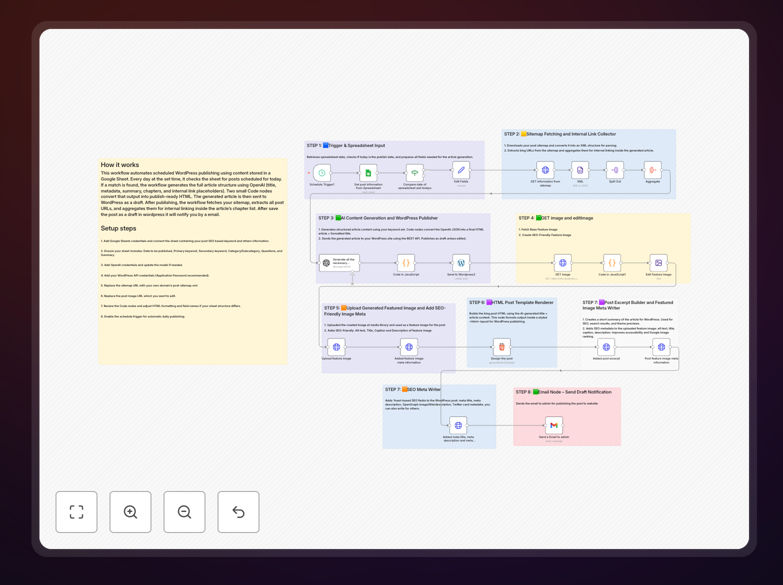
The workflow follows a logical sequence from planning to publication, connecting your favorite tools into a seamless pipeline.
1. Pull Blog Data from Google Sheets
The automation starts by reading your content calendar in Google Sheets. It extracts post titles, target keywords, scheduled dates, target word count, content style guidelines, call-to-action prompts, and any internal/external links that should be included. This structured data becomes the blueprint for everything that follows.
2. Generate AI-Optimized Content
Using AI services (like OpenAI), the workflow crafts complete blog posts. It creates compelling introductions, builds logical chapter structures, incorporates your keywords naturally, writes conclusion paragraphs, and generates relevant FAQ sections—all while maintaining your brand's voice and style guidelines specified in the sheet.
3. Create Custom Feature Images
Visual content gets automated too. The system generates unique featured images for each post using text-to-image AI. It applies your brand colors, fonts, and layout templates, ensuring every post has professional, on-brand imagery without designer involvement.
4. Format & Upload to WordPress
The formatted HTML content, images, and metadata are pushed to WordPress via its REST API. The workflow sets the post status (draft or scheduled), assigns categories and tags, uploads the feature image, and applies Yoast SEO optimization including meta titles, descriptions, and focus keywords.
5. Schedule & Send Notifications
Posts are scheduled based on your calendar dates. Once live, automated email notifications are sent to your team or clients with the post title, link, and brief summary—keeping everyone informed without manual follow-ups.
Pro tip: Use this workflow to batch-create content. Schedule a month's worth of posts in your Google Sheet, and let the automation handle the daily publishing while your team focuses on strategy and promotion.
Who This Is For
This automation is perfect for content marketing agencies managing multiple client blogs, SaaS companies maintaining regular publication schedules, e-commerce brands with product-focused content, and any business scaling their content production. If you're publishing more than 4 blog posts per month, this workflow will save you significant time and ensure consistency.
Marketing managers, content coordinators, SEO specialists, and small business owners will benefit most. The system handles the technical execution while leaving strategic decisions (topic selection, keyword targeting, brand messaging) in human hands where they belong.
What You'll Need
- n8n instance (cloud or self-hosted) with workflow execution capabilities
- Google Sheets with your content calendar structured with columns for title, keywords, date, etc.
- WordPress site with REST API enabled and proper authentication credentials
- AI service account (OpenAI, Anthropic, or similar) for content generation
- Image generation service (like DALL-E or Stable Diffusion) for creating feature images
- Email service (Gmail, SMTP, or email marketing platform) for notifications
Quick Setup Guide
Getting started takes about 30 minutes if you have your accounts ready.
- Download the template using the button above and import it into your n8n instance
- Configure credentials for Google Sheets, WordPress, your AI service, and email in n8n
- Prepare your Google Sheet with the required columns: Title, Keywords, Scheduled Date, Target Word Count, Style Guide, CTA, etc.
- Test with one post by adding a sample row to your sheet and running the workflow manually
- Schedule automation to run daily or weekly based on your publishing frequency
- Monitor and refine the first few posts, adjusting AI prompts or formatting as needed
Pro tip: Start with a small test batch of 2-3 posts. Review the generated content, images, and WordPress formatting before scaling up to full automation. This lets you tweak prompts and settings without affecting your live blog.
Key Benefits
Save 10-15 hours per blog post by eliminating manual formatting, image creation, SEO optimization, and publishing tasks. What used to take a full workday now happens automatically overnight.
Publish 3x more content with the same team resources. Automation handles execution while your team focuses on strategy, research, and promotion—multiplying output without adding staff.
Perfect SEO every time with consistent meta titles, descriptions, URL slugs, and internal linking. The AI follows best practices that human writers sometimes overlook in their rush to publish.
Brand consistency across all content through templated image generation and style guidelines. Every post looks professionally designed even without a graphic designer on staff.
Never miss a publication date with automated scheduling. Your content calendar becomes a self-executing plan that publishes exactly when planned, regardless of vacations or busy periods.