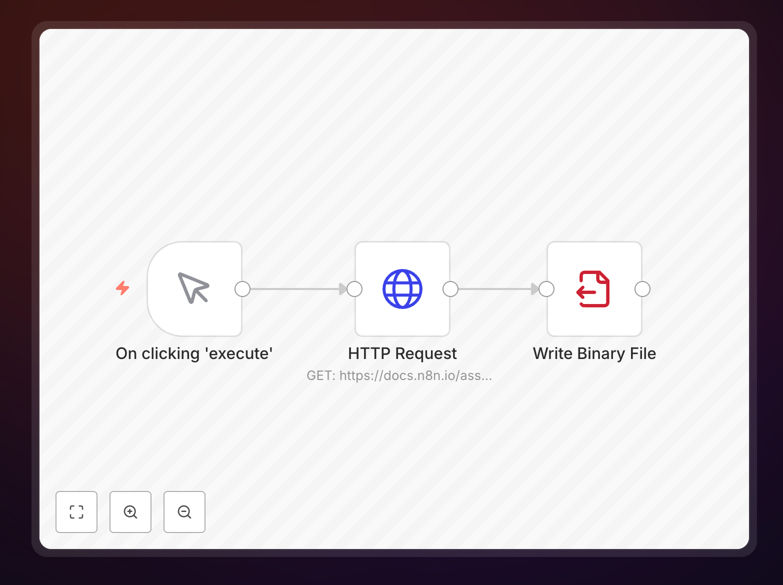
What This Workflow Does
Manual file creation and management on servers is a repetitive, error-prone task that consumes valuable technical resources. This automation workflow solves that problem by programmatically writing files to your host machine based on triggers, schedules, or data inputs.
The workflow handles the entire process: receiving data from various sources, formatting it appropriately, determining the correct file path and name, writing the content to disk, and optionally triggering subsequent actions. This ensures files are created consistently, with proper permissions and structure, without human intervention.
Whether you need to generate daily reports, create configuration files, log system events, or export data for other processes, this automation eliminates the risk of typos, incorrect formats, and missed schedules that plague manual file operations.
How It Works
The workflow follows a logical sequence to ensure reliable file creation every time.
Step 1: Trigger & Data Collection
The workflow begins with a trigger—this could be a schedule (daily at 9 AM), a webhook (incoming API call), or a manual execution. It then collects the necessary data from databases, APIs, or previous workflow steps, ensuring all required information is available for file creation.
Step 2: Data Processing & Formatting
Collected data is processed into the desired file format. The workflow can transform JSON data into CSV, structure log entries with timestamps, or format reports with headers and footers. This step ensures the content is exactly what needs to be written to the file.
Step 3: File Path Determination
Based on rules you configure, the workflow determines where to save the file. This might involve creating date-based directories (like /reports/2024/03/), checking for existing files to avoid overwrites, or organizing files by type or source.
Step 4: File Writing & Validation
The core action: writing the formatted content to the determined location on the host machine. The workflow handles file permissions, ensures disk space is available, and validates that the write operation succeeded before proceeding.
Step 5: Notification & Cleanup
Once the file is successfully created, the workflow can send notifications (email, Slack, etc.), trigger downstream processes that depend on the new file, or perform cleanup operations like archiving old files or updating file indexes.
Who This Is For
This workflow is ideal for system administrators, DevOps teams, data engineers, and business operations managers who need reliable file creation without manual effort. IT departments use it for log file management and configuration deployment. Data teams employ it for report generation and data exports. Business operations leverage it for automated documentation and compliance record-keeping.
Companies with regulatory requirements benefit from the audit trail and consistency. Growing businesses appreciate how it scales file operations without adding headcount. Technical teams value the reduction in "file-related" support tickets and errors.
What You'll Need
- n8n instance – Either self-hosted or n8n.cloud account
- File system access – Appropriate permissions to write to target directories on your host machine
- Source data – Access to databases, APIs, or systems providing content for file creation
- Destination structure – Planned directory organization and naming conventions
- Notification channels (optional) – Email, Slack, or other systems for alerts about file creation
Pro tip: Start with a simple test directory and minimal data to verify the workflow works correctly before pointing it at production file systems. Use descriptive file names with timestamps (e.g., sales-report-2024-03-15.csv) for easy organization and retrieval.
Quick Setup Guide
Follow these steps to implement this file writing automation in your environment.
- Download and import the template JSON file into your n8n instance using the import workflow function.
- Configure the trigger – Set up the schedule or webhook that will initiate file creation based on your needs.
- Connect data sources – Link to your databases, APIs, or other systems that provide content for the files.
- Set file parameters – Define the destination path, file naming convention, and format (CSV, JSON, TXT, etc.).
- Test thoroughly – Run the workflow with test data to ensure files are created correctly in the right locations.
- Add notifications (optional) – Configure alerts to inform your team when important files are created.
- Activate and monitor – Turn on the workflow and check the initial few executions to confirm everything works as expected.
Key Benefits
Eliminate manual errors completely. Automated file creation ensures perfect formatting, correct locations, and consistent naming every single time. No more typos in file names, misplaced documents, or formatting inconsistencies that break downstream processes.
Save 5-15 hours monthly per file process. What used to be a daily 30-minute manual task becomes a fully automated process that runs in seconds. Technical staff can be fully automated, freeing technical staff for higher-value work while ensuring files are always created on schedule.
Improve compliance and auditability. Every file creation is logged with timestamps, source data, and execution details. This creates a verifiable trail for regulatory requirements and makes troubleshooting file-related issues straightforward.
Scale file operations effortlessly. As your business grows and file generation needs increase, the same workflow handles higher volumes without additional effort. Add new file types or destinations by duplicating and modifying the workflow.
Enable reliable downstream processes. Other automated systems can depend on files being created exactly when expected with consistent formats. This reliability unlocks further automation opportunities throughout your business.