What This Workflow Does
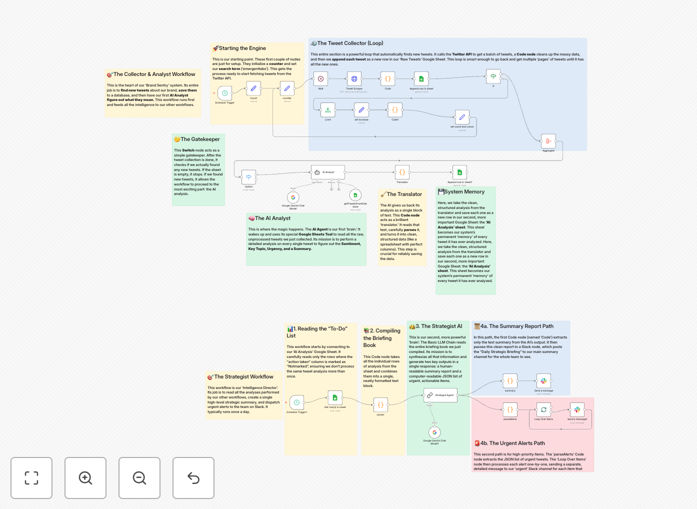
This automated system transforms raw social media data into actionable business intelligence. It serves as the AI analysis engine for comprehensive brand monitoring, designed to process tweets scraped from X (formerly Twitter) and deliver:
- Real-time sentiment scoring of brand mentions using Google Gemini AI
- Automated Slack alerts for urgent negative sentiment spikes
- Daily summary reports of brand perception trends
- Structured data for reputation management and customer service
By automating what would otherwise require manual analysis of hundreds of tweets, this workflow enables marketing and customer service teams to respond strategically to emerging brand perception issues.
How It Works
1. Data Collection
The workflow begins with tweet data collected via scraping tools (like Apify) and stored in Google Sheets. Each new tweet entry triggers the analysis process.
2. AI Sentiment Analysis
Google Gemini processes batches of tweets, evaluating each for:
- Overall sentiment (positive/neutral/negative)
- Emotional tone indicators
- Urgency flags for crisis situations
3. Alert Prioritization
The system separates routine mentions from urgent alerts based on:
- Sentiment severity scores
- Influencer amplification
- Complaint patterns
4. Notification Delivery
Two types of alerts are generated:
- Summary reports: Sent to general brand channels
- Urgent alerts: Directed to response teams with detailed context
Pro tip: Configure different Slack channels for marketing, customer service, and executive teams to ensure the right people see relevant alerts.
Who This Is For
This workflow is ideal for:
- Brand managers monitoring reputation
- Customer service teams identifying pain points
- Marketing teams tracking campaign sentiment
- PR agencies managing client reputations
- Startups monitoring product feedback
What You'll Need
- Google Sheets with tweet data (or connected scraping tool)
- Google Gemini API access
- Slack workspace with appropriate channels
- n8n instance (cloud or self-hosted)
Quick Setup Guide
- Import the JSON template into your n8n instance
- Connect your Google Sheets document
- Configure Gemini API credentials
- Set up Slack webhook URLs
- Adjust sentiment thresholds as needed
- Activate the workflow
Key Benefits
Save 10+ hours weekly by automating manual sentiment analysis of hundreds of tweets.
Respond 5x faster to emerging PR issues with real-time alerts.
Reduce customer churn by identifying and addressing complaints before they escalate.
Improve campaign ROI with data-driven adjustments based on real sentiment.
Benchmark performance with historical sentiment trend analysis.