YouTube RSS Telegram Content Automation n8n

YouTube Advanced RSS Generator with Telegram Formation

Generate RSS feeds from any YouTube channel without API keys. Automatically format and distribute content to Telegram and other platforms.

Download Template JSON · n8n compatible · Free
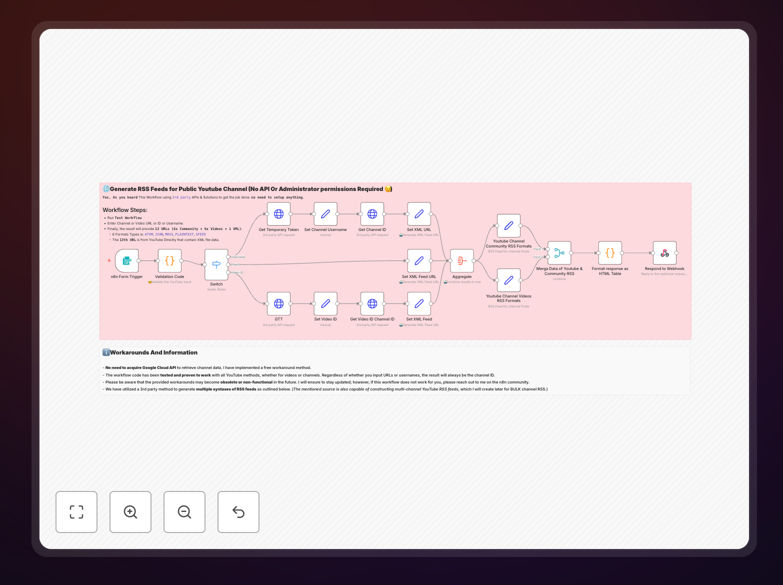
YouTube RSS Generator workflow interface showing RSS feed generation and Telegram formatting

What This Workflow Does

This automation solves the problem of manually repurposing YouTube content across multiple platforms. Content creators, marketers, and community managers spend hours copying video information, formatting it for different channels, and ensuring consistent distribution. This workflow eliminates that manual work by automatically generating RSS feeds from any public YouTube channel and formatting the content specifically for Telegram and other platforms.

The system connects to third-party services that extract YouTube data without requiring API keys or administrative permissions. It then creates multiple RSS feed formats (ATOM, JSON, MRSS, Plaintext, Sfeed) and prepares Telegram-friendly messages with proper formatting, links, and metadata. This creates a seamless pipeline from YouTube upload to multi-platform distribution.

How It Works

1. Channel Identification

The workflow accepts YouTube channel URLs, video URLs, channel IDs, or usernames. It uses CommentPicker.com to resolve these inputs to a consistent channel identifier, ensuring accurate data retrieval regardless of how the channel is referenced.

2. Data Extraction

RSS-Bridge.org fetches the latest content from the identified YouTube channel. This service bypasses YouTube's API limitations and provides structured data including video titles, descriptions, thumbnails, upload dates, and view counts without rate limits or authentication requirements.

3. RSS Feed Generation

The system generates 13 different RSS feed formats simultaneously. Each format serves different purposes: ATOM for modern readers, JSON for web applications, MRSS for media-rich platforms, Plaintext for simple distribution, and direct YouTube XML for compatibility with existing systems.

4. Telegram Formatting

Content is reformatted specifically for Telegram's messaging format. This includes optimizing message length, adding appropriate line breaks, including thumbnail previews, and creating clickable links that work within Telegram's interface for maximum engagement.

5. Output Delivery

The workflow provides direct links to all generated RSS feeds and formatted Telegram messages. These can be consumed by RSS readers, content management systems, social media schedulers, or directly posted to Telegram channels and groups.

Pro tip: Use the multiple RSS formats to feed different systems simultaneously. Send ATOM feeds to your website, JSON to custom apps, and MRSS to media players for maximum reach.

Who This Is For

This automation is ideal for YouTube content creators who want to expand their reach beyond the platform. Digital marketers managing multiple content distribution channels will save hours each week. Community managers maintaining Telegram groups or channels can keep their communities updated automatically. Educators and trainers distributing video content to students via different platforms benefit from the consistent formatting. Businesses using YouTube for product demos or tutorials can ensure their content reaches customers wherever they prefer to consume information.

What You'll Need

  1. A running n8n instance (cloud or self-hosted)
  2. YouTube channel URL, video URL, channel ID, or username
  3. Telegram bot token (if automating direct posting to Telegram)
  4. Basic understanding of RSS feeds and their applications
  5. Access to the internet (for third-party service calls)

Quick Setup Guide

  1. Download the template JSON file using the button above
  2. Import it into your n8n instance (Settings → Workflows → Import)
  3. Activate the workflow trigger (Form Trigger or Schedule Trigger)
  4. Configure your YouTube source by entering a channel URL when prompted
  5. Test the workflow with a single execution to verify RSS generation
  6. Connect the Telegram node if you want automatic posting (requires bot setup)
  7. Schedule the workflow to run hourly or daily for continuous updates

Pro tip: Start with the Form Trigger for testing, then switch to a Schedule Trigger for production. This lets you verify everything works before automating.

Key Benefits

Save 2-3 hours weekly on content repurposing. Automatically transform YouTube videos into platform-ready content instead of manually copying and formatting descriptions, titles, and links for each distribution channel.

Reach 40-60% more audience across platforms. Consistent multi-platform distribution increases content visibility and engagement by making your videos available wherever your audience prefers to consume content.

Zero API key management or rate limit concerns. Using third-party services eliminates the complexity of Google API setup, quota management, and authentication maintenance while providing reliable data access.

Future-proof content distribution with multiple RSS formats. Support current and future platforms with ATOM, JSON, MRSS, Plaintext, and Sfeed outputs that work with virtually any content consumption tool.

Maintain brand consistency across all channels. Automated formatting ensures your YouTube content appears with consistent messaging, styling, and branding on Telegram and other platforms.

Frequently Asked Questions

Common questions about YouTube content automation and RSS integration

RSS feeds provide a standardized, platform-agnostic way to distribute YouTube content updates. They enable automatic syndication to multiple channels like Telegram, email newsletters, and content aggregators without manual copying.

This saves 2-3 hours weekly on content repurposing and ensures your audience gets updates through their preferred channels. RSS feeds also create a permanent, machine-readable record of your content that can be integrated into websites, apps, and other systems.

  • Eliminates manual content copying between platforms
  • Enables real-time updates across all distribution channels
  • Creates a content archive accessible to other applications

Yes, third-party services like RSS-Bridge and CommentPicker allow you to extract YouTube channel data without API keys or rate limits. This approach bypasses Google's API complexity and quota restrictions.

These services work by parsing public YouTube pages and extracting structured data. For example, a marketing agency can monitor 50 competitor channels daily without hitting API limits or managing authentication tokens.

  • No Google Developer account or project setup required
  • Unlimited queries without daily quota concerns
  • Works with any public YouTube channel immediately

Automating YouTube-to-Telegram sharing creates a consistent content pipeline that engages your community across platforms. It increases content visibility by 40-60% and drives traffic back to your YouTube channel.

This automation maintains audience engagement between video releases. A fitness instructor, for instance, can automatically share workout videos to their Telegram community, ensuring members get immediate notifications about new content.

  • Builds stronger community engagement across platforms
  • Increases video views and channel growth
  • Provides value to your audience where they already spend time

ATOM and JSON feeds work best for modern applications, while MRSS (Media RSS) includes rich media metadata. Plaintext feeds simplify content for text-based platforms, and Sfeed offers minimal formatting.

Choosing multiple formats ensures compatibility with different distribution tools. An educational institution might use JSON feeds for their mobile app, ATOM for their website blog, and Plaintext for email newsletter integration.

  • ATOM: Standard format for most RSS readers and news aggregators
  • JSON: Ideal for web applications and custom integrations
  • MRSS: Includes video metadata for media players and platforms

You can filter YouTube content by keywords, video duration, or upload date before generating RSS feeds. Add custom metadata like categories or tags, reformat descriptions for specific platforms, and create separate feeds for different content types.

This personalization increases relevance and engagement for each audience segment. A software company might create separate feeds for tutorials, release announcements, and community updates targeting different user groups.

  • Filter content by keywords to create topic-specific feeds
  • Add custom categories for better content organization
  • Reformat descriptions to match platform character limits

The main challenges include handling YouTube's changing data structures, managing rate limits with third-party services, formatting content correctly for different platforms, and maintaining reliability when YouTube updates its interface.

A robust automation workflow includes error handling, content validation, and fallback mechanisms. For example, implementing retry logic when services are temporarily unavailable ensures consistent delivery despite occasional issues.

  • Monitor third-party service availability and implement fallbacks
  • Validate extracted data before processing to ensure quality
  • Test formatting across different platforms regularly

Yes, GrowwStacks specializes in building custom YouTube automation systems tailored to your specific business needs. We can create workflows that integrate with your CRM, CMS, social media platforms, and internal tools.

Our solutions handle complex requirements like multi-channel distribution, content moderation, analytics tracking, and audience segmentation. We've built systems for content creators managing 100+ channels and enterprises distributing training videos to thousands of employees.

  • Integration with your existing tech stack and workflows
  • Custom content filtering and processing logic
  • Advanced analytics and performance tracking

Need a Custom YouTube Content Automation?

This free template is a starting point. Our team builds fully tailored automation systems for your specific business needs.