What This Workflow Does
For content creators, marketers, and businesses on YouTube, staying ahead means understanding what works for your competitors. Manually checking each channel, copying data, and updating spreadsheets is tedious and time-consuming. This automation solves that by systematically collecting competitor video analytics and organizing them in Google Sheets for instant analysis.
The workflow connects to the YouTube Data API, fetches recent videos from any channel you specify, extracts key performance metrics, and writes everything to a structured spreadsheet. You get a clean dataset showing video titles, view counts, likes, and descriptions—all updated automatically on your schedule. This turns competitive intelligence from a manual chore into a strategic asset.
Beyond basic tracking, this data helps you identify content patterns, benchmark your performance, and discover viral topics before they peak. It's like having a research assistant who works 24/7, giving you more time to create content rather than just analyzing it.
How It Works
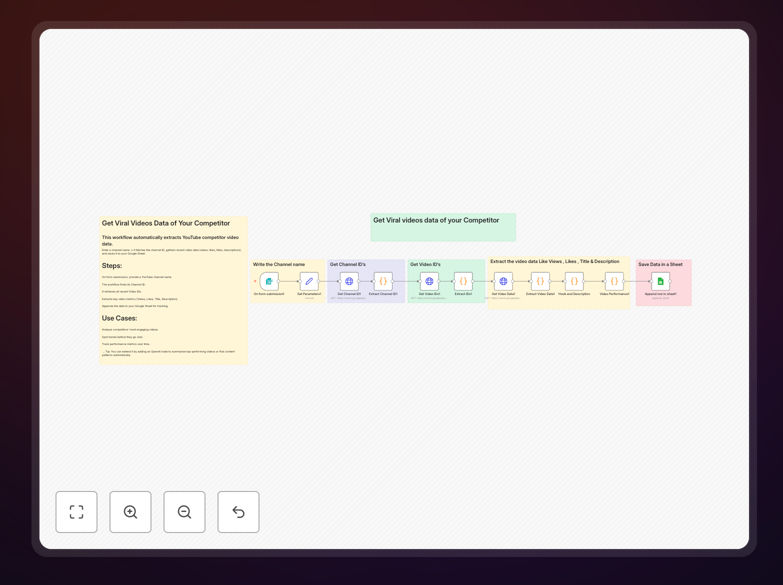
The automation follows a logical sequence to transform a competitor's channel URL into actionable data in your spreadsheet.
1. Channel Identification & API Query
The workflow starts by taking a YouTube channel URL or handle. It uses the YouTube Data API to find the channel's unique ID and retrieve its most recent video uploads. This step ensures you're pulling data from the correct source, even if channels change their display names.
2. Video Data Extraction
For each video found, the automation extracts the title, view count, like count, and description. These metrics provide the core insights: what topics are performing well, how much engagement they're generating, and what messaging the competitor uses to describe their content.
3. Data Transformation & Enrichment
Raw API data gets cleaned and formatted. The workflow calculates engagement rates, timestamps the data collection, and can add custom fields like topic categorization or sentiment indicators. This transforms raw numbers into business-ready insights.
4. Google Sheets Integration
Finally, the processed data is appended to your designated Google Sheet. Each run adds a new row with fresh metrics, building a historical record of competitor performance over time. You can set this to run daily, weekly, or on any schedule that fits your strategy.
Who This Is For
This automation delivers value to several key audiences:
YouTube Creators & Influencers who need to understand what content resonates in their niche without spending hours watching competitor videos. They can identify trending formats, optimal posting times, and content gaps to exploit.
Marketing Agencies managing multiple client channels who need competitive benchmarking reports. This workflow provides data-driven insights for client strategy meetings and content planning sessions.
Brands with YouTube Presence monitoring industry competitors. Product marketers, social media managers, and content strategists can track competitor launches, campaign performance, and audience engagement patterns.
Startups & SaaS Companies in competitive spaces where understanding competitor messaging and content strategy provides market intelligence for product positioning and marketing campaigns.
What You'll Need
- YouTube Data API Key: Free from Google Cloud Console with YouTube Data API v3 enabled.
- Google Account: For Google Sheets access and API authentication.
- Google Sheet: Pre-formatted with columns for Title, Views, Likes, Description, URL, and Timestamp.
- n8n Instance: Either n8n.cloud (recommended for beginners) or self-hosted n8n.
- Competitor Channel URLs: List of YouTube channels you want to monitor.
Quick Setup Guide
Get this automation running in under 15 minutes with these steps:
- Download the template using the button above and import it into your n8n instance.
- Create your Google Sheet with columns: Video Title, Views, Likes, Description, URL, Date Collected.
- Set up credentials in n8n for Google Sheets and add your YouTube Data API key to the HTTP Request nodes.
- Configure the trigger—set it to run on a schedule (weekly recommended) or trigger manually when needed.
- Test with one channel to verify data flows correctly into your sheet.
- Add multiple competitors by duplicating the channel processing logic or creating a list input.
- Schedule automation to run automatically, ensuring you always have fresh competitor data.
Pro tip: Add a "Notes" column in your Google Sheet to manually annotate observations about competitor content strategy. Over time, this creates a valuable knowledge base of what works in your niche.
Key Benefits
Save 5+ hours weekly previously spent manually checking competitor channels and copying data into spreadsheets. The automation handles the tedious work while you focus on strategy and creation.
Spot trends before they peak by tracking which video topics are gaining traction early. Historical data reveals patterns in competitor content strategy and audience preferences.
Make data-driven content decisions instead of guessing what might work. See exactly which video formats, titles, and topics generate the most engagement in your niche.
Benchmark your performance against competitors with objective metrics. Understand where you're winning and where there's opportunity for improvement.
Scale your analysis effortlessly from one competitor to dozens. The same workflow can monitor multiple channels, giving you comprehensive market intelligence.