YouTube WhatsApp WordPress FluentCRM Lead Nurturing

YouTube to WhatsApp Sales Automation with WordPress, FluentCRM & Whinta

Capture video viewers as leads, nurture them via email, then convert via personalized WhatsApp messages—fully automated.

Download Template JSON · n8n compatible · Free
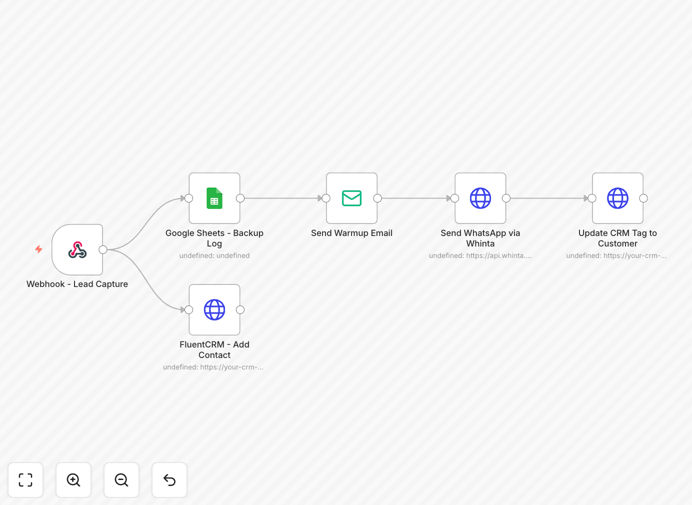
YouTube to WhatsApp sales automation workflow diagram showing integration between platforms

What This Workflow Does

This automation template transforms passive YouTube or Instagram viewers into active sales conversations on WhatsApp. It solves the common problem of lead leakage between platforms: someone watches your content, clicks your link, fills a form, but then gets lost in email follow-ups that they might never open.

The workflow creates a seamless bridge from video engagement to direct messaging. When a viewer submits a contact form on your WordPress landing page, the system instantly logs them in Google Sheets, adds them to FluentCRM with a "New Lead" tag, sends a series of warm-up emails, and finally delivers a personalized WhatsApp message via Whinta's API. This multi-channel approach ensures leads are engaged through the channels they actually use, dramatically increasing response rates.

For businesses selling coaching, courses, or services via video content, this automation turns viewers into conversations within hours—not days. It eliminates manual data transfer between systems and ensures every lead receives timely, personalized follow-up exactly where they're most likely to respond.

How It Works

1. Lead Capture from Video Content

Your YouTube or Instagram video includes a call-to-action driving viewers to a WordPress landing page with a Fluent Forms submission form. The form captures name, email, phone number, and optionally the video source.

2. Data Synchronization & Backup

The form submission triggers the n8n workflow. First, lead details are written to a Google Sheets spreadsheet for simple backup and visibility. Simultaneously, the contact is pushed to FluentCRM where they're tagged as "New Lead" and added to an email automation sequence.

3. Email Warm-Up Sequence

FluentCRM automatically sends a series of 1-5 emails introducing your service, building trust, and providing value before the WhatsApp outreach. This pre-conditioning increases the likelihood of a positive response when the direct message arrives.

4. WhatsApp Personal Outreach

One hour after the last email (or immediately after form submission if you prefer), n8n sends a personalized WhatsApp message via Whinta's API. The message references the lead's name and their specific interest, creating a human touchpoint that feels immediate and relevant.

5. Sales Team Notification & CRM Updates

The sales team receives notification of the new lead and can monitor WhatsApp replies directly. When a sale is closed, the CRM tag updates from "Engaged" to "Customer," completing the automation cycle.

Who This Is For

This template is ideal for content creators, coaches, consultants, and service businesses who generate leads through video content. Specifically:

  • YouTube educators & course creators who want to convert viewers into students
  • Instagram coaches & influencers offering personalized services
  • Digital agencies using video case studies to attract clients
  • B2B SaaS companies with explainer videos driving sign-ups
  • Local service businesses (consultants, trainers, therapists) using video to build trust before consultation

If you're currently manually transferring leads from forms to CRM to WhatsApp, or losing potential clients because follow-up is too slow, this automation will save hours weekly and increase conversion rates.

What You'll Need

  1. WordPress website with Fluent Forms plugin installed
  2. FluentCRM (WordPress plugin) for email automation and tagging
  3. Google Sheets account for backup logging
  4. Whinta.com account with WhatsApp Business API access
  5. n8n instance (cloud or self-hosted) to run the workflow
  6. YouTube or Instagram channel with call-to-action driving to landing page

Pro tip: Before implementing, ensure your WhatsApp Business API account is verified and you have explicit consent language in your form. Compliance is critical for messaging automation.

Quick Setup Guide

  1. Import the template: Download the JSON file and import into your n8n instance.
  2. Configure WordPress webhook: Set up Fluent Forms to send form submissions to your n8n webhook URL.
  3. Connect Google Sheets: Create a spreadsheet and authenticate n8n with your Google account.
  4. Set up FluentCRM API: Add your FluentCRM API credentials in n8n and configure the "New Lead" tag.
  5. Integrate Whinta: Add your Whinta API key and sender ID in the WhatsApp node.
  6. Customize messages: Edit the email sequences and WhatsApp message template to match your brand voice.
  7. Test with a dummy lead: Submit a test form to verify the entire flow works before going live.

Key Benefits

90%+ message open rates: WhatsApp messages have dramatically higher open rates than emails, ensuring your follow-up actually gets seen.

Reduced manual work by 80%: Automatically captures, logs, tags, and messages leads without manual copying between systems.

Faster response time: Leads receive WhatsApp outreach within minutes or hours instead of days, capitalizing on their immediate interest.

Multi-channel nurturing: Combines email building trust with WhatsApp direct conversation—the perfect hybrid approach.

Scalable without extra staff: Handles hundreds of leads daily without requiring additional sales team members for initial outreach.

Frequently Asked Questions

Common questions about YouTube-to-WhatsApp automation and integration

YouTube to WhatsApp automation improves sales conversion by instantly engaging leads after they show interest. When someone fills a form after watching your video, they're highly motivated. An automated WhatsApp message sent within minutes keeps that momentum, personalizes the interaction, and moves them directly into a conversation channel they already use daily, bypassing slower email follow-ups.

This immediate, personal touchpoint feels more like a real human reaching out rather than a generic email blast. Since WhatsApp has over 90% open rates compared to email's 20-30%, your message actually gets seen and responded to.

Integrating WordPress with WhatsApp for lead nurturing creates a seamless, high-touch experience. WordPress captures leads via forms, then WhatsApp delivers immediate, personalized outreach. This combination leverages WordPress's flexibility for landing pages and WhatsApp's high open rates (over 90%) and conversational nature, making follow-up feel more human and urgent than traditional email sequences.

WordPress handles the front-end capture beautifully with customizable forms and landing pages, while WhatsApp provides the direct communication channel that people actually check regularly. Together they create a complete lead capture and engagement system without requiring complex development.

Yes, this automation works perfectly for Instagram leads as well. The workflow triggers from any form submission on your WordPress landing page, regardless of whether the visitor came from YouTube, Instagram, Facebook, or any other source. You can customize the WhatsApp message to reference the specific platform or keep it generic.

The system captures lead source data, allowing you to tailor follow-up sequences based on origin. Instagram leads often have slightly different expectations than YouTube viewers—they might expect faster, more visual communication—so you can adjust your messaging accordingly within the same automated framework.

FluentCRM enhances WhatsApp automation by providing intelligent lead segmentation and email sequencing before WhatsApp outreach. It tags leads based on behavior, sends automated warm-up emails to build trust, and tracks engagement. This pre-conditioning increases WhatsApp response rates because leads are already familiar with your brand.

FluentCRM also logs all interactions, creating a complete lead history for your sales team. When the WhatsApp message arrives, the lead has already received value via email, making them more receptive. The CRM integration ensures no lead falls through the cracks between systems.

Whinta specializes in WhatsApp Business API integration with straightforward setup and reliable delivery. Unlike some platforms that require complex business verification, Whinta often provides simpler access while maintaining compliance. Its API is well-suited for automation workflows because it offers clear documentation, predictable costs, and supports personalized messaging with variables.

For businesses automating WhatsApp outreach, Whinta's straightforward API integration means less technical overhead. The template's Whinta node is pre-configured to work with their system, reducing implementation time compared to building custom integrations with WhatsApp's direct API.

Ensure compliance by only messaging users who explicitly opted in via your form, including clear consent language. Always identify your business in messages, provide an opt-out option, respect local regulations (like GDPR), avoid spammy frequency, and use WhatsApp Business API (not personal accounts). The template includes consent capture and proper identification, but you should verify specific regulations for your region and industry.

Best practices include: collecting phone numbers only for WhatsApp communication, stating clearly that they'll receive WhatsApp messages, including your business name in every message, and providing an easy unsubscribe method. Automated messaging requires careful compliance planning.

Yes, this automation can scale for hundreds of leads daily. n8n handles high-volume workflows efficiently, Google Sheets provides simple logging, and Whinta's API supports bulk messaging. The key is monitoring WhatsApp Business API rate limits and ensuring your CRM (FluentCRM) can handle the contact volume.

For very high volumes, consider adding queue management and staggered sending to avoid API throttling. You might also implement lead scoring to prioritize high-value leads for immediate WhatsApp outreach while others receive scheduled follow-up.

Yes, GrowwStacks specializes in building custom YouTube-to-WhatsApp automation systems tailored to your specific business needs. We can adjust messaging sequences, integrate additional platforms (like your existing CRM), add lead scoring, implement AI-powered response routing, and ensure compliance with your industry regulations.

Our team designs workflows that match your sales process and team capacity. Whether you need multi-language support, integration with your booking system, or advanced segmentation based on video content type, we build automation that fits your exact requirements.

  • Custom message templates matching your brand voice
  • Integration with your existing CRM or booking software
  • Advanced lead scoring and prioritization logic
  • Compliance review for your specific industry

Need a Custom YouTube-to-WhatsApp Automation?

This free template is a starting point. Our team builds fully tailored automation systems for your specific business needs.