YouTube AI Automation Social Media

YouTube Video Optimization & Distribution Automation

Automate post-publish workflows including SEO optimization, cross-platform promotion, and analytics reporting

Download Template JSON · n8n compatible · Free
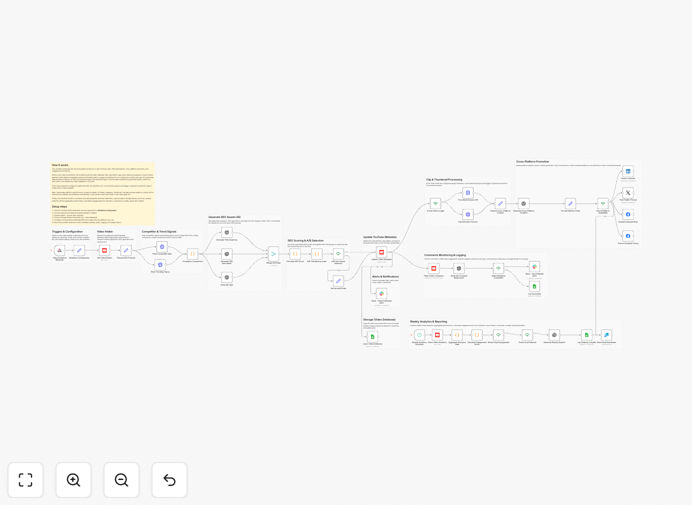
YouTube video automation workflow diagram showing connections between platforms

What This Workflow Does

This automation transforms your YouTube video publishing process from a manual, time-consuming task into a streamlined system that works while you focus on content creation. It handles everything that happens after you hit "publish" - optimizing your video for maximum reach, promoting it across all your social channels, and tracking performance.

The workflow combines AI-powered SEO optimization with multi-platform distribution and comprehensive analytics. It automatically generates platform-specific promotional content, monitors engagement, and provides actionable insights to improve your video strategy - all without manual intervention.

How It Works

1. Video Processing

When a new video is published, the workflow immediately extracts metadata and analyzes the content. AI reviews the video title, description, and tags against current trends and competitor data to suggest improvements.

2. SEO Optimization

The system generates multiple SEO-optimized title and description variations, tests them against performance metrics, and automatically updates your YouTube metadata with the highest-scoring options.

3. Cross-Platform Distribution

AI creates tailored promotional content for each connected platform (Twitter, LinkedIn, Instagram, etc.) and schedules posts at optimal times. The workflow can also extract highlight clips and create platform-specific versions.

Screenshot showing cross-platform distribution settings in the workflow
Workflow configuration for multi-platform video distribution

4. Engagement Monitoring

The system tracks comments and engagement across all platforms, using sentiment analysis to identify and respond to important interactions. Negative feedback triggers alerts while positive engagement is amplified.

5. Analytics & Reporting

Performance data is collected from all platforms, analyzed for trends, and compiled into weekly reports. The system identifies what's working and suggests adjustments for future videos.

Who This Is For

This automation is ideal for:

  • YouTube creators who want to grow their channel without spending hours on promotion
  • Marketing teams managing multiple company channels
  • Agencies handling video content for clients
  • Businesses using video as part of their content marketing strategy

Pro tip: Combine this with our Video Content Calendar workflow to automate your entire video production pipeline from planning to performance analysis.

What You'll Need

  1. YouTube API credentials
  2. OpenAI API key for AI-powered optimizations
  3. Social media accounts for platforms you want to distribute to
  4. Google Sheets for analytics tracking (optional but recommended)
  5. Slack or email for notifications (optional)

Quick Setup Guide

  1. Download the template file
  2. Import into your n8n instance
  3. Connect your YouTube account in the credentials section
  4. Add your OpenAI API key
  5. Configure which social platforms to distribute to
  6. Set up your notification preferences
  7. Test with a recent video to verify all connections

Workflow settings panel showing API connection options
API connection settings in the workflow configuration

Key Benefits

Save 5-10 hours per video by automating repetitive post-publish tasks like SEO optimization and cross-posting.

Increase video reach by 30-50% through consistent, optimized distribution across all your platforms.

Improve engagement metrics with AI-generated, platform-specific content that resonates with each audience.

Get actionable insights from consolidated analytics that show what's working across all distribution channels.

Scale your video strategy without proportional increases in workload as your channel grows.

Frequently Asked Questions

Common questions about YouTube automation and integration

Automating YouTube workflows saves 5-10 hours per video by handling repetitive tasks like SEO optimization, cross-posting, and analytics. It ensures consistency in your content promotion while freeing up time for creative work.

The system also applies data-driven optimizations that would be time-consuming to do manually, like A/B testing titles and analyzing competitor performance across multiple metrics simultaneously.

Automated distribution increases video reach by 30-50% by simultaneously publishing optimized content across platforms. It also improves engagement metrics by ensuring timely, platform-specific posts that drive traffic back to your YouTube channel.

For businesses, this translates to higher conversion rates from video content and better ROI on video production investments. The automated analytics also provide clear performance data to justify video marketing budgets.

AI analyzes trends and competitor data to generate high-performing titles, descriptions, and tags. It can also create platform-specific post variations and suggest optimal posting times based on audience behavior patterns.

Advanced workflows use computer vision to analyze thumbnails and suggest improvements, or natural language processing to generate comment responses that match your brand voice.

Key metrics include view duration, click-through rate, engagement rate, traffic sources, and conversion rates from external platforms. Automated reporting consolidates these metrics across all distribution channels for easy analysis.

For growth-focused creators, also track subscriber conversion rate and watch time percentage. Businesses should monitor lead generation and sales attribution from video content.

With pre-built templates, setup takes 1-2 hours for basic workflows. The most technical part is API connections, but step-by-step guides make this manageable even for non-developers.

The template includes detailed documentation for each step, and many platforms offer visual guides for generating API keys. For complex needs, our team can handle the setup for you.

Yes, advanced workflows can automatically identify highlight moments, create short clips with captions, and format them for each social platform's specifications.

The system can detect audience engagement patterns to predict which moments will perform best as clips, and even generate platform-optimized captions and aspect ratios.

Absolutely! Our team specializes in building tailored YouTube automation systems that match your specific content strategy, tools, and business goals. We can create custom workflows that integrate with your existing tech stack.

Custom automations can include features like:

  • Integration with your CRM or marketing tools
  • Custom reporting dashboards
  • Brand-specific content rules
  • Multi-user collaboration features

Need a Custom YouTube Automation?

This free template is a starting point. Our team builds fully tailored automation systems for your specific business needs.