What This Workflow Does
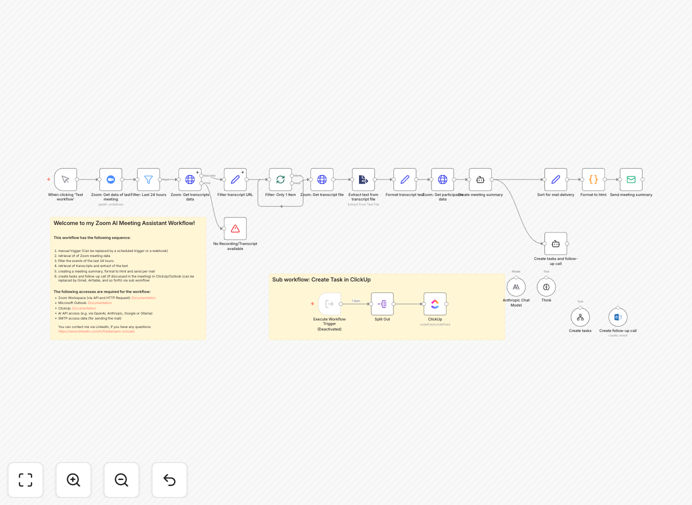
This workflow transforms your Zoom meetings into actionable outcomes by automatically:
- Retrieving Zoom meeting transcripts from the last 24 hours
- Processing the conversation with AI (Claude 3.7 Sonnet)
- Generating concise meeting summaries
- Sending summaries to all participants via email
- Creating ClickUp tasks for action items
- Scheduling follow-up calls when needed
The updated version with Claude 3.7 and Think Tool delivers significantly better results, especially for longer meetings where context retention is critical.
How It Works
1. Meeting Data Retrieval
The workflow starts by fetching your Zoom meeting data through the Zoom API. It looks for completed meetings from the last 24 hours.
2. Transcript Processing
For each meeting, it retrieves the transcript and extracts the raw text content. The Think Tool helps maintain context throughout long conversations.
3. AI Summary Generation
Claude 3.7 analyzes the transcript, identifying key discussion points, decisions made, and action items. It formats this into a professional summary.
4. Email Distribution
The system sends the polished summary to all meeting participants via email, ensuring everyone has the same understanding of outcomes.
5. Task Creation
Action items are automatically turned into ClickUp tasks with assignees and deadlines based on the conversation context.
Pro tip: For best results, enable Zoom's automatic transcription feature and ensure all participants speak clearly.
Who This Is For
This workflow is ideal for:
- Remote teams conducting frequent Zoom meetings
- Project managers tracking action items
- Consultants who need meeting documentation
- Executives attending back-to-back meetings
- Any professional who wants to eliminate manual note-taking
What You'll Need
- Zoom Workspace Pro account with Cloud Recording/Transcripts enabled
- ClickUp account for task management
- AI API access (Claude 3.7 recommended)
- SMTP credentials for sending emails
- Basic understanding of workflow automation
Quick Setup Guide
- Download the template file
- Import into your n8n instance
- Configure Zoom API credentials
- Set up ClickUp connection
- Connect your AI provider (Claude 3.7 recommended)
- Test with a recent meeting
Key Benefits
Save 5+ hours per week by eliminating manual note-taking and follow-up coordination.
Improve meeting accountability with automatic task creation and assignment based on actual discussion.
Ensure consistency with standardized meeting summaries sent to all participants.
Reduce missed action items through systematic capture and tracking in ClickUp.
Enhance remote collaboration by documenting decisions and next steps clearly.