Slack Linear Bug Tracking Product Development n8n

Add a Bug to Linear via Slack Command

Automate bug reporting from Slack to Linear. Capture issues instantly where your team communicates and create structured tickets automatically.

Download Template JSON · n8n compatible · Free
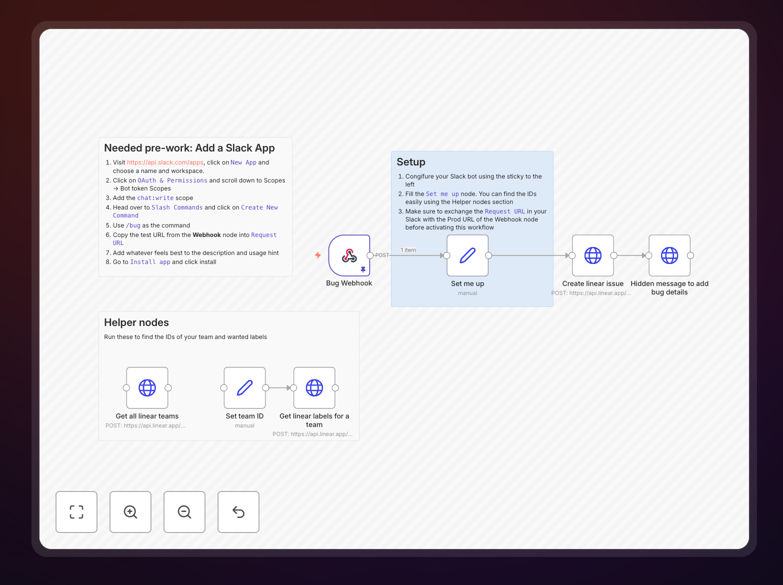
Slack to Linear bug reporting automation workflow interface

What This Workflow Does

When building products, discovering and eliminating bugs quickly is critical for quality and user satisfaction. Traditional bug reporting involves manual ticket creation, context switching, and often results in incomplete information. This workflow solves that by allowing anyone on your team to report bugs directly from Slack using a simple slash command.

The automation listens for a /bug command in Slack, captures the bug description and details, then automatically creates a properly formatted ticket in Linear with predefined labels, descriptions, and assignments. It then sends a confirmation back to the user in Slack with a link to the newly created ticket, creating a seamless feedback loop.

This eliminates manual data entry, ensures consistent ticket formatting, and keeps your development team focused on fixing bugs rather than administrative tasks. By capturing bugs where they're discovered—in team communication channels—you reduce friction and increase reporting compliance across your organization.

How It Works

1. Slack Command Trigger

A team member uses the /bug command in any Slack channel or direct message. The workflow captures the command text, user information, and channel context through a webhook connection.

2. Data Processing & Validation

The workflow processes the incoming data, extracts key information, and can prompt for additional details through Slack modals if needed. It validates the input and prepares it for Linear ticket creation.

3. Linear Ticket Creation

Using Linear's API, the workflow creates a new issue in your designated project with appropriate labels, priority settings, and a structured description that includes the bug report and context from Slack.

4. Confirmation & Notification

The workflow sends a confirmation message back to the user in Slack with a direct link to the newly created Linear ticket, completing the feedback loop and keeping everyone informed.

Pro tip: Extend this workflow by adding AI classification to automatically route bugs to the right team based on the description, or integrate with GitHub to create linked branches for each bug fix.

Who This Is For

This automation is ideal for product teams, engineering teams, QA teams, and customer support organizations that use Slack for communication and Linear for project management. It's particularly valuable for:

  • Product managers who want to streamline bug reporting from multiple sources
  • Engineering teams that need structured bug reports without administrative overhead
  • QA teams that discover bugs during testing and need to report them quickly
  • Customer support teams that receive bug reports from users and need to route them to development
  • Startups and scale-ups looking to optimize their product development workflows

What You'll Need

  1. A Slack workspace with permissions to create apps and slash commands
  2. A Linear account with API access and a project board for bug tracking
  3. n8n instance (self-hosted or cloud) to run the workflow
  4. Basic understanding of Slack app configuration and Linear project setup
  5. Webhook URL from the workflow to configure in your Slack app

Quick Setup Guide

  1. Download and import the template JSON file into your n8n instance
  2. Create a Slack app at api.slack.com with a /bug slash command pointing to your n8n webhook URL
  3. Configure Linear credentials in n8n with your API key and project IDs
  4. Customize the ticket template in the Set node to match your bug reporting format
  5. Test the workflow by using /bug in Slack and verifying the Linear ticket creation
  6. Activate the workflow and share the Slack command with your team

Pro tip: Before going live, test with a small group and iterate on the bug report format. Consider adding optional fields for severity, reproduction steps, and screenshots through Slack modals.

Key Benefits

Reduce bug reporting time by 80%: What used to take 5-10 minutes of manual ticket creation now happens instantly with a Slack command, freeing your team for more valuable work.

Improve bug report quality: Structured templates ensure every ticket includes necessary information like steps to reproduce, expected vs actual behavior, and environment details.

Eliminate context switching: Team members stay in their workflow—reporting bugs from where they discover them without switching to Linear or other project management tools.

Create audit trails: Every bug report maintains links between Slack conversations and Linear tickets, providing complete context for future reference and analysis.

Scale with your team: As your organization grows, this automated system handles increased bug reporting volume without additional administrative overhead or training.

Frequently Asked Questions

Common questions about Slack-Linear automation and bug reporting

Automating bug reporting from Slack to Linear saves significant time for product teams by eliminating manual ticket creation. It ensures all bug reports are captured immediately with consistent formatting, reduces context switching for developers, and creates a single source of truth for all product issues.

For example, when a QA tester finds a bug, they can report it instantly from their testing environment without leaving their workflow. The automation creates a properly formatted Linear ticket with all necessary details, assigns appropriate labels, and notifies the relevant team—all within seconds.

  • Eliminates manual data entry and copy-pasting
  • Ensures consistent ticket formatting across all reports
  • Reduces bug reporting friction for non-technical team members

Slack-Linear integration bridges communication and project management tools, allowing teams to report bugs where they naturally communicate. It automatically creates structured tickets with descriptions, labels, and priorities, ensuring nothing gets lost in chat.

This creates a seamless flow from problem discovery to task assignment. When a customer support agent receives a bug report, they can immediately create a Linear ticket without switching contexts, complete with customer context and priority based on business impact.

  • Connects real-time communication with structured task management
  • Maintains context between conversation and actionable tickets
  • Reduces administrative overhead for product managers

A good bug report should include a clear title, detailed reproduction steps, expected vs actual behavior, environment details (browser, OS, app version), screenshots or screen recordings, and priority level. Automated workflows can prompt users for this information through Slack modals.

For instance, when a user submits a bug via Slack command, the workflow can respond with a modal asking for specific details like "Steps to reproduce," "Expected behavior," and "Actual behavior." This ensures developers receive complete, actionable information without back-and-forth questions.

  • Clear, concise title summarizing the issue
  • Step-by-step reproduction instructions
  • Visual evidence (screenshots, videos, logs)

Yes, bug reporting workflows can be customized for different teams by adjusting ticket fields, labels, assignees, and project boards. You can create different Slack commands for different bug types or route bugs to specific team boards based on keywords.

A mobile team might have a /mobile-bug command that creates tickets in their mobile project with iOS/Android labels, while the web team uses /web-bug for their board. You can also add custom fields for severity, customer impact, or business priority based on your specific needs.

  • Create team-specific commands and workflows
  • Route bugs based on keywords or team mentions
  • Add custom fields for your specific development process

Ensure security by using Slack's official API with appropriate scopes, implementing Linear's OAuth authentication, storing credentials securely in environment variables, validating user permissions before creating tickets, and using webhook signatures to verify request authenticity.

The automation should run on secure infrastructure with encrypted data transmission between services. Implement rate limiting to prevent abuse, audit logs to track all ticket creations, and regular security reviews of your integration permissions and access patterns.

  • Use OAuth for authentication instead of API keys where possible
  • Store credentials in environment variables, not in workflow code
  • Validate webhook signatures to prevent unauthorized requests

Beyond bug reporting, you can automate feature request collection, sprint planning updates, standup meeting summaries, deployment notifications, customer feedback routing, and team member onboarding. Slack can trigger tasks in Linear, Asana, or Jira while receiving updates from these tools.

For example, you could create a workflow that posts daily standup summaries from Linear updates, automatically creates feature request tickets from Slack discussions, or notifies channels when deployments are completed. These automations create bidirectional sync that keeps everyone informed without constant manual checking.

  • Feature request collection and prioritization
  • Automatic sprint updates and progress reporting
  • Deployment notifications and incident management

Yes, GrowwStacks specializes in building custom bug reporting and product development automations tailored to your specific tools, workflows, and team structure. We can design workflows that match your existing processes, integrate with your unique tech stack, and include custom validation logic.

Our team works with you to understand your current bug reporting challenges, design an automation solution that fits your workflow, implement it with best practices for security and scalability, and provide ongoing support as your needs evolve. We can integrate multiple tools beyond Slack and Linear, add AI classification, and create comprehensive reporting dashboards.

  • Custom integration with your specific tool stack
  • AI-powered bug classification and routing
  • Comprehensive reporting and analytics dashboard

Need a Custom Bug Reporting Automation?

This free template is a starting point. Our team builds fully tailored automation systems for your specific business needs.